These days, buying groceries is easier than ever. Instead of driving to a supermarket and waiting in checkout lines, people simply open an app, place an order, and get everything delivered to their doorstep.
This shift has created a huge opportunity for businesses.
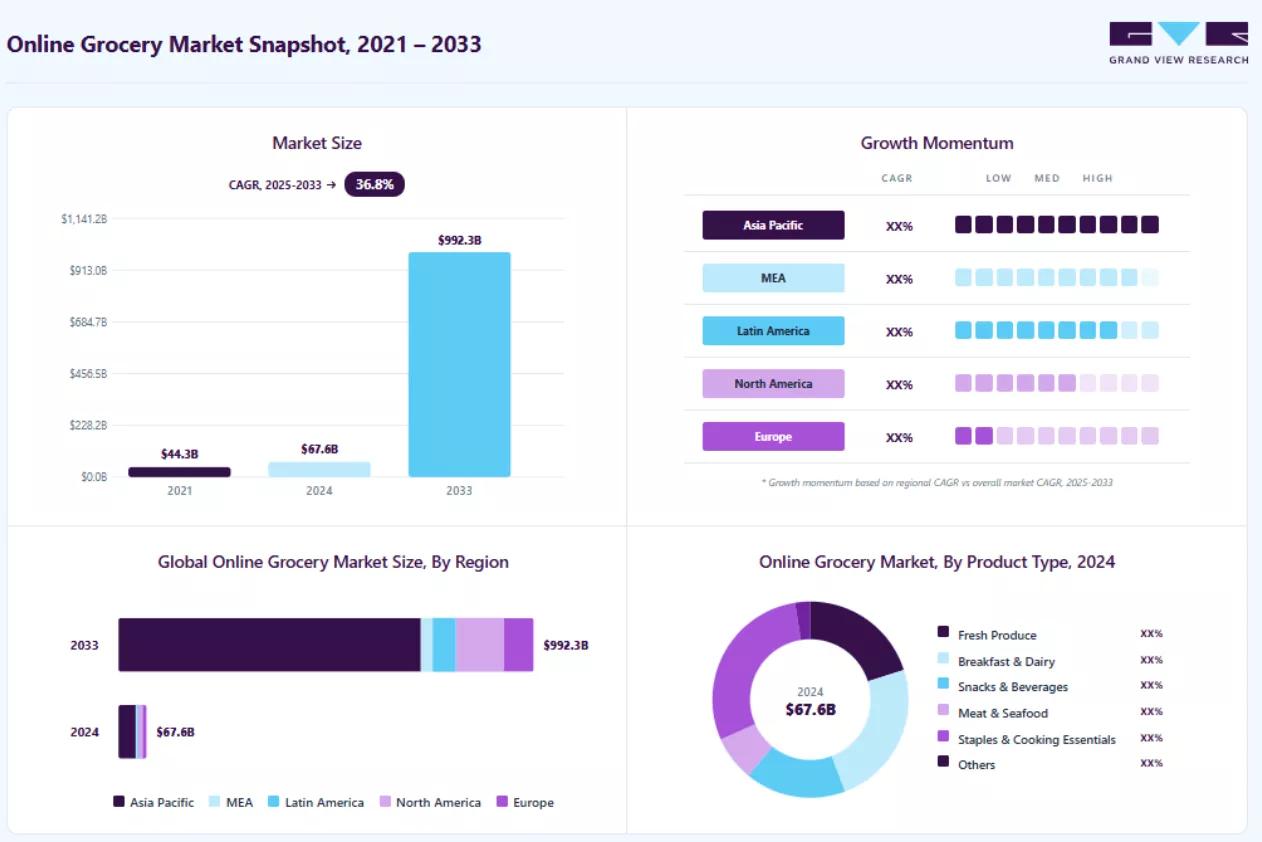
In fact, the global online grocery market is projected to reach $992.35 billion by 2033, growing at a CAGR of 36.8%, according to Grand View Research.
Instacart showed that you don't need to own grocery stores or warehouses to build a successful grocery delivery business. By connecting customers, local stores, and delivery partners through one platform, it built one of the world's most successful grocery delivery apps.
Now, many startups, retailers, and entrepreneurs want to build a similar platform. If you're one of them, you're probably wondering how to build an app like Instacart.
The truth is, mobile app development like Instacart is about much more than creating a mobile app. You need the right business model, the right features, reliable technology, and a clear plan to launch and grow your platform.
Here is the catch. Most guides either oversimplify the process or drown you in jargon, so you finish reading with no clear budget, timeline, or product scope.
That is exactly what this guide fixes for you.
In this guide, you'll learn:
- What an app like Instacart is and how it works
- The business and revenue models to choose from
- Must-have and AI-powered features
- A step-by-step build process and the right tech stack
- Real development costs, timelines, and common mistakes
By the end, you'll have a clear roadmap for how to build an app like Instacart, make informed development decisions, and launch a grocery delivery platform that is built to grow.
What Is an App Like Instacart?
An app like Instacart is an online grocery delivery platform that connects customers, local grocery stores, and delivery partners in one place.
Customers can browse products, place an order, pay online, and get groceries delivered to their doorstep. Local stores receive the order, while shoppers or delivery partners pick up the items and deliver them.
One thing many people don't realize is that an app like Instacart is not just one app.
It's actually a group of four connected apps that work together.
- Customer app: Lets users browse products, place orders, and track deliveries.
- Shopper or delivery app: Helps shoppers accept orders, pick groceries, and deliver them.
- Store panel: Allows grocery stores to manage products, inventory, and incoming orders.
- Admin dashboard: Lets the platform owner manage users, stores, orders, payments, and overall operations.
When all four apps work together smoothly, the entire grocery delivery business runs efficiently.
How Does an App Like Instacart Work?
An app like Instacart connects customers, grocery stores, and delivery partners to complete every order smoothly.
Here's how the process works:
- Place an order: The customer selects a store, adds products to the cart, and chooses a delivery slot.
- Order gets assigned: The store confirms the order, and the system assigns it to a nearby shopper or delivery partner.
- Shop and deliver: The shopper collects the items, contacts the customer if a replacement is needed, and delivers the order.
- Track the order: The customer can track the delivery in real time and rate the experience after receiving the groceries.
Customer App
↓
API Gateway
↓
Backend
↓
Inventory
↓
Payments
↓
AI
↓
Notifications
↓
Store
↓
Delivery PartnerEvery step above depends on real-time syncing between all four apps. That coordination is what separates a grocery platform that scales from one that stalls the moment order volume climbs.
Want to Validate Your Grocery App Idea?
Every successful marketplace starts with the right business model and roadmap. Our experts can help you evaluate your idea, estimate costs, and identify the fastest path to launch.
Why Build an App Like Instacart?
Online grocery delivery is growing fast, and more people now prefer ordering groceries from their phones instead of visiting stores. This creates a great opportunity for startups and eCommerce businesses to launch their own grocery delivery platform.
Here are some of the biggest reasons to build an app like Instacart:
- High demand
- Revenue
- Low investment
- Expansion
- AI
Top 7 Business Models You Can Choose From
Before you build an app like Instacart, you need to decide how your business will operate. The business model you choose affects your development cost, operations, and revenue.
Here are the most common options:

1. Multi-Vendor Marketplace (Aggregator Model)
This is the same model used by Instacart. Your app connects multiple grocery stores with customers, while you manage the orders and deliveries. You earn money through commissions and delivery fees without owning inventory.
2. Single-Store Grocery App
This model is built for a single grocery store or supermarket. Customers can order only from that store, giving the owner full control over products, pricing, and branding.
3. Grocery Chain App
This model is designed for supermarket chains with multiple locations. Customers can shop from the nearest branch, while all stores are managed through one platform.
4. Hyperlocal Delivery Model
A hyperlocal app serves customers within a specific area or city. It partners with nearby stores to provide faster deliveries and lower operating costs, making it a popular choice for startups.
5. Dark Store (Quick Commerce) Model
In this model, products are stored in your own warehouses instead of retail stores. This allows ultra-fast deliveries but requires a much higher investment in inventory and operations.
6. Inventory-Led Model
Here, you buy and store your own inventory and sell directly to customers. This gives you better control over pricing and quality but also increases storage and inventory costs.
7. White-Label or SaaS Solution
Instead of building everything from scratch, you use a ready-made grocery delivery platform and customize it with your own branding. It is the fastest and most affordable way to launch and is ideal for validating your business idea.
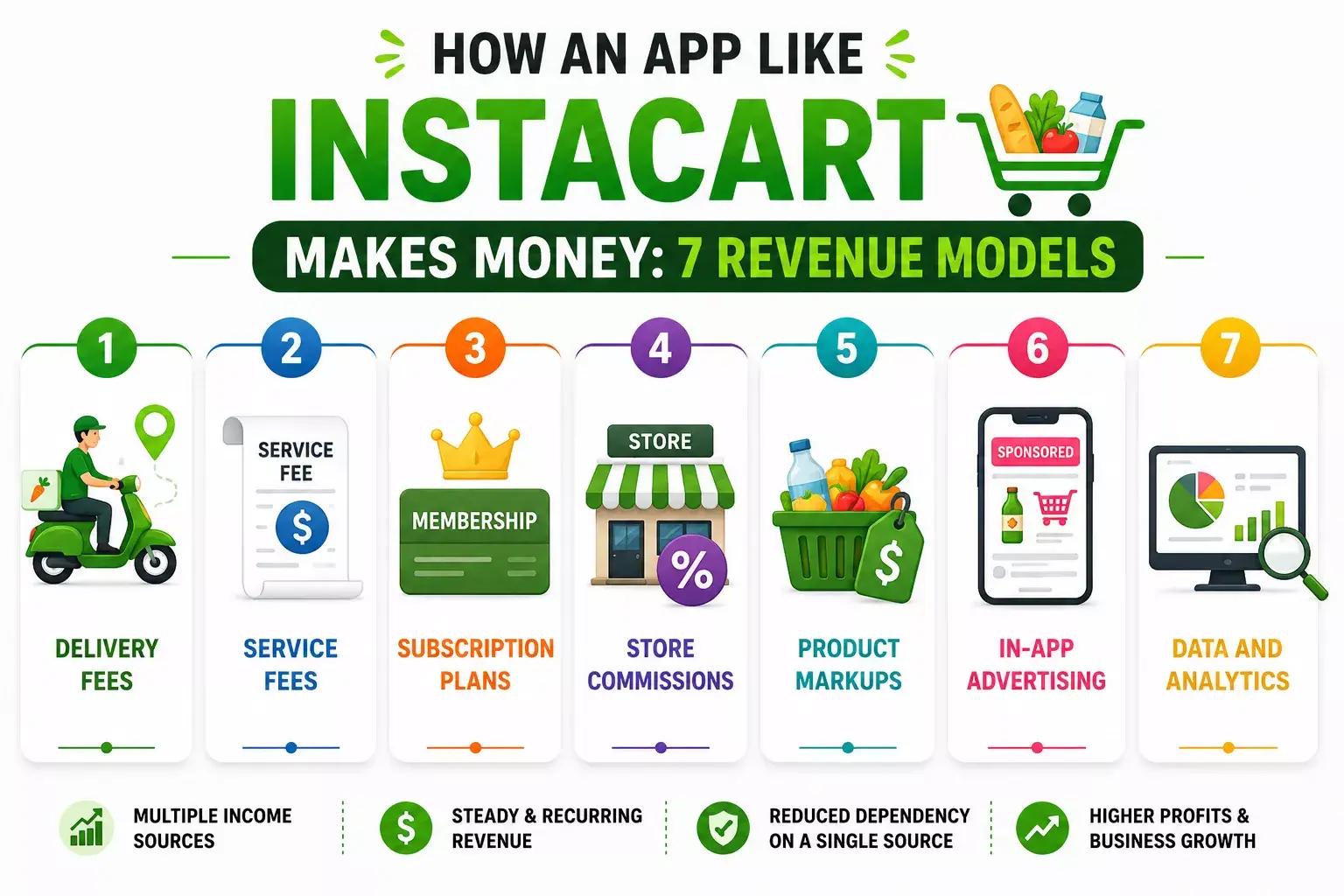
How an App Like Instacart Makes Money: 7 Revenue Models
An app like Instacart earns money in several ways, not just through delivery charges. By using multiple revenue streams, the platform can generate steady income, increase profits, and reduce its dependence on a single source.
Here are the most common revenue models:
1. Delivery Fees
Customers pay a delivery fee for every order they place. The fee usually depends on factors such as delivery distance, order value, or the selected delivery time. This is one of the platform's primary sources of income.
2. Service Fees
Along with the delivery fee, customers are charged a small service fee to cover operating costs such as payment processing, customer support, order management, and platform maintenance.
3. Subscription Plans
Many grocery apps offer monthly or yearly membership plans. Subscribers enjoy benefits like free delivery, lower service fees, faster delivery, and exclusive discounts, while the platform earns recurring monthly revenue.
4. Store Commissions
Grocery stores pay a commission on every order they receive through the platform. Since the app helps stores reach more customers, this becomes one of the largest and most reliable revenue streams as order volume grows.
5. Product Markups
Some platforms sell products at slightly higher prices than the in-store rates. The small difference between the purchase price and selling price becomes additional profit without significantly affecting the customer experience.
6. In-App Advertising
Brands and grocery stores can pay to promote their products through sponsored listings, banner ads, or featured placements inside the app. As the platform attracts more users, advertising becomes a valuable source of revenue.
7. Data and Analytics
The platform collects valuable shopping insights, such as customer preferences, popular products, and buying trends. It can provide these analytics to partner stores, helping them improve inventory planning, marketing, and sales while creating another source of income.
Must-Have Features to Build an App Like Instacart
When you build an app like Instacart, you are really building four apps at once, so feature planning has to cover every user. The features below appear across almost every successful grocery app, which is exactly why they belong in your build.
1. Customer App Features
The customer app is where the whole experience begins, so it must feel fast, clean, and effortless. If this layer frustrates users, they leave and rarely come back.
- User registration and profiles: Quick sign-up by email, phone, or social login, with saved addresses and payment methods.
- Smart search and filters: Category, brand, and price filters plus predictive search so shoppers find items instantly.
- Multi-store browsing: The ability to shop items from several nearby stores inside one cart.
- Real-time inventory: Live stock and pricing pulled from store systems so customers never order the unavailable.
- Cart and scheduling: Easy cart edits, clear totals, and a choice of delivery or pickup slots.
- Multiple payment options: Cards, digital wallets, and region-specific methods for a smooth checkout.
- Live order tracking: Map-based updates from shopper assignment through to doorstep delivery.
- Ratings and reviews: Post-order feedback that keeps quality and trust high across the platform.
2. Shopper and Delivery Partner App Features
The shopper app is an operational tool, so speed and accuracy matter more than polish. Every second saved here improves both margins and customer happiness.
- Easy onboarding and verification: Simple registration with ID checks and background verification.
- Order requests and acceptance: Real-time alerts to accept or decline based on location and availability.
- Optimized pick lists: Items sorted by store aisle to cut in-store shopping time.
- Navigation and routing: Built-in maps with route optimization for faster, cheaper deliveries.
- Barcode scanning: Quick item verification to reduce picking errors.
- In-app chat: Direct messaging with customers to confirm substitutions.
- Earnings dashboard: A clear view of completed orders, tips, and payouts.
3. Store and Vendor Panel Features
Retailers need their own control center to keep the catalog accurate and orders flowing. Strong vendor tools are what keep your whole marketplace running without manual chaos.
- Product and inventory management: Add, edit, and update products, prices, and stock in real time.
- Order management: Receive, confirm, and prepare incoming customer orders quickly.
- Promotions and discounts: Create store-specific offers and coupons to attract buyers.
- POS and inventory sync: Automatic syncing with existing systems to prevent stock mismatches.
- Sales analytics: Dashboards showing revenue, top sellers, and customer behavior.
4. Admin Dashboard Features
The admin dashboard is your command center, giving you full visibility over users, orders, and money. It is where day-to-day decisions get made, so it deserves as much attention as the customer app.
- User and partner management: Manage customers, shoppers, and stores from one place.
- Order monitoring: A live view of every order, driver location, and delivery status.
- Commission and payments: Automated payouts, commission handling, and refunds.
- Analytics and reporting: Deep insight into sales trends, retention, and platform performance.
- Promotions engine: Targeted campaigns and loyalty programs across customer segments.
- Support tools: A built-in system to resolve tickets, complaints, and disputes.
Not Sure Which Features to Build First?
We help startups prioritize MVP features, reduce development costs, and create scalable product roadmaps.
Advanced and AI-Powered Features
Basic features help your grocery delivery app work, but AI features make it faster, smarter, and more profitable. They improve the customer experience, automate daily tasks, and help you make better business decisions.
Here are some of the most valuable AI-powered features to consider:
1. AI Product Recommendations
AI analyzes a customer's shopping history and preferences to recommend products they are most likely to buy. This creates a more personalized shopping experience and helps increase order value.
2. AI Demand Forecasting
AI predicts which products will be in high demand by analyzing past sales, seasonal trends, weather, and local events. This helps stores manage inventory better and avoid stock shortages.
3. AI Route Optimization
AI finds the fastest and most efficient delivery routes based on traffic, distance, and driver location. This reduces delivery time, lowers fuel costs, and improves customer satisfaction.
4. Smart Product Substitutions
If a product is out of stock, AI automatically suggests similar alternatives based on the customer's previous purchases and preferences. This reduces order cancellations and improves the shopping experience.
5. AI-Powered Search and Voice Search
Customers can search using natural language or voice commands, making it easier to find products quickly. AI understands what users are looking for, even if they don't use the exact product name.
6. Dynamic Pricing
AI can automatically adjust delivery charges, discounts, and promotional offers based on demand, delivery time, and driver availability. This helps maximize revenue while keeping prices competitive.
7. AI Chatbots and Virtual Assistants
AI chatbots provide instant support by answering common questions, tracking orders, handling refunds, and resolving simple issues 24/7. This reduces support costs and improves customer service.
Related: How to Integrate AI Chatbots in an Online Store: Step-by-Step Guide
8. Fraud Detection
AI continuously monitors transactions and user activity to identify suspicious behavior, fake accounts, and payment fraud. Detecting these issues early helps protect customers, partner stores, and your business.
How to Build an App Like Instacart: Step-by-Step Process
Building an app like Instacart is a step-by-step process. Instead of trying to build everything at once, focus on one stage at a time.
Following this roadmap will help you reduce risks, control development costs, and launch a platform that can grow with your business:
Step 1. Validate Your Idea and Research the Market
Before investing in development, make sure there is demand for your idea. Study your target customers, analyze competitors like Instacart, Walmart Grocery, and Shipt, and identify what you can do differently. It could be faster delivery, lower fees, better customer service, or serving a specific city or niche. This research will help you build a product that solves real customer problems instead of copying existing apps.
Step 2. Choose the Right Business Model
Next, decide how your grocery delivery business will operate. Will you connect multiple grocery stores, work with a single supermarket, or manage your own inventory through dark stores? Your business model affects everything, including your features, development cost, operations, and revenue. Making this decision early helps avoid expensive changes later.
Step 3. Hire an Experienced App Development Company
Once your business plan is ready, hire an experienced app development company. Choose a team with expertise in on-demand marketplace apps, UI/UX design, AI integration, and post-launch support. An experienced partner like Ciphernutz can help you choose the right technology, avoid costly mistakes, and build a scalable grocery delivery platform.
Step 4. Define Your MVP and Project Requirements
Work with your development company to decide what your first version should include. Instead of building every possible feature, focus on a MVP development with only the essential features. For example, customer registration, product browsing, cart, payments, order tracking, shopper management, and an admin dashboard are enough to launch. Once you start getting real users, you can add advanced AI features in future updates.
Step 5. Design the User Experience
After the requirements are finalized, your development team will create the UI/UX design for every user. This includes the customer app, shopper app, store panel, and admin dashboard. The goal is to make every task simple, whether it's placing an order, accepting deliveries, managing products, or tracking orders. A clean and easy-to-use design improves customer satisfaction and reduces support issues.
Step 6. Develop the Grocery Delivery Platform
Now the actual development begins. Your development company builds the customer app, shopper app, store panel, admin dashboard, backend system, and APIs that connect everything together. At this stage, they also build secure user authentication, databases, real-time order management, and a scalable architecture to support future growth.
Step 7. Integrate Third-Party Services
Modern grocery apps rely on several third-party services to work smoothly. Your development team will integrate payment gateways, Google Maps or Mapbox for navigation, push notifications, SMS and email services, analytics tools, and cloud storage. These integrations help automate daily operations and improve the overall customer experience.
Step 8. Add AI Features
Once the core platform is working properly, you can add AI-powered features to make your app smarter. These may include personalized product recommendations, AI-powered search, demand forecasting, smart product substitutions, route optimization, fraud detection, and AI chatbots for customer support. Adding AI gradually keeps development costs under control while improving efficiency.
Step 9. Test Everything Before Launch
Before releasing the app, test every feature thoroughly. Your development team should perform functional testing, security testing, performance testing, and usability testing to ensure the app works smoothly. Running a beta launch with a small group of users is also a great way to identify bugs and collect feedback before the public release.
Step 10. Launch, Collect Feedback, and Scale
Launch your app in one city or region instead of expanding everywhere at once. Monitor customer feedback, analyze user behavior, fix issues quickly, and regularly release updates. Once your operations, delivery network, and customer experience are running smoothly, you can expand to more cities, partner with more grocery stores, and add advanced features to grow your business.
Tech Stack to Build an App Like Instacart
Your technology choices decide how well the platform performs, scales, and handles thousands of orders at once.
A modern, cloud-based stack keeps you flexible and saves you from costly rebuilds later. The table below shows a proven setup, and you can adapt it to your budget and team.
| Layer | Common Technologies | Purpose |
|---|---|---|
| Mobile frontend | React Native, Flutter, Swift, Kotlin | Fast apps for iOS and Android from a shared codebase |
| Web and admin | React, Next.js | Server-rendered dashboards for admins and stores |
| Backend | Node.js, Python, .NET | Order, user, inventory, and notification services |
| Database | PostgreSQL, MongoDB, MySQL | Secure storage for orders, users, and catalogs |
| Cloud | AWS, Google Cloud, Azure | Scalable, containerized hosting with autoscaling |
| Maps and routing | Google Maps API, Mapbox | Live tracking and multi-stop route optimization |
| Payments | Stripe, PayPal, Braintree | Secure, compliant payment processing |
| Notifications | Firebase Cloud Messaging | Order updates and personalized alerts |
| Search | Elasticsearch | Fast product search and filtering at scale |
| AI and ML | TensorFlow, PyTorch, OpenAI APIs | Forecasting, recommendations, and fraud detection |
Now that you've seen the tech stack behind a grocery platform, let's take a look at the three ways to actually get it built.
How Much Does It Cost and How Long Does It Take?
Cost is the question every founder asks first, and the honest answer is that it depends on scope, features, and who builds it. To help you plan a real budget, here is how the numbers break down from several angles.
1. Cost by App Complexity
The single biggest cost driver is how ambitious your first version is, and the table below shows the usual ranges.
| App Tier | What It Includes | Estimated Cost |
|---|---|---|
| Basic MVP | Core customer app, shopper app, admin panel, basic tracking, payments | $30,000 to $60,000 |
| Mid-Level App | Adds multi-store support, live tracking, loyalty, and richer features | $60,000 to $120,000 |
| Advanced Platform | Full AI features, multi-city scaling, advanced analytics, automation | $150,000 to $300,000+ |
Starting with an MVP and scaling later is almost always the smartest way to protect your budget while you prove demand.
2. Cost by App Component
Since the platform is really four apps, it helps to see where the budget goes across each piece.
| Component | Estimated Cost |
|---|---|
| Customer app | $25,000 to $50,000 |
| Shopper and delivery app | $15,000 to $30,000 |
| Store and vendor panel | $10,000 to $20,000 |
| Admin dashboard | $15,000 to $25,000 |
| Backend and APIs | $20,000 to $40,000 |
| AI features | $20,000 to $60,000 |
4. Ongoing and Hidden Costs
Building the app is only the beginning. You'll also need to budget for ongoing expenses to keep your platform running smoothly.
These include:
- Cloud hosting
- Maps and API usage:
- Payment processing fees
- App maintenance and updates
- Marketing and customer acquisition
- Customer support
Building an app like Instacart typically takes 4 to 8 months, depending on the features, complexity, and development approach.
| App Version | Estimated Timeline |
|---|---|
| Basic MVP | 3 to 4 months |
| Mid-Level App | 4 to 8 months |
| Advanced App (with AI features) | 8 to 12 months |
The overall timeline depends on factors such as the number of user apps, third-party integrations, and the project's scope.
Challenges of Building an App Like Instacart and How to Solve Them
Building a grocery delivery app comes with several technical and operational challenges. Understanding these early helps you avoid costly mistakes and build a platform that can grow successfully.
Challenge 1. Real-Time Inventory Synchronization
Keeping product availability updated across multiple grocery stores is one of the biggest challenges. If inventory is not updated in real time, customers may order items that are already out of stock, leading to cancellations and a poor user experience.
Solution: Integrate your app with store inventory systems using APIs, enable real-time stock updates, and use AI to predict stock shortages before they happen.
Challenge 2. Delivery Logistics and Slot Management
Managing deliveries during busy hours can quickly become difficult. Accepting more orders than your delivery partners can handle leads to delays and unhappy customers.
Solution: Use AI-powered route optimization and delivery slot management to assign orders efficiently and avoid overbooking.
Challenge 3. Order Accuracy and Product Substitutions
Missing or incorrect items can reduce customer trust and increase refund requests. Handling out-of-stock products is also a common challenge.
Solution: Use barcode scanning, shopper verification, and AI-powered product recommendations to suggest suitable replacements when items are unavailable.
Challenge 4. Shopper and Driver Retention
Finding reliable delivery partners is difficult, but keeping them is even harder. High turnover increases recruitment costs and affects delivery quality.
Solution: Offer fair earnings, simple app navigation, optimized delivery routes, and performance-based rewards to improve driver satisfaction.
Challenge 5. Customer Retention
Customers can easily switch to another grocery delivery app if they find better prices or a better experience.
Solution: Build loyalty through subscription plans, personalized offers, reward programs, and a fast, reliable delivery experience.
Challenge 6. Backend Scalability
As your user base grows, your app must handle thousands of orders, users, and transactions without slowing down or crashing.
Solution: Build your platform on a cloud-based, scalable architecture that can automatically handle increasing traffic and order volume.
Challenge 7. Data Security and Payment Protection
A grocery delivery app stores sensitive customer information, including addresses and payment details. A security breach can damage customer trust and your business reputation.
Solution: Protect your platform with data encryption, secure payment gateways, access controls, regular security audits, and compliance with industry security standards.
Costly Mistakes to Avoid When Building an App Like Instacart
Building a grocery delivery app is a big investment, and a few early mistakes can cost you both time and money. The good news is that most of these mistakes are easy to avoid if you plan ahead.
Mistake 1. Trying to Build Every Feature at Once
Many founders want their first version to do everything. This usually leads to higher costs, longer development time, and a delayed launch. Start with an MVP that includes only the core features, then improve the app based on real user feedback.
Mistake 2. Ignoring Inventory and Product Data
Even the best-looking app won't succeed if product information is inaccurate or inventory isn't updated in real time. Keeping your catalog and stock data accurate helps reduce cancellations and improves the customer experience.
Mistake 3. Choosing the Wrong Architecture
Your app may work well in the beginning, but if it's not built to scale, you'll face performance issues as your users and orders grow. Building a scalable architecture from day one saves you from expensive changes later.
Mistake 4. Paying Attention Only to the Customer App
A grocery delivery platform is much more than a customer app. Your shopper app, store panel, and admin dashboard are just as important. If any one of them doesn't work well, the entire delivery process is affected.
Mistake 5. Launching Without Proper Testing
Releasing your app without thorough testing can lead to crashes, payment issues, and failed deliveries. Take the time to test every important feature before going live.
Mistake 6. Forgetting About Ongoing Costs
Building the app is only part of the investment. You'll also need to budget for cloud hosting, third-party APIs, maintenance, marketing, customer support, and regular updates to keep the platform running smoothly.
Mistake 7. Expanding Too Fast
It can be tempting to launch in multiple cities right away, but growing too quickly often creates operational problems. Start with one location, improve your service, and expand only after you've built a strong foundation.
Security and Compliance for a US Grocery Delivery App
If you're building a grocery delivery app for the US market, security and compliance should be part of your plan from day one. Following the right regulations helps protect customer data, avoid legal issues, and build trust with users.
| Requirement | Why It Matters |
|---|---|
| PCI DSS | Secure payments |
| Privacy Laws | Protect user data |
| SNAP/EBT | Optional government payments |
| Age Verification | Alcohol & restricted items |
| Sales Tax | State compliance |
Why Choose Ciphernutz to Build Your App Like Instacart
You can plan the perfect app, but flawless execution is what turns a plan into a profitable product.
That is exactly where Ciphernutz makes the difference for founders entering the grocery delivery market.
We build production-ready web, mobile, and AI-powered platforms designed around your real operations, never templated. From the customer app to AI-driven logistics, we deliver systems built to scale with your business rather than break under growth. Here is what sets our team apart.
- Proven experience: 100+ clients across 20+ countries.
- Outcome-focused delivery: Fixed-scope, production-ready builds shipped in 3 to 6 weeks.
- Reliable partnership: A 98% client retention rate and 10K+ hours saved for the businesses we serve.
- End-to-end expertise: Strategy, design, development, AI, and support under one roof.
- Risk-free start: A one-week risk-free trial so you can begin with confidence.
Ready to move from idea to launch?
Our experts will assess your business goals, identify the right opportunities, and provide a clear roadmap for building a scalable grocery delivery platform.
Conclusion
Building a grocery delivery app is not about copying Instacart feature for feature. It is about getting the model, the experience, and the execution right for your market.
Choose the right business model, focus on a lean first version, and invest in the four apps and the data that hold everything together.
We hope this guide helped you understand how to build an app like Instacart, from features and costs to the mistakes that sink most projects.
Now it's your turn to take the next step and turn your idea into a working product.
When you are ready, book your free consultation with our app experts today and get a clear scope, timeline, and cost estimate.
Frequently Asked Questions
1. How much does it cost to build an app like Instacart?
The cost usually ranges from $30,000 for a basic MVP to $300,000 or more for a full platform with AI features. Your final price depends on complexity, the number of user apps, integrations, and where your development team is based.
2. How long does it take to build an app like Instacart?
A focused MVP typically takes three to four months, while a full-featured platform can take eight to twelve months. Clear requirements and a disciplined scope shorten this, and a fixed-scope team can ship a working product in just a few weeks.
3. What features are must-have in an app like Instacart?
Every grocery platform needs four connected apps: a customer app, a shopper app, a store panel, and an admin dashboard. Core features include search, real-time inventory, order tracking, multiple payments, delivery scheduling, and ratings.
4. Is it better to build a custom app or use a ready-made Instacart clone?
Custom development gives you full control and a unique product but costs more and takes longer. A ready-made or hybrid solution launches faster and cheaper, which makes it ideal for testing demand before a bigger investment.
5. How does an app like Instacart make money?
These platforms earn through delivery fees, service fees, subscriptions, retailer commissions, product markups, and in-app advertising. Combining several streams keeps income steady and reduces reliance on any single source.
6. Do I need separate apps for customers, shoppers, and stores?
Yes, a complete grocery ecosystem needs a customer app, a shopper or delivery app, a store panel, and an admin dashboard. Each serves a different user, and all four must sync in real time for the platform to run smoothly.
7. Can an app like Instacart integrate with a store's existing POS and inventory system?
Yes, modern grocery apps connect to store POS and inventory systems through APIs. This keeps product catalogs, pricing, and stock levels synchronized across both online and in-store channels in real time.
8. How do I make my grocery delivery app stand out from competitors?
Focus on a specific city or category, deliver a genuinely fast and reliable experience, and use AI for personalization and smart logistics. Solving one real problem better than anyone else beats trying to match every feature the giants offer.