Real Estate CRM Automation with n8n: The Complete Guide
Vijay Vamja
3-4 mins
A new property lead arrives. All the information is already in your CRM, but your agent is busy doing other things. Nothing gets done.
You still need someone to read the enquiry, record the information, qualify the lead, allocate the agent, and respond to the lead. That delay can cost you the deal.
This is the exact point where n8n workflow automation becomes valuable for a CRM system. Rather than forcing your agents to transfer data across multiple applications, n8n connects your applications and automates the process based on your specific use cases.
What Real Estate CRM Automation with n8n Actually Means
The CRM system stores all your contacts, listings, deal stages, notes, and reports.
n8n takes care of all the processes related to this data. It links your CRM system to property portals, email, calendars, messaging apps, documents, AI, and automates processes based on that connection.
So, for instance, when a new lead appears, n8n can take the lead’s data, qualify them, assign the agent, send a response message and update the CRM automatically.
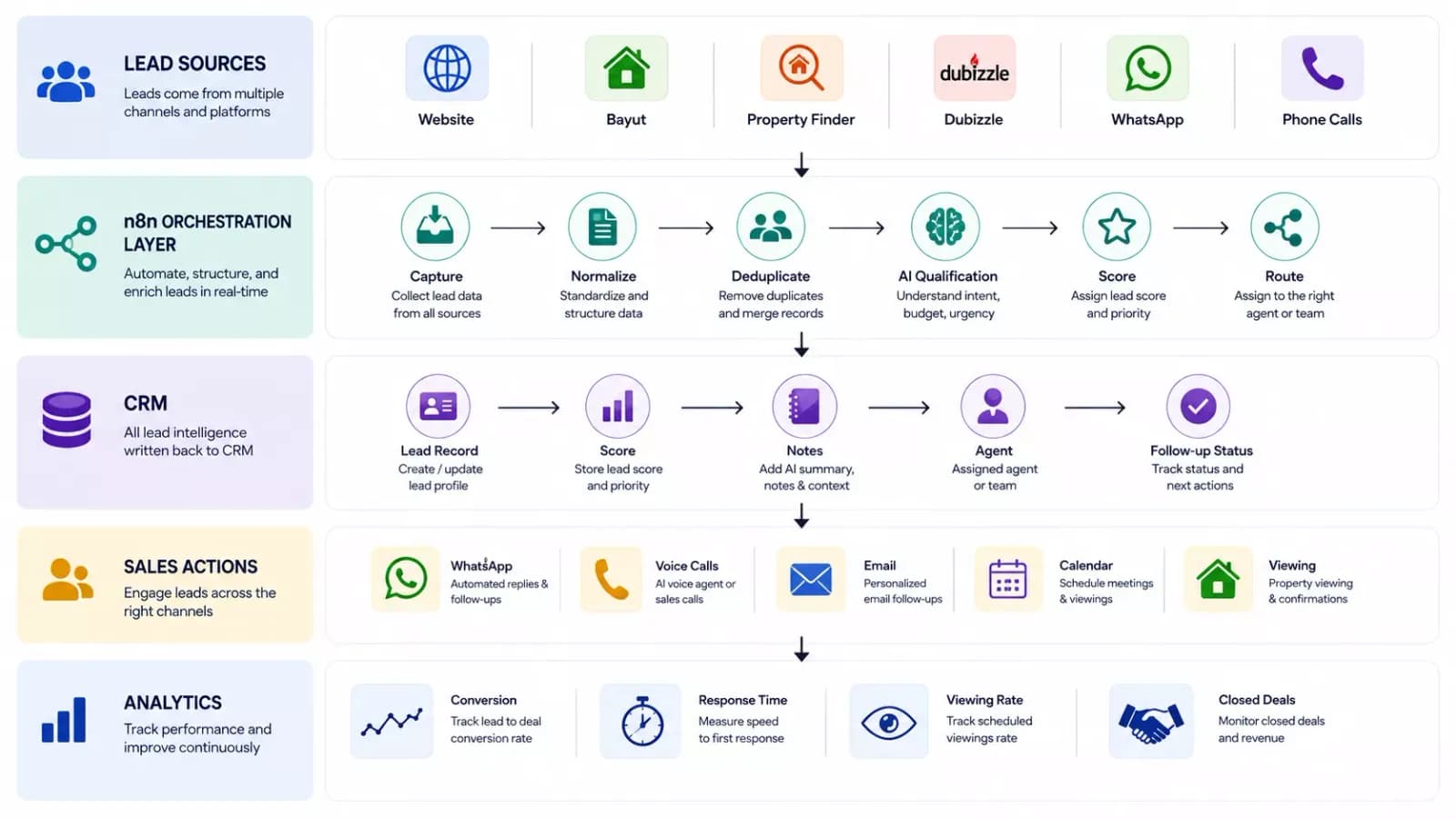
We recently deployed an AI-powered real estate sales automation system that connected lead management, AI voice interactions, WhatsApp follow-ups, lead scoring, and CRM updates. See the full implementation: AI-Powered Real Estate CRM & Sales Automation
10 Real Estate CRM Automation Workflows You Can Run with n8n
Save time, support productivity and automatically update connected systems and CRM with these 10 Real Estate CRM Automation workflows based on n8n.
1. Multi-Portal Lead Capture Into a Single CRM Record
An n8n integrated system can auto-capture property leads via portals, online advertisements, business website, and social media sites, along with gathering key information, such as budget, area, and property type to build a centralized lead record in your CRM.
The workflow can standardize fields such as:
- Name
- Phone number
- Property ID
- Property type
- Location
- Budget
- Source
- Lead timestamp
This creates a consistent lead record regardless of enquiry origin source.
Example workflow:
Property Portal → n8n → Data Validation → Duplicate Check → CRM
2. AI Lead Qualification and Scoring (With CRM)
Identify your inquiries intelligently to offer calibrated or immediate sales attention.
AI can analyze the information provided by a prospect and determine factors such as:
- Buying intent
- Urgency
- Budget
- Property requirements
- Preferred location
- Purchase timeline
- Viewing intent
n8n can then write the qualification result and lead score back to the CRM.
For example:
Lead Score: 92/100
AI Summary: "High-intent buyer looking for a 3-bedroom property in Dubai Marina with a budget of AED 2M. Wants to schedule a viewing this weekend."
The sales agent can immediately understand the opportunity, see what matters, and decide what action to take.
Read more: Build an AI Lead Qualification Agent Using n8n
3. Speed-to-Lead Response and Agent Routing
For every new lead that arrives, n8n can automatically send a personalized response and assign it to the correct agent depending on variables like site location, property type, and/or agent availability.
For example:
Dubai Marina + Budget > AED 1.5M + High Intent → Senior Dubai Sales Team
Or:
Rental enquiry → Rental Team
Commercial property → Commercial Team
Low-intent enquiry → Automated nurture
Routing rules can be based on:
- Location
- Property type
- Budget
- Lead score
- Language
- Agent availability
- Lead source
This helps sales teams spend more time on the relevant opportunities.
4. Viewing Scheduling, Confirmations, and No-Show Recovery
Setup property viewing and scheduling to happen only after a lead is qualified by building a custom n8n workflow connected with CRM, calendar and communication tools.
The workflow can:
- Identify an available time.
- Offer the prospect suitable slots.
- Create the appointment.
- Update the CRM.
- Send confirmation.
- Send a reminder before the viewing.
- Follow up after the scheduled time.
- Trigger a recovery workflow if the prospect does not attend.
Incorporate property viewing and scheduling as a part of the automated sales process.
5. Buyer-to-Listing Matching and Property Alerts
Your n8n workflow can be optimized to alert and update or compare property listing data (with price) based on buyer preferences recorded into the CRM.
For example:
Budget: AED 2MLocation: Dubai MarinaProperty: 3-bedroom apartmentTimeline: 30 days
When a suitable property is added or updated, an n8n workflow can compare the property information against buyer preferences and deliver alerts respectively.
6. Transaction Milestone and Deadline Tracking
Real estate transactions usually happen across multiple stages and also within strict deadlines and the n8n system can monitor important changes to trigger milestones-led actions for buyers and your team.
Depending on the business process, these may include:
- Offer accepted
- Documentation
- Financing
- Mortgage approval
- Inspection
- Contract signing
- Completion
For example:
Mortgage approved → Update CRM → Notify agent → Request next document → Set deadline
7. Document Intake, KYC Extraction, and E-Sign Chasing
AI can assist with extracting information and sending the record for human review to ascertain:
- Names
- Dates
- Document types
- Property information
- Reference numbers
The same workflow can also trigger reminders for missing or unsigned documents.
For sensitive documents, businesses must set up access controls, retention policies, and security procedures.
8. Two-Way Sync Across CRM, Inbox, Calendar, and Accounting
Your CRM system can share useful customer information with the n8n workflow to synchronize relevant events across the system.
CRM ↔ Email ↔ Calendar ↔ Accounting ↔ Other Business Systems
For example:
A viewing is scheduled in the calendar → CRM activity is updated.
An important email arrives → CRM activity is created.
A transaction reaches a defined stage → accounting workflow is triggered.
The goal is to identify which system owns which data and automate selective synchronization that adds up business value.
9. Landlord, Tenant, and Renewal Automation
Real estate automation can have practicable uses for property management businesses by automating recurring sales processes and administrative work.
Examples include:
- Lease expiry reminders
- Renewal notifications
- Maintenance request routing
- Tenant communications
- Landlord notifications
- Document reminders
- Property inspection scheduling
Workflow example:
Lease expiry approaching → CRM check → Generate reminder → Send notification → Create follow-up task
10. Pipeline Reporting and Stalled-Deal Alerts
Sales managers can use the n8n system to periodically evaluate pipeline data and identify specific conditions to generate insights and summaries.
For example:
- Leads without a first response
- Qualified leads without follow-up
- Viewings that have not been completed
- Deals stuck at one stage
- Leads without an assigned agent
- Opportunities with overdue activities
The summarized alert can then become a focused list of actions:
- 12 leads have no follow-up
- 5 high-intent leads are unassigned
- 3 viewings need confirmation
- 4 deals have been inactive for more than 7 days
If your business needs help building and scaling these workflows, you can hire n8n experts to design, implement, and optimize production-ready n8n automations.
Ready to automate your real estate CRM?
Identify your highest-value workflows and turn them into production-ready automations with our AI Workflow Automation Package.
Mapping n8n to the CRM You Already Run
Real Estate CRM Automation with n8n looks slightly different on every platform, because each CRM leaves a different gap. Use this table to find yours and pick a starting point.
| CRM | Where n8n can help | Example workflow |
|---|---|---|
| Salesforce | Cross-system orchestration and custom AI workflows | AI lead qualification |
| HubSpot | Portal, messaging and document integrations | Multi-source lead capture |
| Zoho CRM | AI processing and external workflow orchestration | Document intake |
| Pipedrive | Multi-step routing and enrichment | Speed-to-lead |
| Custom CRM | API-based orchestration | Lead qualification + CRM write-back |
Sync and Deduplication Rules That Keep Your CRM Clean
Real Estate CRM Automation with n8n can improve your data, but if your CRM already has messy or duplicate records, automation can make the problem bigger.
Follow these simple rules to keep your CRM clean:
- Before creation: Always check if the contact exists in your CRM before creating a new one. If it does, then update the existing record instead.
- Use a unique ID: Use the CRM record ID to identify contacts and deals instead of relying only on names or phone numbers.
- Keep data consistent: Use the same format for emails, phone numbers, property IDs, and other important fields before comparing records.
- Evaluate vague matches: If n8n is unable to determine the identity of a lead, refer it to your team for evaluation instead of creating a duplicate.
- Set data ownership rules: Set which system will have ownership of what kind of data. This way, no system will override any important data in the CRM.
- Clean up regularly: Run regular checks for duplicate or incomplete records and fix them before they become a bigger problem.
These simple rules help keep your CRM accurate, organized, and reliable as you connect more systems to it.
Conclusion
Real estate CRM automation primarily makes your existing systems communicate and work better together. With n8n, you can connect various business systems, lead sources, CRMs, AI tools, communication channels, calendars, and so on to automate the conversion journey.
Begin strategically with a real-impact and measurable workflow, then expand your automation as your operations mature and multiply.
Locate your highest-impact automation opportunity and get a practical implementation roadmap with our AI Readiness Audit.
Frequently Asked Questions
1. Does n8n replace my real estate CRM?
Not really; the n8n automation platform serves as an add-on solution, meaning that your CRM system will continue storing contacts, listings, and deal stages, while n8n takes care of the actions and results.
2. Will Real Estate CRM Automation with n8n work with my current CRM?
It almost definitely can, because n8n integrates via native nodes to many different platforms as well as through HTTP requests for any platform that supports APIs, and Salesforce, HubSpot, Zoho, Pipedrive and most real estate CRM software integrate without the need for middleware.
3. Do I need a developer on my team to run this?
Yes and no. While building production-ready workflows requires an engineer's input, monitoring of execution logs, verifying the runs of workflows daily, and requesting changes can be performed by an operations lead.
4. How long before the first workflow goes live?
One defined workflow should take two to three weeks from start to production-ready state, including the tests. A full stack of four to six workflows with AI qualification takes about four to six weeks.
5. What does it cost to keep running each month?
Self-hosting costs usually lie within the range of $50 - $400 per month, depending on volume and AI usage. This is due to the pricing model being determined by server capacity and not task number, meaning you will have a fixed cost as volume increases.