AI Accounts Payable Automation for Manufacturers: Invoices, POs and ERP Integration
Dharmesh Dave
5-6 mins
The AI accounts payable (AP) automation for manufacturers captures supplier invoices, matches them to purchase orders (POs) and goods receipts. It also handles routing exceptions to the right owner, and post approved invoices to the ERP as part of a broader procure-to-pay automation strategy. It reduces manual entry and payment delays while keeping a full audit trail.
AI accounts payable automation for manufacturers is developed using OCR, intelligent document processing, machine learning, AI workflow automation, and ERP integration. This guide covers how it works, what to demand from a solution, how it connects to ERPs and enterprise tools from SAP, Oracle, NetSuite, Dynamics or Tally, and what it costs.
Key takeaways
- AI AP automation is a connected workflow, not one tool: capture, validation, matching, exceptions, ERP posting, supported by intelligent document processing.
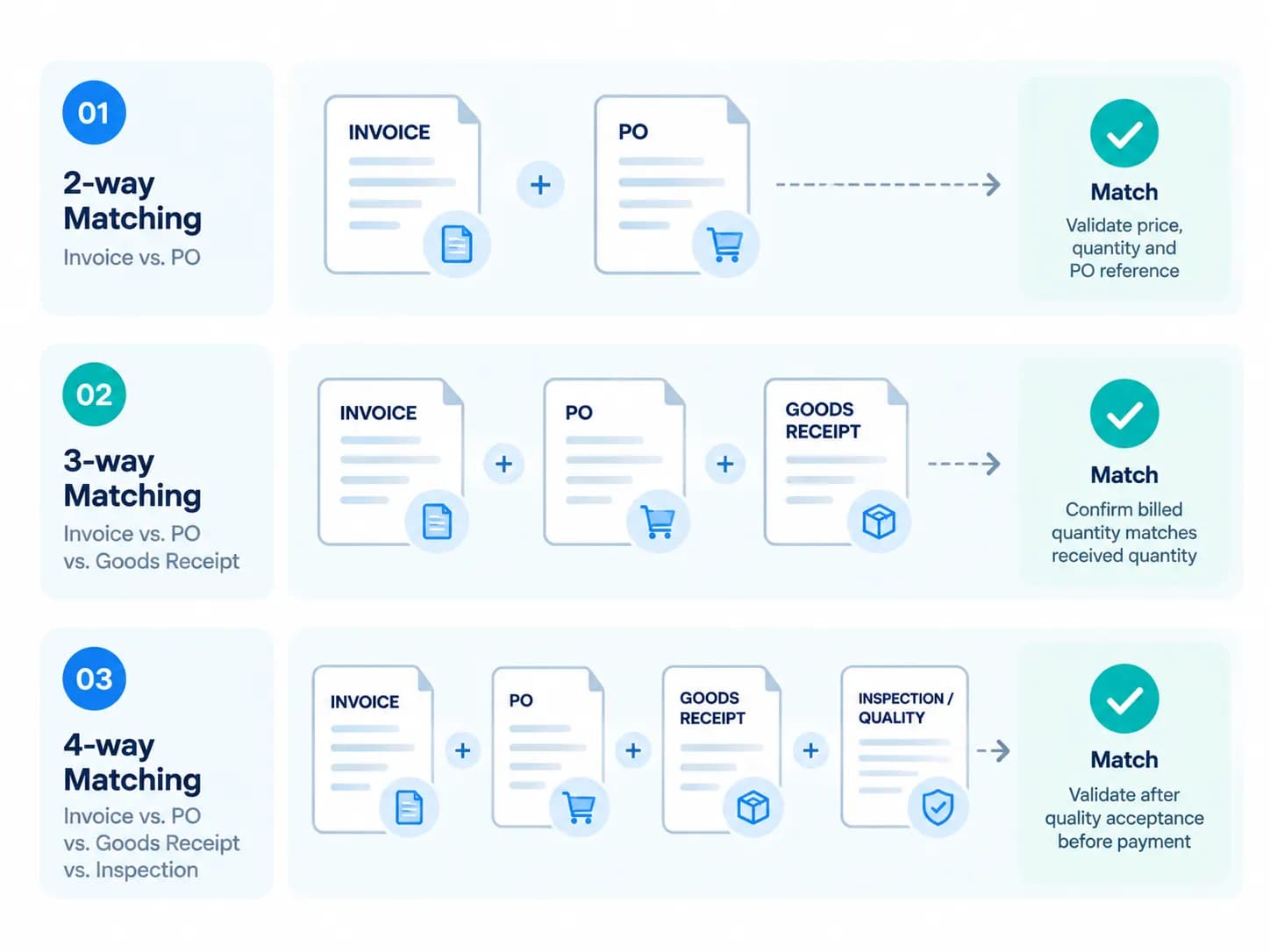
- 3-way matching (invoice, PO, goods receipt) is the standard control for physical goods.
- Clean master data and reliable ERP integration are as important as model quality.
- Agentic AI should automate clean work, assist on uncertain cases and escalate payments and bank changes to humans.
- Pilot on your own invoices, including partial deliveries and multi-PO invoices, before scaling plant by plant.
How AI Accounts Payable Automation Works: From Invoice to Payment
AI accounts payable automation is a connected workflow that links each supplier invoice to purchasing, receiving, approval and financial records. Instead of keying invoices in and reconciling later, manufacturers capture invoice data once and validate it against POs and goods receipts right away. Rules and human review resolve exceptions during the cycle, and approved invoices post to the ERP.
In short, AI accounts payable automation works for manufacturers by connecting invoice capture, validation, PO and goods-receipt matching, exception handling, approvals, and ERP posting into one controlled workflow.
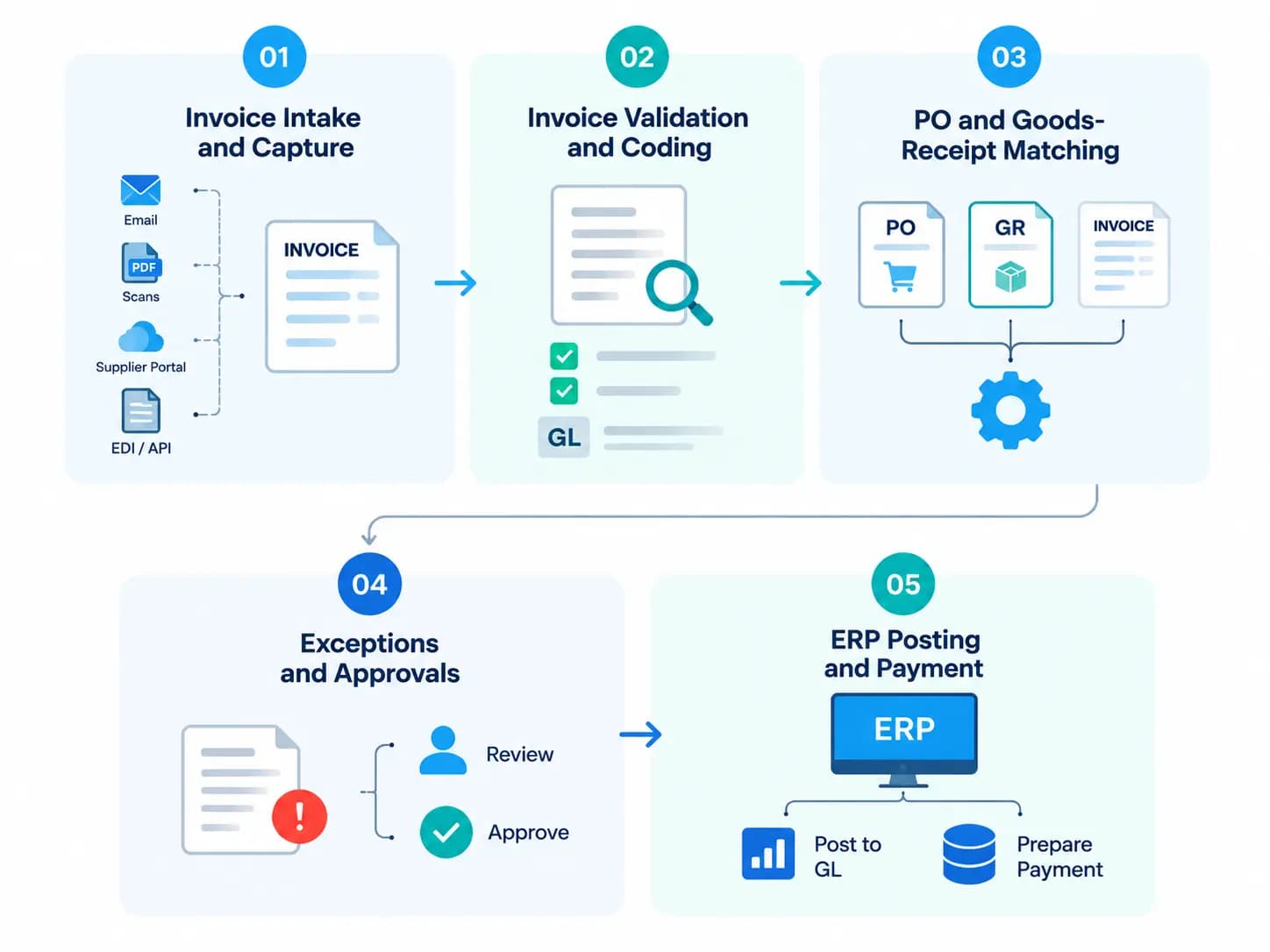
The AI AP automation workflow for manufacturing companies has five stages, with invoice processing automation happening in the first two stages:
- Invoice Intake and Capture: collect invoices from email, portals, scans, EDI and APIs.
- Invoice Validation and Coding: extract, normalize and classify invoice data.
- PO and Goods-Receipt Matching: compare invoices with purchase and receiving records.
- Exceptions and Approvals: route mismatches to the right owner and approve clean invoices.
- ERP Posting and Payment: record the liability, update PO and receipt status, and prepare payment.
1. Invoice Intake and Capture
The first stage of the automation receives supplier bills from sources like email, supplier portals, EDI, e-invoicing networks, scans, and APIs. This layer identifies the document type, checks for duplicates and prepares each invoice for extraction.
During this invoice processing stage with automation, OCR converts scanned invoices into machine-readable text. Then, intelligent document processing (IDP) identifies invoice headers, line items, PO references, currencies, and taxes.
Capture should handle varied supplier formats, multi-page invoices, multiple POs, credit memos and plant-specific layouts, and flag missing, unclear or conflicting data before matching begins.
2. Invoice Validation and Coding
This stage performs validation checks to determine if the invoice has the key information like supplier, invoice-number, date, correct currency, tax, amount, and line-item data. Then, defined rules are applied to assign the invoice to the correct GL account, cost center, plant, profit center, project, job, or work order.
Coding is usually done at line level, not header level, because one invoice may need to be allocated across multiple plants, cost centers, inventory accounts, product codes or batches.
The system must therefore support configurable coding and allocation rules across locations.
3. PO and Goods-Receipt Matching
The purchase order and goods-receipt matching automation confirms that the supplier invoice matches what was ordered and what was actually received. For standard PO invoices, the system compares invoice lines with PO lines for price and quantity, then validates them against available goods receipts.
For goods-receipt-based invoice verification, the invoice may be linked to individual deliveries rather than only to the purchase order, which is useful in the case of partial deliveries.
This stage is also responsible for handling non-PO invoices, blanket POs, service invoices, consignment-related billing, and landed-cost invoices.
| Invoice type | Matched against | Evidence required |
|---|---|---|
| Standard goods (PO) | PO and goods receipt (3-way) | PO line, goods receipt, invoice |
| Quality-controlled goods | PO, receipt and inspection record (4-way) | Quality acceptance |
| Services | PO or contract | Service acceptance |
| Blanket PO | Blanket PO limit and releases | Release or call-off, plus receipt |
| Consignment | Consumption or settlement record | Consumption or settlement report |
| Landed cost (freight, duty) | Related goods receipts | Freight or duty documents, allocated to received items |
| Non-PO | No order | Budget-owner approval, contract or service evidence |
(The table above shows which matching control applies to common manufacturing invoice types.)
4. Exceptions and Approvals
This stage identifies mismatches and resolves them so the invoice can proceed. Because the workflow exists to keep invoices moving, exception-handling logic is essential. The table below shows common exception types and who typically resolves them.
| Exception | Typical cause | Primary owner | Typical resolution |
|---|---|---|---|
| Price variance | Invoice price differs from the PO beyond tolerance | Procurement | Approve with documentation, or request a credit note |
| Missing receipt / quantity variance | Goods billed but not yet received or posted | Receiving / warehouse | Post the receipt, or hold the invoice |
| Duplicate invoice | Same supplier, number, amount or date submitted twice | AP | Block the duplicate and notify the supplier |
| Coding error | Missing or invalid GL account, cost center or plant | AP / budget owner | Correct the coding and re-route for approval |
| Master-data mismatch | Unknown supplier, inactive account or missing unit conversion | Master-data team | Fix the record, then re-match |
| Tax or e-invoice mismatch | Tax rate, registration number or e-invoice data fails validation | Tax / AP | Request a corrected invoice |
| Quality rejection (4-way) | Goods failed inspection | Quality | Reject or short-pay, and request a credit or replacement |
(The table above maps common invoice exceptions to the team that should resolve them.)
A clean invoice moves directly to approval, whereas instances like price variance, missing receipt, duplicate invoice or similar mismatches are routed to the correct exception owner. The routing stage also delivers the supporting invoice, PO, receipt, and tolerance data to the owner.
5. ERP Posting and Payment
In AI AP automation for manufacturers, this stage is responsible for converting an approved invoice into a financial and operational record inside your ERP.
The system records the accounts payable liability, posts the cost to the right GL account and updates PO and receipt status. This is where AI in ERP does the heavy lifting, since the posting logic works directly against your existing finance and procurement modules.
Before payment is released, built-in controls check supplier details, payment terms, approval status and duplicate-payment risk.
Not sure where AI fits in your AP process?
Our AI Readiness Audit maps your current workflows, scores your readiness across data, process and platform, and gives you your top AI use cases.
AI for Invoice, PO and Goods Receipt Matching
The AI can propose associations for invoice-to-PO and invoice-to-receipt by comparing item identifiers, quantities, prices, units, supplier history, and prior matching behavior. It must also validate proposed matches based on business rules and confidence thresholds.
Worked Example (Illustrative Figures)
The invoice triggers two exceptions: a price variance and a quantity with no receipt. The following example shows how an AI AP automation system handles a partial delivery and a price variance on the same invoice.
| PO | Goods receipt | Invoice | Result | |
|---|---|---|---|---|
| Quantity | 1,000 units | 600 units | 1,000 units | 400 units billed with no receipt are held |
| Unit price | $12.00 | n/a | $12.30 | 2.5% over the PO, which breaks a 2% tolerance, so it routes to procurement |
| Line value | $12,000 | $7,200 (600 × $12.00) | $12,300 | Only the 600 received units are eligible to match; the balance waits for the remaining receipt |
Key AI Capabilities for Manufacturing Accounts Payable
AI accounts payable automation goes beyond basic optical character recognition (OCR). It combines intelligent document processing, machine learning, business rules, and workflow automation to help manufacturers process invoices, identify discrepancies, and maintain financial controls.
1. Intelligent Invoice Data Extraction
AI-powered invoice processing extracts information from PDFs, scanned documents, email attachments, and supplier invoices with different layouts. It identifies key fields such as supplier names, invoice numbers, dates, line items, quantities, unit prices, taxes, and payment terms.
Intelligent document processing can also help interpret inconsistent product descriptions and document structures. Extracted information should be validated against supplier records and purchase orders before it is used for matching or ERP posting.
2. Duplicate Invoice Detection
Duplicate invoices can result in overpayments, reconciliation issues, and additional administrative work. AI can identify potential duplicates by comparing invoice numbers, supplier IDs, invoice dates, amounts, purchase order references, and line-item details.
It can also flag invoices that appear similar despite differences in formatting or reference numbers. When a potential duplicate is detected, the system can hold the invoice for review rather than automatically rejecting it, since legitimate invoices may share similar attributes.
3. AI-Based Invoice Exception Handling
Manufacturing invoices frequently contain discrepancies involving quantities, prices, purchase orders, and goods receipts. AI can classify these exceptions, summarize the likely cause, and recommend the next step.
For example, if an invoice lists 1,000 units but the goods receipt records only 900 units, the system can flag the quantity mismatch and route it to the procurement or receiving team. Business rules determine whether the invoice should be held, partially processed, or escalated for approval.
For manufacturers with complex workflows or legacy systems, custom manufacturing software development can help bridge integration gaps and connect business applications with existing ERP platforms.
4. Automated Invoice Approval Workflows
AI-powered AP workflows can route invoices to the appropriate approvers based on invoice value, department, cost center, plant location, supplier category, and company policies.
For example, an invoice within an approved purchase order's tolerance limits may follow a standard approval workflow, while a high-value invoice or unexpected price variance may require additional authorization.
Workflow automation reduces manual follow-ups and improves approval visibility. However, approval thresholds and authorization rules should remain configurable and enforced through controlled systems.
5. Fraud and Anomaly Detection
AI can analyze invoice and transaction patterns to identify unusual activity that may require investigation. Examples include unexpected increases in invoice amounts, repeated billing patterns, unusual supplier transactions, and inconsistencies in supplier information.
These signals do not necessarily indicate fraud. They help finance teams prioritize suspicious transactions for further verification. Supplier bank-detail changes should be independently verified through an approved process, and payment releases should remain subject to appropriate authorization controls.
6. AI-Assisted General Ledger Coding
General ledger (GL) coding determines how an invoice is categorized in the manufacturer's financial records. Incorrect coding can affect expense reporting, cost allocation, and financial reconciliation.
AI can suggest GL accounts, tax codes, and cost centers using historical transactions, supplier categories, invoice descriptions, and predefined accounting rules. For example, an invoice for machine maintenance may be assigned to a relevant maintenance expense account, subject to the company's accounting policies.
Finance teams should validate suggested codes, particularly for unusual transactions, tax-sensitive invoices, and high-value expenses. Approved coding rules and ERP validation should determine the final accounting treatment.
ERP Integration Requirements for AI Accounts Payable Automation
AI accounts payable automation for manufacturers requires bidirectional integration with the ERP for supplier, PO, receipt, invoice, approval, tax, and payment data.
Once an invoice has passed the AI accounts payable automation stages, it must be posted to the ERP used by the manufacturing companies. The AP platform and the ERP also need to exchange supplier, PO, receipt, invoice, approval and payment data, because AI decisions are only as reliable as the data they read.
For example, our [SAP-connected daily stock reporting automation case study] demonstrates how a manufacturing plant reduced daily stock report generation from 5–6 hours to under four minutes, achieving 99% data reliability. This illustrates the value of automating data workflows around existing ERP systems.
Native ERP Connectors and APIs
Syncing invoice processing automation status, exception status, and posting results is managed using native connectors and APIs, which also reduces manual file transfers. Typical patterns are near-real-time APIs for PO, receipt and posting-acknowledgement data, and scheduled batch syncs for slower-moving master data such as suppliers and GL accounts.
Whichever pattern you choose, the integration should support authentication, retries, error logging, reconciliation and duplicate prevention.
SAP, Oracle, NetSuite and Dynamics Integration
Take the following table as the starting point for vendor questions regarding supported ERP integrations. Since interfaces and product names can change between releases, always confirm the details against the current vendor documentation.
| ERP | Integration patterns to evaluate | Common watch-outs |
|---|---|---|
| SAP | Supported product and deployment (ECC or S/4HANA); IDoc, BAPI, API or OData flows for PO, receipt, supplier and invoice data; posting acknowledgements | Tolerance and posting-block settings that conflict with the AP platform; error recovery for failed postings |
| Oracle | Supported Oracle environment; REST, SOAP, file import or native services; invoice creation, validation holds and posting status | Validation holds and approval status not syncing back to the AP platform |
| NetSuite | Native, connector-based or custom integration; SuiteScript or SuiteFlow use; vendor-bill, PO, item-receipt, approval and attachment handling | Custom fields and scripts that break standard connectors |
| Microsoft Dynamics | Dynamics 365 Finance and Business Central treated separately; invoice entities, interfaces, approvals, matching policies and posting behavior | Differences in product-receipt matching between the two products |
| Tally | XML over HTTP, ODBC or JSON API (by release); purchase voucher, PO and receipt note posting | Ledger and unit-name mismatches, GST and TDS treatment, multi-company mapping |
EDI and E-Invoicing
EDI and e-invoicing send structured invoice data directly between suppliers and buyers. AI AP automation should still validate that data against POs, receipts, supplier records and tax rules.
Mandates differ by country and keep expanding. Examples include India's GST e-invoicing, Mexico's CFDI, Italy's SDI and Peppol-based mandates in several European countries.
Manufacturers should map each jurisdiction where they operate, including formats, transmission methods, tax validation, archiving and reporting rules, and confirm deadlines with a qualified local tax advisor.
Master Data Synchronization
Supplier, item, PO, receipt, tax and accounting data must stay consistent across systems.
Clean these common failure points before go-live: vendor mismatches, duplicate vendor records, inactive GL accounts, invalid cost centers, changed supplier details and missing PO or receipt records. Left unfixed, they cause failed matches and posting errors that no model can correct.
Not sure how your ERP and invoices would fit?
Send us some of your real invoices, We’ll show you the touchless rate, the exception types and the ERP integration approach for your setup.
Technologies Required for AI Invoice Processing Automation
AI invoice processing automation results depend on connected technologies for document understanding, matching, workflow, integration and analytics. The overall architecture is crucial in determining the outcome, so these technologies must work together: OCR, IDP, machine learning, NLP, multimodal AI, workflow automation, ERP integration, and analytics.
OCR and Intelligent Document Processing
OCR converts scanned or image-based invoices into machine-readable text. Intelligent document processing goes further by classifying documents, extracting the header and line-item fields, and identifying PO references, so the transaction data is ready for validation.
Machine Learning for Extraction and Coding
Machine learning learns from historical invoices, supplier behavior and user corrections to improve extraction accuracy and GL coding suggestions. It also identifies likely PO-line matches and flags unusual invoice patterns.
NLP and Multimodal AI
Natural language processing (NLP) helps interpret supplier descriptions, invoice notes, and line-item text. Multimodal AI then plays the role of combining the text, layout, tables and image signals to accurately understand the complex invoice documents.
Generative AI for Exceptions
Generative AI in the accounts payable automation summarizes invoice exceptions, explains their causes and drafts supplier follow-ups. It helps AP teams understand the context of a mismatch and supports human decision-making.
Invoice processing automation is not about eliminating people; it changes what they spend time on. Generative AI should never independently change financial records.
How to Measure the ROI of AI-Powered AP Automation
Manufacturers can measure the ROI of AI accounts payable automation by comparing invoice processing costs, processing time, error rates, and approval efficiency before and after implementation.
| KPI | What it measures |
|---|---|
| Cost per invoice | Average internal cost of processing an invoice |
| Invoice processing time | Time from receipt to approval or posting |
| First-pass match rate | Percentage of invoices matched without manual intervention |
| Exception rate | Percentage of invoices requiring additional review |
| Duplicate payment rate | Frequency of duplicate payments |
| Days payable outstanding (DPO) | Average time taken to pay suppliers |
| On-time payment rate | Percentage of invoices paid by their due dates |
How to Calculate ROI
To estimate ROI, consider the current invoice processing costs, expected savings from automation, implementation expenses, and ongoing software and maintenance costs.
ROI Formula:
ROI (%) = (Annual Savings − Annual Operating Costs − Implementation Costs) ÷ (Annual Operating Costs + Implementation Costs) × 100
For example, a manufacturer processing 24,000 invoices annually at $8 per invoice spends $192,000 per year. If automation reduces addressable processing costs by 40%, the estimated gross annual savings would be $76,800.
Actual ROI depends on invoice complexity, automation accuracy, ERP integration, and implementation costs. Manufacturers should validate these estimates through a pilot before scaling automation across plants.
Next Steps
Successful AI accounts payable automation starts with understanding your current invoice processing workflow, identifying bottlenecks, and preparing supplier and financial data for reliable matching. Establish baseline metrics for processing time, exception rate, touchless processing, and cost per invoice to measure improvements.
Start with a pilot using real manufacturing invoices, including non-PO invoices, partial deliveries, and multi-PO scenarios. Validate matching accuracy, exception handling, and ERP integration before expanding automation across plants.
Ready to streamline your accounts payable workflow? to discuss your manufacturing invoice processing challenges and explore a tailored AI automation solution.
FAQs on AI Accounts Payable Automation for Manufacturers
1. What is 3-way matching in AP automation?
Three-way matching compares the supplier invoice, the purchase order and the goods receipt before payment. It confirms the supplier billed only for goods that were ordered and received, at the approved price. It is the standard control for physical goods, which is why manufacturers use it.
2. How much does AI accounts payable automation cost, and what is the ROI?
Pricing is usually per invoice or a subscription by volume or entity, plus implementation and connector fees. Payback in months equals one-time implementation cost divided by monthly net savings. Net savings are processing savings, discounts captured and avoided erroneous payments, minus recurring platform costs. Compare total cost over several years, not first-year price.
3. Which ERP systems can AI AP automation integrate with?
AI AP automation integrates with SAP, Oracle, NetSuite, Microsoft Dynamics and Tally through native connectors, APIs, middleware, EDI or file-based exchange. The right method depends on your ERP product, version and deployment model. Always confirm the exact integration approach and how posting errors are returned before you commit.
4. What is the difference between AI AP automation and RPA?
RPA follows fixed scripted steps and breaks when invoice layouts change. AI AP automation reads variable invoice formats, matches lines to POs and receipts, and learns from corrections. Many deployments combine both, using AI to read and decide and RPA or APIs to move data into the ERP.
5. How long does it take to implement AI AP automation?
As a planning assumption, expect several weeks for assessment and data cleanup, two to three months for a pilot, and a plant-by-plant rollout after that. ERP complexity, number of plants and master-data quality drive the real timeline. Pilot on your own invoices, including partial deliveries and multi-PO cases, before scaling.