Intelligent Document Processing (IDP) for Mid-Size Companies: Use Cases, Costs, and How to Start
Dharmesh Dave
5-6 mins
Intelligent document processing (IDP) turns invoices, contracts, claims, and forms into validated, structured data using OCR, machine learning, and large language models. This guide is for operations, finance, and IT leaders at mid-size companies deciding whether IDP is worth the investment and how to start.
Key takeaways
- IDP handles structured, semi-structured, and unstructured documents that template-based OCR cannot.
- Accuracy and straight-through processing rate decide the business case, so measure both before you buy.
- Pricing model, deployment choice, and compliance scope drive total cost of ownership.
- A 90-day pilot with human-in-the-loop review is a practical way to begin.
IDP vs OCR vs Manual Data Entry
IDP reads documents, classifies them, extracts fields, and validates the results. OCR only converts images to text. Manual entry relies on people for every step. For mid-size companies, the gap shows when layouts vary by supplier, customer, or region.
| Manual entry | Template-based OCR | IDP | |
|---|---|---|---|
| What it does | People key data from documents | Converts images to text in fixed zones | Classifies, extracts, validates, and routes |
| Layout variation | Handles any layout | Breaks when a template changes | Handles structured, semi-structured, and unstructured documents |
| Data validation | Spot checks by reviewers | None built in | Rules and confidence scores on every field |
| Exceptions | Resolved by staff | Errors pass through unflagged | Low-confidence fields go to human review |
| Scaling | Adds headcount | Adds templates to maintain | Adds volume with review capacity |
| Best fit | Very low volume | Uniform, high-quality forms | Mixed, variable document flows |
Note: OCR remains a useful component inside an IDP pipeline. It is rarely enough on its own once document formats multiply.
Structured, Semi-structured, and Unstructured Documents: where IDP gets hard
Document type decides the extraction approach. Match the method to the layout before you compare vendors.
| Document type | Examples | Layout | Fitting extraction approach |
|---|---|---|---|
| Structured | Standardized forms, fixed-field surveys | Fixed field positions | Template or zone-based extraction with validation rules |
| Semi-structured | Invoices, purchase orders, bills of lading, bank statements | Same fields, varying positions | Layout-aware ML models, or LLM-based extraction mapped to a schema |
| Unstructured | Contracts, leases, emails, medical notes, reports | Free text, no fixed fields | LLM-based extraction with defined entities or clauses, plus human review of critical fields |
Note: Semi-structured documents are where template-based tools fail and layout-aware or LLM-based models earn their cost.
How Does an IDP Pipeline Work?
An IDP pipeline moves each document through six stages. Every stage writes its output and confidence score to an audit record.
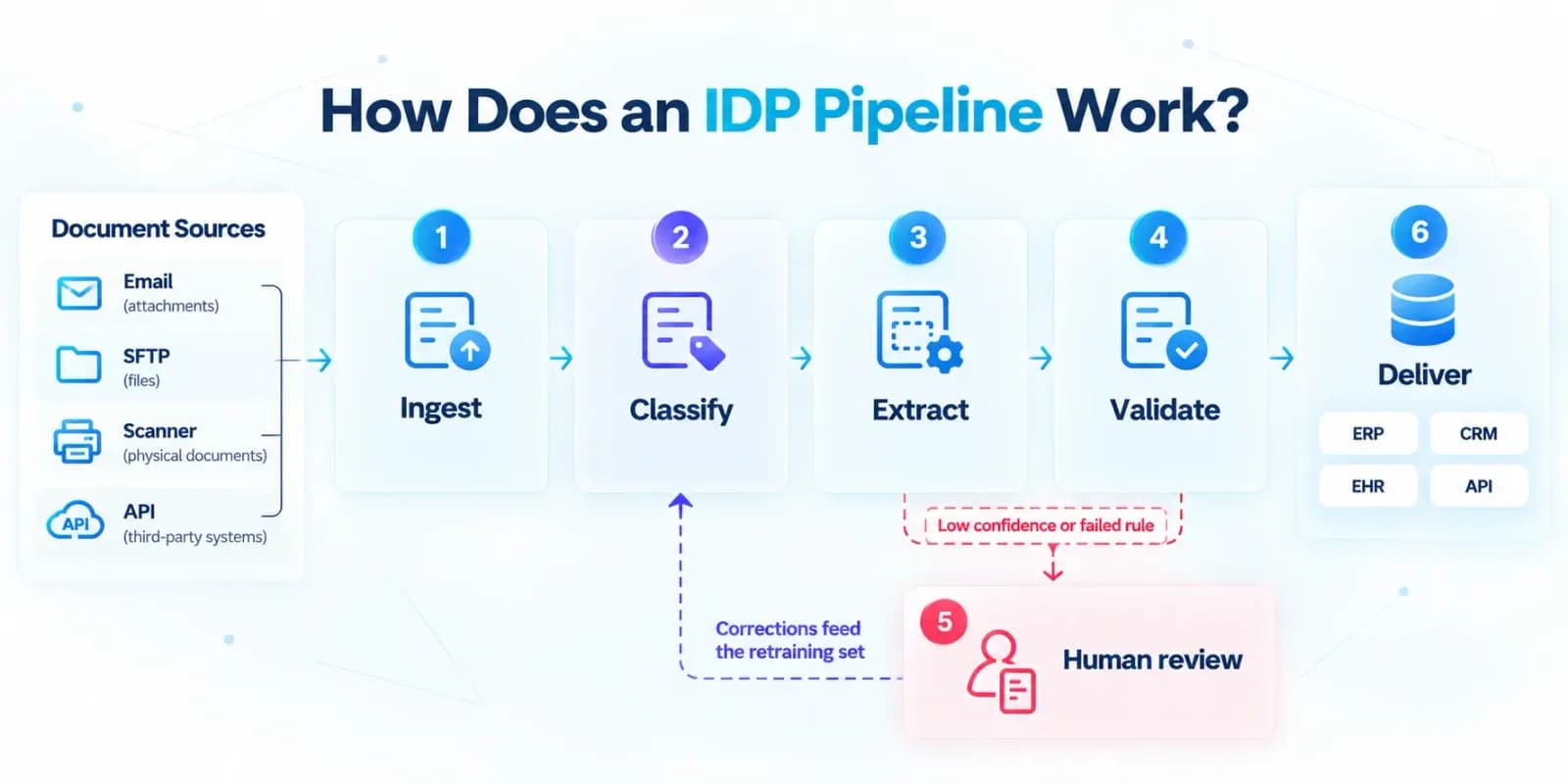
Ingest and Prepare
Capture files from email, SFTP, scanners, or APIs. Clean images, split packets into separate documents, and detect language.
Classify
- Identify the document type and route each page to the right model and rules.
Extract
- Combine OCR with ML or LLM models to pull fields, tables, and line items into a defined schema.
Validate
- Check extracted values against business rules and reference data.
Review
- Send low-confidence or failed fields to people.
Deliver and Learn
- Push approved data to your ERP, CRM, or EHR, and log corrections for retraining.
Not Sure Which Document Workflows to Automate First?
Identify high-impact automation opportunities, assess your existing systems, and prioritize the right AI solutions for your business.
Six IDP Use Cases for Mid-size Companies
Each use case follows one template: the outcome, the documents, the key fields, the validation rules, and what goes to human review.
1. Supplier Invoice Processing for Manufacturers
- Outcome: Fewer three-way-match exceptions, faster approvals, and less re-keying of supplier invoices.
- Documents: Supplier invoices as PDFs, scans, and email attachments.
- Key fields: Supplier details, invoice number, date, line items, taxes, and totals.
- Validation: Match each invoice to purchase orders and goods-receipt records. Check totals, tax, and duplicate invoice numbers.
- Review: Quantity or price mismatches, unknown suppliers, and low-confidence totals. Clean data goes to the ERP for approval.
2. Purchase-order Processing for Manufacturers
- Outcome: Faster order processing and a more reliable audit trail across procurement activity.
- Documents: Purchase orders in different templates from suppliers, plants, and procurement teams.
- Key fields: Order lines, quantities, prices, delivery dates, and delivery details.
- Validation: Classify the document type first. Check items, prices, and units against master data before creating or updating ERP records.
- Review: Unrecognized part numbers, price variances, and templates the model has not seen.
3. Patient Intake Automation for Healthcare Providers
- Outcome: A lighter front-desk workload, faster registration, and cleaner patient records.
- Documents: Registration forms, insurance cards, identification documents, referrals, and consent forms.
- Key fields: Patient details, coverage details, and referral information.
- Validation: Confirm required fields are present, flag missing information, and check that identity and coverage details agree.
- Review: Incomplete forms, unreadable cards, and handwritten entries. Approved data writes to the EHR or patient-management system.
4. Claims Document Processing for Healthcare Providers
- Outcome: Fewer incomplete claims, faster turnaround, and better visibility into claim status.
- Documents: Claims packets with mixed document types, variable layouts, handwritten notes, and supporting evidence.
- Key fields: Claim details and policy details.
- Validation: Classify each document, identify missing attachments, and match policy details to the records on file.
- Review: Missing attachments, handwritten notes, and policy mismatches.
5. Contract and Lease Data Extraction for Real Estate Firms
- Outcome: Faster contract review preparation and fewer missed dates or obligations.
- Documents: Agreements and lease documents.
- Key fields: Parties, property details, dates, rent terms, escalation clauses, renewal options, and responsibilities.
- Validation: Check that dates are consistent, such as an end date after the start date, and that rent terms and property details match lease records.
- Review: Escalation and renewal clauses and low-confidence dates, since an error there causes a missed obligation. Structured output feeds lease administration, renewal tracking, and portfolio reporting.
6. Statement-of-account Processing for Real Estate Portfolios
- Outcome: Faster reconciliation and more dependable financial reporting.
- Documents: Statements of account, rent rolls, and payment records.
- Key fields: Tenant, period, charges, payments, and balances.
- Validation: Check that charges, payments, and balances reconcile to the stated total.
- Review: Totals that do not reconcile and unmatched tenants, before the property-management or accounting system updates.
IDP Pricing Models and Software Cost Comparison
Price per document depends on what a vendor counts as a billable unit. Compare models by cost driver and by where each one penalizes your document mix.
| Pricing model | Cost driver | Published example (USD, 2026) | Where it penalizes you | Best fit |
|---|---|---|---|---|
| Per page (cloud API) | Pages processed and features used | Google Document AI: OCR $1.50 per 1,000 pages, Form Parser $30 per 1,000. AWS Textract (US West, Oregon): $0.0015 per page for text, $0.015 with tables, $0.05 with forms | Long contracts and packets, features billed separately, differing page definitions | Variable volume, custom builds |
| Per document | Document type | Google Document AI: W-2 parser $0.30 per classified document, US passport parser $0.10 per document | Short, simple documents on higher-priced parsers | Standard document types |
| Tiered platform plan | Workflow scope and features | Rossum: Starter, Business, Enterprise, and Ultimate plans, priced by volume and workflow complexity | Paying for features you do not use | Multi-step AP or order workflows |
| Committed annual volume | Pre-purchased volume | Rossum Starter from $18,000 per year with a one-year minimum. Azure lists commitment tiers by page volume | Unused volume, overage rules, and lock-in | Stable volume after a pilot |
| Token-based (LLM API) | Input and output tokens | Anthropic: a PDF page typically uses 1,500 to 3,000 text tokens plus image tokens, at standard token rates | Dense pages, retries, long outputs, and unpredictable bills | Unstructured, low-volume, or prototype work |
Build an IDP Solution Around Your Business Workflows
We helps businesses build AI-powered workflows that validate data and integrate with existing systems.
How to Start in 90 Days
A 90-day plan gets you to a measured pilot on one document process, not a finished rollout. All durations below are planning estimates, not benchmarks. Adjust them to your document mix, approvals, and system access.
| Stage | Window in this Plan | Planning Estimate for Full Delivery |
|---|---|---|
| Discovery | Days 1 to 28 | 2 to 4 weeks |
| Proof of concept | Days 29 to 60 | 4 to 8 weeks |
| Production | Days 61 to 90 (pilot only) | 8 to 16 weeks |
Discovery (Days 1 to 28)
- Pick one process. Choose a document flow with high volume, a clear owner, and a measurable cost.
- Baseline it. Collect samples and measure cost per document, error rate, and cycle time. Then make a go or no-go call using the ROI framework.
Proof of concept (Days 29 to 60)
- Set targets. Build a ground-truth set and set accuracy and STP targets by field, following the evaluation method.
- Prove it. Test platform, API, and custom options on your own documents. Compare them with the vendor scorecard.
Pilot (Days 61 to 90)
- Add controls. Configure validation rules, review queues, audit trails, and access controls, using the security and compliance requirements.
- Run the pilot. Process one document type in production and compare results with your baseline. Then decide whether to expand, adjust, or stop.
On day 90, you hold measured accuracy, STP rate, and cost per document on real documents. That is the evidence for a full rollout, which follows the production estimate above. If your team lacks capacity for these stages, a development partner can run them with you.
Working with an IDP Development Partner
A partner makes sense when a platform or API cannot meet your requirements, or when your team lacks the engineers to build around one. Judge any partner by how it handles your documents, not by its pitch.
When to Engage an IDP Software Development Company
- Your documents, validation rules, or deployment limits do not fit a platform.
- You lack engineers to build review screens, integrations, and monitoring.
- Legacy systems need integration that vendor connectors do not cover.
What to Expect from IDP Development Services
| Stage | The partner delivers | You provide |
|---|---|---|
| Discovery | Document inventory, process map, baseline cost per document, target accuracy and STP rate, and security scope | Sample documents, system access, and process owners |
| Proof of concept | A working pipeline on your documents, hold-out accuracy and STP results, and a cost estimate | Ground-truth labels and reviewer time |
| Production | Integrations, review queues, monitoring, audit trails, and security controls, then handover or managed support | Approvals and change management |
Ask every partner four questions:
- Will you test on our documents before you quote?
- Who owns the code, models, and data?
- Can you deploy in our cloud or on-premise?
- How do you report accuracy and STP rate?
Disclaimer: Ciphernutz is an IDP development partner that helps mid-sized companies implement AI-native solutions, and custom software, including custom IDP solutions.
Ready to Scope your IDP Pilot?
Bring one document process and a sample set. We will baseline your cost per document and plan a pilot you can measure.
FAQs
What is intelligent document processing, and how is it different from OCR?
IDP turns documents such as invoices, contracts, and forms into validated, structured data. OCR only recognizes text. IDP adds classification, field extraction, validation rules, human review, and delivery to systems like your ERP.
How much does IDP cost?
Cost depends on the pricing model and your document mix. Published 2026 list prices in USD include Google Document AI OCR at $1.50 per 1,000 pages, AWS Textract table extraction at $0.015 per page, and Rossum Starter plans from $18,000 per year. Review labor, integration, and maintenance add to these.
How accurate is IDP, and what is straight-through processing (STP) rate?
Accuracy depends on your documents, so test it on your own files. STP rate is the share of documents processed with no human touch. Measure field-level and document-level accuracy on a hold-out set, then tune confidence thresholds.
Can IDP handle handwritten, multilingual, and unstructured documents?
Yes, with limits. Handwriting is the least predictable input, so route handwritten fields to review at first. For multilingual files, test each language, script, and date or currency format. LLM-based extraction suits unstructured documents.