How to Unify Bayut, Property Finder and Dubizzle Leads into One AI Workflow
Dharmesh Dave
4-5 mins
UAE real-estate businesses receive enquiries from Bayut, Property Finder, Dubizzle, websites, paid campaigns, WhatsApp, and referrals. When these leads remain distributed across portal dashboards, email inboxes, spreadsheets, and agents’ personal devices, teams struggle to respond consistently and identify high-intent prospects.
A unified AI workflow automation brings these enquiries into one connected system. It can normalize lead data, detect duplicates, extract rental or purchase intent, assign leads to the right agent, support WhatsApp follow-up, and update the CRM automatically.
How to Build a Unified AI Lead Workflow for UAE Real Estate
A typical unified AI lead workflow follows six stages: capture, normalization and deduplication, AI qualification, lead scoring and routing, engagement, and CRM synchronization.
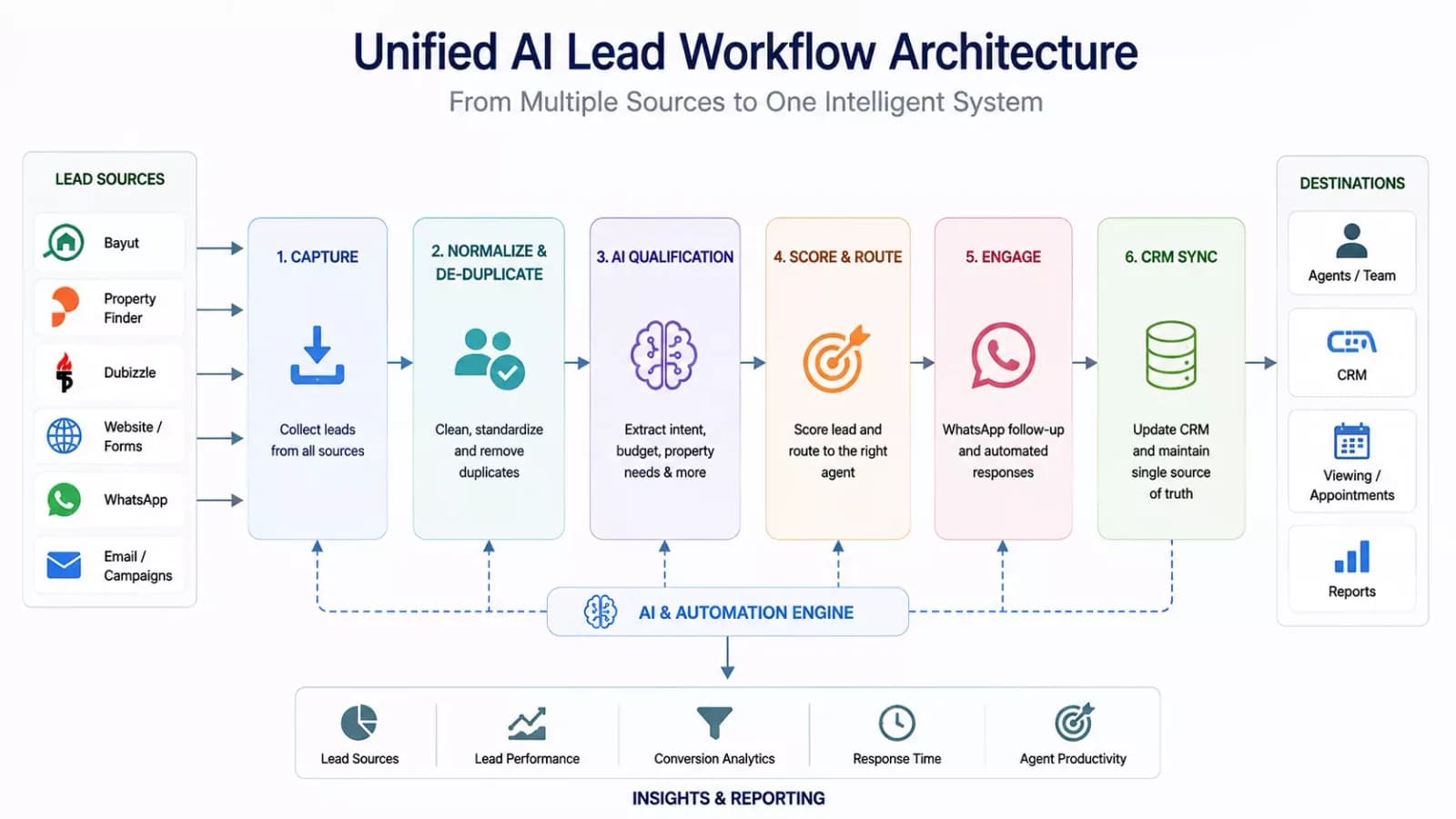
The workflow brings leads from multiple sources into one structured system, where they can be cleaned, qualified, routed, followed up with, and synchronized with the CRM.
The CRM remains the operational source of truth, while agents retain control over conversations, property decisions, and high-value interactions.
Step 1: Capture Leads From Bayut, Property Finder and Dubizzle
Each portal lead should enter the workflow with its original information intact.
Depending on the available integration, the system may capture:
- Name
- Phone number
- Email address
- Portal source
- Listing reference
- Property URL
- Original enquiry
- Lead timestamp
- Campaign source
- Assigned listing agent
- Contact preference
A standardized record might look like this:
Source: Property Finder
Property: Two-bedroom apartment in Dubai Marina
Intent: Rent
Budget: Up to AED 120,000 annually
Move-in: Within 30 days
Language: English
Status: New
Next action: Offer viewing slots
The original enquiry should always be preserved. AI may summarize or classify the message, but it should not replace the source record.
This prevents the implementation from depending on an integration method the client cannot access or use appropriately.
Step 2: Normalize and Deduplicate Leads
Bayut, Property Finder, and Dubizzle may use different field names, formats, and property identifiers. The integration layer maps them into a common CRM model.
| Portal data | Unified CRM field |
|---|---|
| Listing ID | Property reference |
| Inquiry text | Original enquiry |
| Advertiser contact | Assigned agent |
| Lead channel | Source channel |
| Created date | Lead timestamp |
| Phone number | Normalized contact |
| Property title | Property of interest |
Duplicate detection can compare:
- Normalized phone number
- Email address.
- Portal-specific lead ID
- Name
- Property reference
- Enquiry timing
- Conversation similarity
- Existing CRM records
The system should not merge records solely because two names look similar. A safer match uses multiple signals, such as the same phone number and a related enquiry within a defined time window.
When a duplicate is found, the workflow should:
- Maintain one primary contact record
- Preserve every original portal source
- Link all related property enquiries
- Retain the activity history
- Assign one responsible agent
- Prevent conflicting automated messages
- Record the duplicate source for reporting
Step 3: Use AI to Qualify Property Leads
Once a lead is centralized, AI can extract the information needed for prioritization and routing.
Rental Enquiries
- Preferred community
- Budget
- Bedrooms and property type
- Furnishing preference
- Move-in timeline
- Viewing readiness
- Language preference
- Specific property interest
Buyer and Investor Enquiries
- Purchase budget
- Preferred location or project
- Cash or financing intent
- Purchase timeline
- End-use or investment purpose
- Unit type
- Viewing or consultation preference
Landlord Enquiries
- Property location
- Property type
- Current occupancy
- Expected rent
- Furnishing status
- Management requirements
- Preferred valuation or consultation time
A progressive qualification flow might ask:
1. Are you looking to rent, buy, or appoint a property manager?
2. Which area and property type are you interested in?
3. What budget and timeline should we work with?
4. Would you like to schedule a viewing?
The AI should ask only questions that affect the next action.
Step 4: Score and Route Leads to the Right Agent
AI scoring should help agents prioritize their work. It should not decide whether a person deserves access to a property or service.
A transparent score can consider:
- Timeline
- Budget fit
- Requirement clarity
- Engagement level
- Viewing readiness
- Property availability
- Source information
- Completeness of the lead record
Example:
Priority: High
Confidence: 0.86

Confirmed:
- Rental enquiry
- Dubai Marina
- Two bedrooms
- Furnished
- Budget up to AED 120,000
- Move-in within 30 days
- Evening viewing requested

Missing:
- Preferred payment structure
- Exact viewing date

Recommended action:
Offer two evening viewing slots and assign the lead to the Dubai Marina leasing team.
A practical classification could include:
- High priority: Clear requirement, suitable budget, relevant timeline, and viewing readiness.
- Medium priority: Relevant enquiry requiring more information or follow-up.
- Early-stage: Exploratory enquiry suitable for helpful information and permission-based nurture.
The score should explain which facts influenced it. The thresholds should eventually be calibrated against the client’s actual viewing, lease, and sale-conversion data.
Leads can be routed by:
- Community
- Property category
- Rental or sales intent
- Budget range
- Language
- Agent availability
- Listing ownership
- Branch
- Priority
- Existing customer relationship
Example:
Dubai Marina + rental + English
→ Dubai Marina leasing team

Arabic-speaking landlord enquiry
→ Arabic-speaking owner-acquisition manager

Commercial property enquiry
→ Commercial property division

Existing tenant issue
→ Property-management support queue
Agents should be able to correct extracted information, change priority, reassign ownership, stop automation, and take over conversations whenever needed.
Step 5: Automate WhatsApp Lead Follow-Up
Where the lead has contacted the business through WhatsApp or provided appropriate consent, the workflow can continue through the official WhatsApp Business Platform.
Example:
Thank you for enquiring about the two-bedroom apartment in Dubai Marina. I can help confirm availability, answer basic questions, and arrange a viewing. What move-in date are you targeting?
The workflow can automate:
- Qualification questions
- Approved property information
- Viewing-slot selection
- Confirmations and reminders
- Rescheduling
- Agent notifications
- Post-viewing follow-up
- Human handoff
Property availability, pricing, amenities, and listing details should come from an approved, current source. The AI should never invent them.
WhatsApp business-initiated messages outside the applicable customer-service window may require approved templates. Consent, opt-outs, message frequency, and suppression lists should be built into the workflow.
For related use cases, see Ciphernutz’s real-estate workflow automation guide.
Step 6: Sync Leads With Your CRM
The CRM should act as the operational system of record for the lead journey.
Each unified record can include:
- Contact information.
- Portal and campaign sources.
- Duplicate relationships.
- Property of interest.
- AI-extracted requirements.
- Lead priority.
- Assigned agent.
- Conversation summary.
- Consent status.
- Viewing history.
- Follow-up tasks.
- Pipeline stage.
- Conversion outcome.
A CRM integration should create action, not merely store data. New leads should generate ownership, deadlines, alerts, and next steps.
If the existing CRM cannot support the required portal integrations, property data, routing, WhatsApp workflows, or reporting, a custom integration layer or real-estate CRM extension may be required.
Explore Ciphernutz’s real-estate IT solutions and PropTech automation services.
Implementation Roadmap: From First Integration to Full Automation
Phase 1: Centralize
Phase 1 focuses on auditing portal accounts, API access, CRM capabilities, lead volume, response processes, property data, agent ownership, and WhatsApp infrastructure.
The pilot connects one CRM with one or two validated lead sources and one property team.
Phase 2: Qualify and Convert
In the second phase, the workflow can add:
- Intent extraction
- Conversational qualification
- Lead scoring
- Property matching
- WhatsApp responses
- Viewing scheduling
- Reminders
- Agent alerts
- Conversation summaries
- Portal-level analytics
Phase 3: Scale
Once the core workflow is reliable, AI-powered real estate workflows can expand to:
- All three portals
- Multiple branches
- Rental and sales pipelines
- Landlord acquisition
- Investor enquiries
- Off-plan qualification
- Arabic and English routing
- Voice-agent support
- Resident and maintenance workflows
- Custom CRM features.
- Revenue attribution
If you're planning to implement this workflow, start with one CRM, one property team, one lead type, and one or two validated portal integrations. Once the workflow is reliable, expand it across additional portals and use cases.
Frequently Asked Questions
Can Bayut, Property Finder, and Dubizzle leads enter one CRM?
Integration availability depends on the portal, account type, permissions, and approved connection methods. Validate the available options for each portal before implementation.
Can AI reply to every portal lead?
AI can support immediate acknowledgement and qualification, but it should use approved data, respect WhatsApp rules, and escalate negotiations, legal questions, complaints, and sensitive requests to a human.
Can the system identify the same lead across portals?
It can identify likely duplicates using phone number, email, portal IDs, property references, timing, and other signals. Matching should be conservative to avoid incorrectly merging different people.
Should an agency replace its CRM?
Not necessarily. Ciphernutz can integrate with a suitable CRM. A custom CRM or PropTech layer becomes relevant when the current system cannot support portal integrations, property data, routing, WhatsApp, or reporting.
What should be automated first?
Start with lead capture, normalization, duplicate detection, routing, acknowledgement, and CRM updates. Add AI scoring, property matching, viewing bookings, and nurture after the foundation is reliable.