Real Estate Workflow Automation: 10 Use Cases Driving ROI In 2026
Milind Barot
5-7 mins
Real estate companies usually don’t fail to make deals due to low demand but due to inefficient process flow.
Any delays in lead responses, contracts requiring approvals, or even lack of follow-ups can become the reason for revenue loss. And with company growth, manual activities become a burden, causing bottlenecks and increasing the costs of doing business.
This is where real estate workflow automation comes into play.
It enables you to integrate all your real estate solutions and communication tools into automated workflows, eliminating repetitive actions and minimizing the time required to do certain things. And the most important thing here is understanding which workflows to automate first.
In this guide, you'll explore 10 high-impact real estate workflow automation use cases driving results in 2026, along with the recommended technology stack to build scalable automation.
10 Real Estate Workflow Automation Use Cases Driving ROI
The list below spans the full property lifecycle, front office and back office together, because that is where the complete return lives.
1. Lead Capture and Instant Qualification
Static contact forms collect names and tell you almost nothing useful about intent. An automated intake flow asks about timeline, budget, financing status, and preferred area. It then scores the lead and routes it to the right agent within seconds, so your team works only the inquiries worth a call.
What to automate:
- Capture from your website, portals, ads, and social inboxes into one pipeline
- Qualifying questions that adapt based on the previous answer
- Lead scoring, agent assignment, and instant acknowledgement
- Automatic CRM record creation with full conversation context
ROI signal: track your median first-response time and the share of inquiries that convert to booked appointments.
Related: Learn how AI Lead Qualification automatically scores, routes, and nurtures leads.
2. Automated Follow-Up and Nurture Sequences
Every lead requires several contact points before taking action, and manual follow-ups become impractical as soon as your staff gets too occupied. Behavior-driven automated flows maintain contact with every prospect through email, SMS, and other reminders based on their behavior. If someone visits your listing three times, they are tracked – not missed.
What to automate:
- Multi-step sequences triggered by listing views, email opens, and replies
- Re-engagement campaigns for leads that went quiet months ago
- Alerts to the agent when a contact shows genuine buying signals
- Scheduled check-ins after viewings, offers, and closings
ROI signal: measure recovered pipeline from previously cold contacts against your sequence build cost.
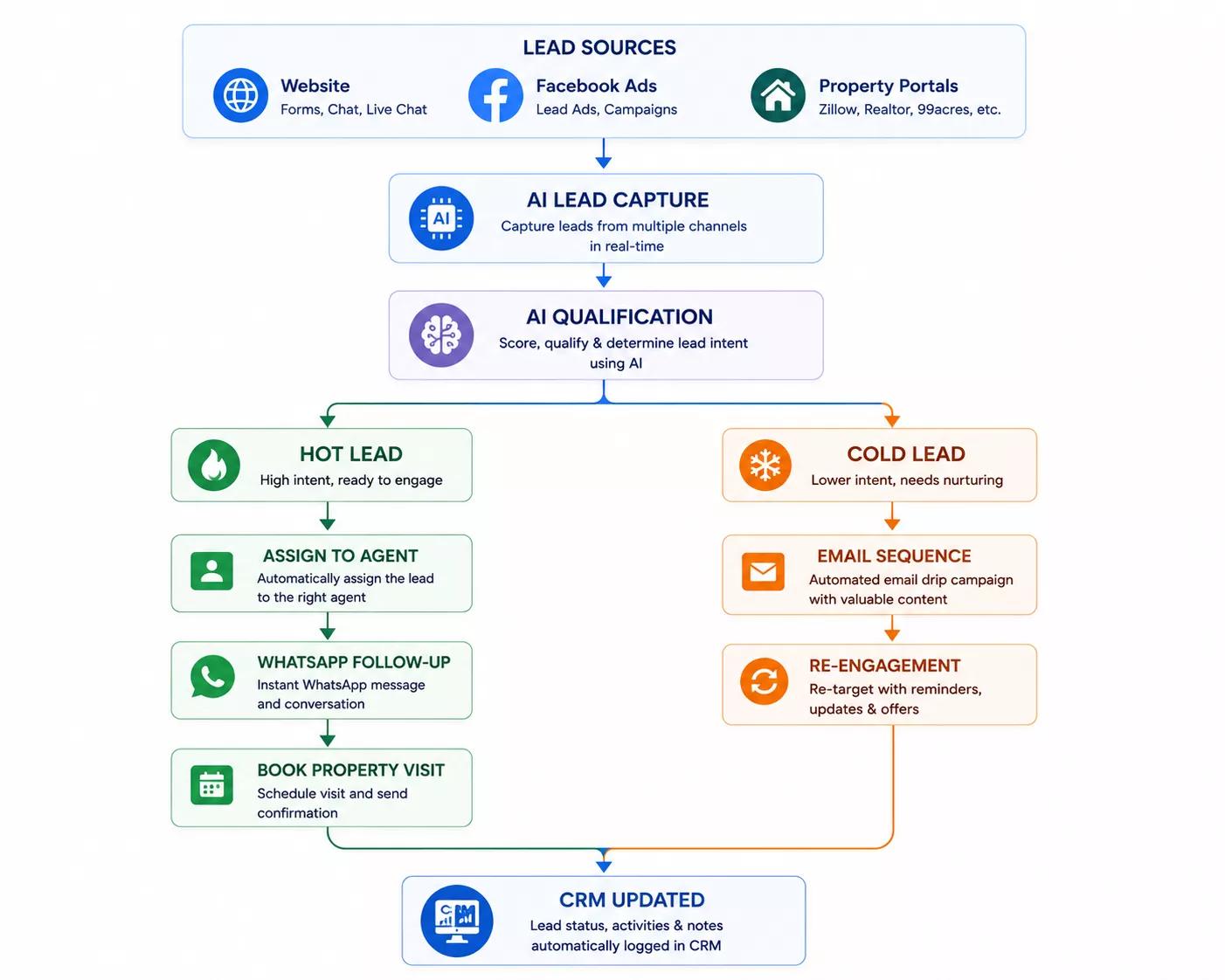
Businesses using AI-powered workflows can automate emails, WhatsApp messages, and CRM updates using n8n Workflow Automation. You can read our recent blog on Real Estate Workflow Automation with n8n to Automate Leads, CRM & Follow-Ups to know more about it.
3. Listing Creation and Multi-Channel Syndication
Preparing one listing package eats hours, and manually posting it to five portals invites inconsistency. Automation generates descriptions and social copy from your property data, then pushes approved listings everywhere at once. Price changes and status updates sync back automatically, so no portal keeps advertising a property you already sold.
What to automate:
- Draft descriptions, headlines, and social captions from structured property fields
- Internal review and approval routing before anything publishes
- Distribution to portals, your website, and marketing channels together
- Two-way sync for price, status, and media updates
ROI signal: compare hours spent per listing before and after, then multiply across your monthly listing volume.
4. Viewing Scheduling and Appointment Coordination
Arranging a viewing should not require four texts and a phone call. Automated scheduling allows sharing of availability, booking confirmation, adding it to the calendar and sending reminders, which reduces the number of no-shows. Inspections, appraisals and photo sessions can all be scheduled automatically across multiple parties.
What to automate:
- Real-time availability sharing tied to agent calendars
- Instant confirmations, rescheduling links, and reminder sequences
- Access instructions and directions sent before the appointment
- Automatic feedback requests after each viewing
ROI signal: watch your no-show rate and the average time between inquiry and first viewing.
5. Document Collection, Contract Generation and E-Signature
Bureaucracy kills deals in secret, usually as a result of one person waiting for paperwork that wasn't followed up on. Automation initiates all needed paperwork, creates contracts based on pre-approved templates, sends them for signatures, and archives properly.
What to automate:
- Automated document requests with reminders until each item arrives
- Contract generation populated from CRM and property records
- Sequential signature routing with completion tracking
- Structured filing, version control, and retention rules
ROI signal: track days from offer acceptance to fully executed paperwork.
6. Tenant Screening and Digital Onboarding
Checking is always performed according to the exact same criteria and is therefore ripe for automation. Tenants go through identity check, credit check, background check, income verification and references simultaneously rather than in sequence as a result of applications. Approved applicants are then moved directly to the onboarding process.
What to automate:
- Application intake with completeness validation before submission
- Parallel verification checks with consolidated results for review
- Approval routing with clear, consistently applied criteria
- Welcome packs, deposit collection, and key handover scheduling
ROI signal: measure days from application received to move-in ready.
7. Lease Abstraction and Renewal Tracking
Commercial leases can be lengthy documents, and not meeting the various obligations within the contract will result in financial consequences. Automated abstraction allows for extraction of relevant parties, rent schedule, escalation dates, options and pass-through clauses in an organized fashion and backed by citation to the page of the contract.
What to automate:
- Field extraction from executed leases into your administration system
- Flagging of non-standard clauses for human legal review
- Calendars for escalations, renewal windows, and reporting duties
- Advance alerts before any option or covenant deadline closes
ROI signal: compare paralegal hours per lease and count the deadlines you previously missed.
8. Maintenance Request Routing and Vendor Dispatch
Maintenance tickets get lost between a tenant text, a voicemail, and someone's memory. Automated intake captures the request with photos, classifies urgency, checks vendor coverage, and dispatches the right contractor with the property details attached. Tenants receive status updates without calling to ask.
What to automate:
- Multi-channel request intake with photo and description capture
- Urgency classification and automatic escalation rules
- Vendor matching by trade, coverage area, and current availability
- Work order tracking, tenant updates, and completion sign-off
ROI signal: monitor average resolution time and repeat-visit rates per work order.
9. Rent Collection, Invoice Processing and Reconciliation
This is the highest-volume workload in any sizable portfolio and usually the biggest single saving. Automation ingests invoices from email and vendor portals, then extracts the data. It codes each item correctly, matches it against purchase orders, and routes it for approval, while rent receipts reconcile on their own.
What to automate:
- Invoice capture, data extraction, and duplicate detection
- GL coding by property, project, and expense category
- Three-way matching with tolerance rules and variance flags
- Rent reconciliation with plain-language explanations for each exception
ROI signal: track cost per invoice processed and how many items clear without any human touch.
10. Portfolio Reporting and Predictive Analytics
Month-end reporting drains days of skilled time assembling numbers from disconnected systems. Automated pipelines pull from your CRM, accounting platform, and property management system into live dashboards that never need rebuilding. Once that data is consistent, forecasting genuinely becomes possible.
What to automate:
- Scheduled data consolidation across every operational system
- Live occupancy, arrears, pipeline, and expense dashboards
- Variance alerts when a property drifts outside expected performance
- Renewal risk and demand forecasting built on clean historical data
ROI signal: measure reporting hours reclaimed and how much earlier issues surface than before.
Need Help Automating Your Real Estate Workflows?
Our AI workflow automation experts help agencies, brokers, and property managers identify the highest-ROI workflows, integrate existing systems, and deploy scalable automation.
Best Technology Stack for Real Estate Workflow Automation
Choosing the right technology stack is just as important as selecting the workflows to automate. Modern real estate automation combines CRM platforms, workflow automation tools, AI models, communication services, and document management solutions to create a connected, scalable system.
| Need | Recommended Tool |
|---|---|
| CRM | HubSpot, Salesforce |
| Workflow | n8n, Make, Zapier |
| Property Management | AppFolio, Buildium |
| AI | OpenAI, Claude |
| Communication | Twilio, WhatsApp |
| Documents | DocuSign |
If you're evaluating platforms, read our comparison of n8n vs Zapier vs Make to choose the right workflow automation tool.
Conclusion
Real estate workflow automation pays you back when you treat it as an operations decision rather than a technology purchase. The firms getting real returns map their process first, start with high-volume work, design for exceptions, and prove the number before scaling. The 10 use cases here give you a ranked starting point.
We hope this guide helped you understand where real estate workflow automation delivers the most value and the technology stack needed to maximize ROI.
If you're planning to automate lead management, leasing, maintenance, or back-office operations, explore our n8n Workflow Automation Services or book a free discovery session to discuss your requirements.
Frequently Asked Questions
Below are answers to some of the most common questions about real estate workflow automation, including implementation costs, expected ROI, software selection, and how automation impacts real estate professionals.
1. What is real estate workflow automation in simple terms?
This is software that handles the repeatable property management tasks from beginning to end, without any manual handoffs. Lead collection, document collection, rent reconciliations and reports will all proceed automatically according to the rules and triggers you have set.
2. Which real estate workflow should I automate first?
Pick the workflow with the largest volume, the clearest set of rules, and the obvious next step. Most agencies will start by automating lead intake and lead follow-ups. Most property managers will achieve larger savings with invoice processing.
3. How much does real estate workflow automation cost?
Typically, a single automated workflow will cost somewhere between $6,000 and $18,000. Front-office automation with connection to other systems will cost somewhere between $18,000 and $45,000. Full back-office operations will cost $30,000-$75,000.
4. How long before automation pays for itself?
Usually, front-office workflows such as leads will pay themselves off in one to three months. The back office operations will take a longer time – about three to six months. However, they will generate bigger savings after that period.
5. Will automation replace real estate agents or property managers?
No, not at all, and the successful implementations never even attempt to. Automation strips out all the coordination tasks such as data entry, document collection, and status reports, leaving your people free to do what they do best.