n8n for Real Estate: CRM, Lead Routing and Follow-Up Automation
Dharmesh Dave
4-5 mins
Most real estate teams copy leads by hand from Facebook, Zillow, and their website into a CRM. Then they hope someone remembers to send a follow-up before the moment passes. That delay costs contacts and closings. This guide shows how n8n automates lead routing, CRM sync, and follow-up for brokerages, plus an honest comparison against Zapier and Make.
The Importance of Speed in Real Estate
Why Speed to Lead Matters in Real Estate?
Speed to lead is one of the strongest predictors of contact and qualification rates in real estate. The foundational research comes from Dr. James Oldroyd's 2007 Lead Response Management Study, run with InsideSales.com.
The study tracked six companies across more than 15,000 leads and 100,000 call attempts. It found that the odds of contacting a lead drop 100 times when the callback window stretches from 5 minutes to 30 minutes. The odds of qualifying that lead drop 21 times over the same window.
That's vendor-collected behavioral data from a specific dataset, not a controlled trial across the whole industry. But the direction of the finding has held up in follow-on research for nearly two decades, which is why speed-to-lead remains a core operating principle for brokerages today.
Also Read: AI Workflow Automation Statistics In Real Estate
Why Does Manual Lead Handling Slow Your Sales Team?
Despite that, most agents and brokers are stuck in a manual trap. They download Facebook leads by hand, paste them into a CRM, and try to remember a follow-up email before the moment passes.
How n8n Automates Real Estate Lead Management?
n8n is a node-based automation platform that can close that gap. It acts as the connective layer between your lead sources, your CRM, and your team's communication tools. If you want a broader look at how this fits into a full tech stack, see our real estate n8n workflow automation services.
This guide covers three real estate specific workflows built around real estate lead routing automation, real estate CRM automation, and follow-up sequencing. It closes with a quick-start section, an honest comparison of n8n against Zapier and Make, and an FAQ section for the questions agents and brokers ask most.
Real Estate Workflow Automation Architecture
Facebook Ads      Zillow      Website
       │             │            │
       └─────────────┼────────────┘
                     │
                 Webhook
                     │
                  n8n Workflow
                     │
        ┌────────────┼────────────┐
        │            │            │
      CRM        Lead Routing   Follow-up
        │            │            │
        └────────────┼────────────┘
                     │
          Email • SMS • Slack
                     │
               Agent Notification
Workflow 1: Real Estate Lead Routing Automation for Property Inquiries
The Scenario
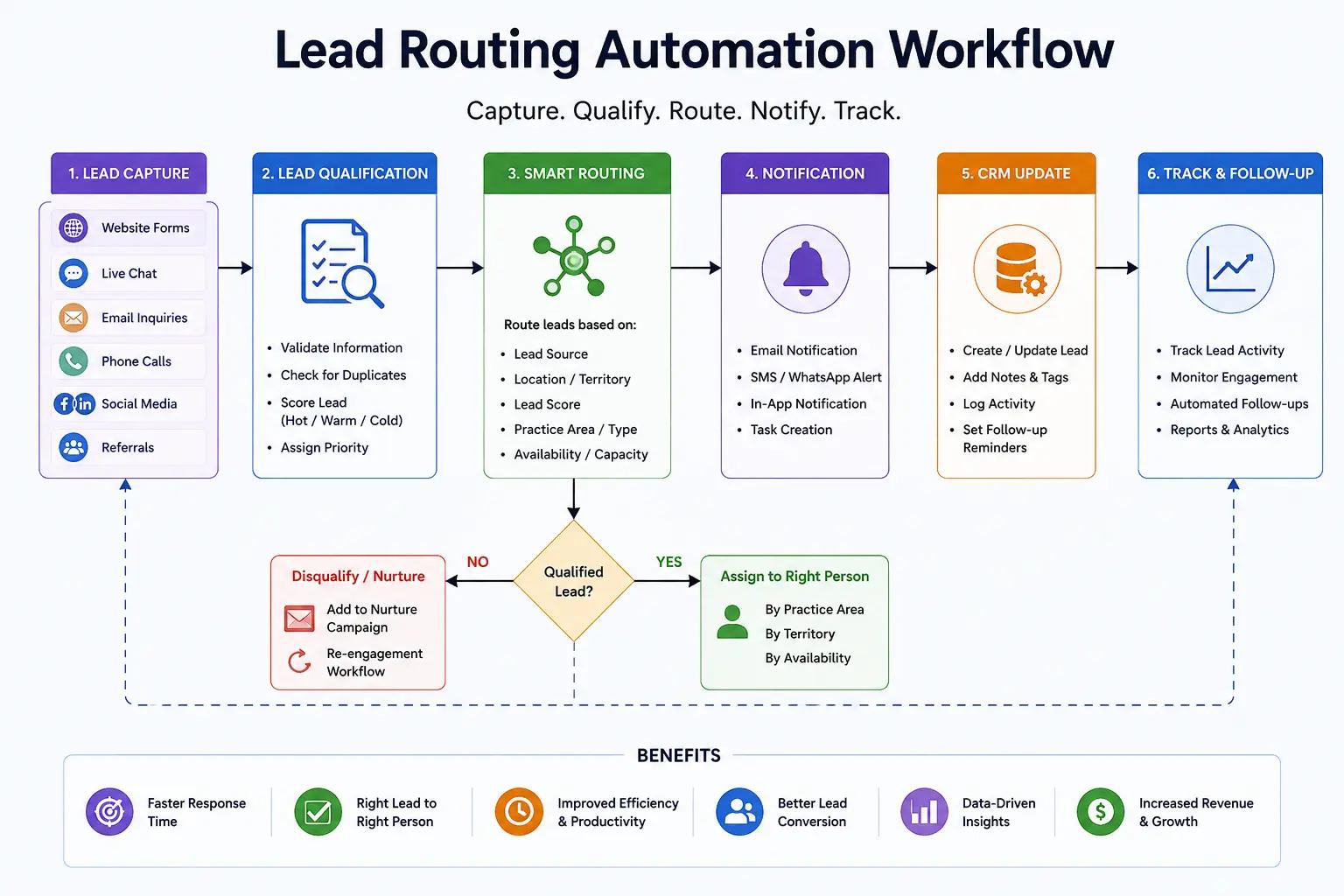
A prospect submits an inquiry through a Facebook Ad, a Zillow listing, an open house registration form, or your website. That inquiry needs to reach the right agent, correctly tagged, within minutes rather than hours.
The Automation Steps
1. Trigger: A Webhook node captures the incoming lead the moment it's submitted.
2. Authentication check: The workflow verifies the webhook's signature or secret token before processing anything. Without this step, anyone who finds the endpoint URL could inject fake leads directly into your CRM.
3. Deduplication: Some lead sources resend a webhook if they don't get a fast enough response. The workflow checks each payload against a short-term cache keyed on email and phone, so one inquiry can't fire twice.
4. Segmentation: The workflow classifies the lead as buyer or seller, and tags property type and price range from the source form fields.
5. Routing: It assigns the lead to the correct agent by zip code, listing assignment, or round-robin, depending on how your brokerage structures territories.
6. Validation: If a required field like email or phone is missing, the workflow routes the record to a manual review queue instead of silently dropping it.
Why Segment and Route Before the CRM
Handling buyer/seller classification and agent assignment inside n8n, before the record reaches your CRM, means the lead arrives already tagged and owned. This avoids a second update pass inside the CRM. It also sidesteps race conditions, where the CRM's own automation rules and your webhook logic try to modify the same record at the same time.
Why a Webhook Instead of Polling
A webhook pushes data to n8n the instant a lead is submitted. Polling checks the source system on a schedule instead, say every 5 or 15 minutes. That reintroduces the exact delay this workflow is meant to eliminate. Given how steeply contact odds fall in the study cited above, polling works against the goal for anything response-time sensitive.
The Benefit
New inquiries reach the right agent within seconds of submission, tagged and validated, without anyone touching a spreadsheet.
Workflow 2: Real Estate CRM Automation for Transaction Milestones
The Scenario
Your team runs a CRM like Follow Up Boss, HubSpot, or Salesforce, but transaction documents, inspection scheduling, and lender communication happen in separate tools. Every milestone change risks falling out of sync.
The Automation Steps
1. Trigger: A deal stage updates in your CRM, for example to "Under Contract" or "Inspection Scheduled."
2. Field normalization: Before data moves downstream, the workflow standardizes formats. Phone numbers, dates, and addresses often arrive differently depending on which system created the record.
3. Document generation: n8n creates a structured transaction folder in Google Drive or Dropbox, then generates milestone documents like disclosure agreements or inspection checklists from templates.
4. Lender and vendor notification: Once inspection is scheduled, the workflow notifies the lender contact and inspector automatically, rather than relying on an agent to remember.
5. Token refresh handling: Most CRM integrations use OAuth, and access tokens usually expire on a schedule, often hourly. The workflow needs a built-in refresh step, or syncs fail silently once the token lapses.
6. Idempotency check: Deal stage updates can fire more than once, from a double edit or a retry after a timeout. The workflow checks whether the milestone action already ran before creating a duplicate folder or document.
Extending to MLS Sync and Commission Tracking
For brokerages looking to manage rental properties, lease agreements, maintenance requests, and tenant communication, explore our property management software development services to build a solution tailored to your business needs.
The same pattern extends to keeping CRM listing data in sync with MLS feed changes. When a saved-search property changes status (price drop, pending, sold), the workflow can notify matched buyer leads automatically.
Once a deal closes, a similar milestone trigger can kick off commission calculation and disbursement tracking, using the same normalization and idempotency logic described above.
Why Normalize Data Before Syncing
Lead and transaction data enters your stack from MLS feeds, lender portals, and web forms, each with its own formatting conventions. Pushing raw, unformatted fields into your CRM breaks deduplication logic and makes reporting unreliable. Normalizing at the automation layer, before data lands anywhere permanent, keeps every downstream system working from clean records.
The Benefit
Transaction milestones, from inspection scheduling through lender handoff to commission tracking, stay synchronized across every tool your team touches.
Case Study: AI-Powered Real Estate CRM & Sales Automation
Workflow 3: Real Estate Follow-Up Automation for Buyers, Sellers, and Open Houses
The Scenario
A new lead needs instant acknowledgment, and your team needs to know immediately when it's a hot one. Open house attendees need a different follow-up path than a cold online inquiry.
The Automation Steps
1. Trigger: A new lead is added to the CRM, or an open house registration form is submitted.
2. Segmented follow-up: Buyers get a different welcome sequence than sellers. Open house attendees receive a same-day thank-you and a property comparison, not a generic new-lead template.
3. Client-facing action: n8n sends a personalized SMS via Twilio and starts an email sequence through Mailchimp or ActiveCampaign, branched by segment.
4. Internal alert: A Slack or Discord message notifies the assigned agent's channel with lead details and a click-to-call link.
5. Rate limit handling: SMS and email providers cap how many messages you can send per minute. During high-volume moments, like the day after an open house, the workflow batch(es) sends and respects those limits instead of getting throttled.
6. Retry logic: If a send fails, say a temporary timeout with Twilio, the workflow retries with exponential backoff before flagging it for manual follow-up.
The Benefit
Buyers, sellers, and open house attendees each get a follow-up sequence built for their stage, and agents are alerted inside the tools they already use.
Quick Start: Building Your First n8n Real Estate Workflow
Step 1: Set Up Your Environment
Choose cloud hosting or self-hosting based on your team's technical resources and data privacy requirements. Cloud hosting is faster to start with. Self-hosting gives you full control over where data lives.
To know more about, read: n8n Cloud vs Self Hosting: Enterprise Guide
Step 2: Connect Your Credentials
Connect OAuth or API credentials for your CRM, email, and messaging tools. Note which integrations use OAuth tokens that expire, since those workflows will need refresh logic.
Step 3: Add Your First Trigger
Start with a Webhook node for your primary lead source. Add signature verification from the start, rather than retrofitting it after something goes wrong.
Step 4: Add Logic and Actions
Use If/Else nodes for routing and segmentation. Use HTTP Request nodes for any tool without a pre-built n8n integration.
Step 5: Test for Edge Cases Before Going Live
Before launching, test what happens with a duplicate webhook delivery, a missing required field, and an expired token. Those are the failure modes that show up in production, not in a demo.
What Does Automation Of This Magnitude Realistically Deliver?
The figures below are illustrative ranges based on implementations we've built for similar teams, not guarantees. Actual results depend on lead volume, your existing tech stack, and how consistently your team follows up.
Time reclaimed: Agents and transaction coordinators who hand off manual data entry and document generation often report reclaiming several hours a week, redirected toward client-facing work.
Response time: Automating the trigger-to-notification path removes the human delay between a lead arriving and an agent finding out. Given the response-time research cited earlier, closing that gap is one of the more reliably valuable pieces of a system like this.
Volume handling: Because routing and CRM entry no longer depend on someone being available, teams can generally absorb higher lead volume, like a surge in open house registrations, without adding headcount purely to handle intake.
Conclusion
Automation isn't a shortcut around a good sales process, but it removes the delay and manual error that undercut an otherwise solid one. Building lead capture, CRM sync, and follow-up on n8n gives a brokerage a system that keeps working at 9pm on a Saturday, which is when a lot of inquiries actually come in.
Take the Next Step: Book an AI Readiness Audit
We'll assess your current processes and design custom AI workflows and automation solutions for your brokerage or commercial real estate firm.
Frequently Asked Questions
What is n8n used for in real estate?
Real estate teams use n8n to connect lead sources like Zillow, Facebook Ads, and MLS feeds directly to a CRM, and to automate follow-up messaging, transaction documents, and milestone tracking without manual data entry.
Is n8n better than Zapier for real estate automation?
It depends on the team. n8n gives more control over data and custom logic, which suits brokerages with technical resources or strict data privacy needs. Zapier is usually the better starting point for non-technical teams that want something running quickly.
How fast should a real estate team respond to a new lead?
The 2007 MIT/InsideSales.com Lead Response Management Study found that contact odds drop 100 times when response time stretches from 5 minutes to 30 minutes. Hence, most automated routing workflows should be aiming for a handful of minutes, period.
Can n8n integrate with MLS feeds and real estate CRMs?
Yes. Through its Webhook and HTTP Request nodes, n8n can connect to most MLS feed providers and CRMs like Follow Up Boss, HubSpot, and Salesforce, either through a native integration or a REST API.
Does automated follow-up replace an agent's personal outreach?
No. Automation handles acknowledgment, routing, and internal alerting so an agent can follow up personally within minutes instead of hours. It supports that outreach; it doesn't replace it.