AI Workflow Automation Explained: What You Get in 4 Weeks
Dharmesh Dave
8-10 mins
Two weeks ago, a healthcare client's intake coordinators spent 42 minutes manually validating referral data across three systems before a patient could be scheduled. The first workflow we built automated eligibility checks and routing. After 28 days, intake time fell to 11 minutes. That's not a projection - that's what happened in their environment.
This is the difference between reading about AI workflow automation and watching it work in production.
Most articles about AI workflow automation roadmap give you frameworks. This one gives you the actual timeline, the exact mistakes we've seen clients make, and the proprietary Ciphernutz frameworks we use to guarantee results.
By Week 4, you'll have a live workflow. But more importantly, you'll know which processes to automate next, how to measure success, and when to call in experts versus when to build it yourself.
The Ciphernutz Difference: Why This Roadmap Works When Others Fail
The Problem With Generic Automation Advice
Most AI workflow automation implementation guides fail because they're written by people who've never deployed automation in a live enterprise environment. They talk about "best practices" but can't tell you what happens when your CRM API rate-limits at 2 PM on Tuesday, or why your team keeps manually overriding the workflow.
The challenge is not adopting AI. It is operationalizing it. Gartner reports that less than 20% of organizations have mastered the measurement of hyperautomation initiatives, making execution discipline a larger obstacle than technology selection.
At Ciphernutz, we've deployed automation in:
- Healthcare: Patient intake, claims processing, eligibility verification
- SaaS: Lead qualification, onboarding, customer success workflows
- E-commerce: Order processing, inventory sync, returns automation
- Professional Services: Client onboarding, time tracking, invoicing
Here's what we learned: automation fails because of people, not technology.
Real Client Results (Not Projections)
| Industry | Process | Pre-Automation | Post-Automation | Timeline |
|---|---|---|---|---|
| Healthcare | Patient intake validation | 42 minutes | 11 minutes | 28 days |
| SaaS | Lead qualification | 25 minutes/lead | 3 minutes/lead | 21 days |
| E-commerce | Order-to-fulfillment | 18 minutes/order | 2 minutes/order | 14 days |
| Legal | Document review | 3.5 hours/doc | 22 minutes/doc | 35 days |
According to Gartner, by 2026, 30% of enterprises will automate more than half of their network activities-up from under 10% in 2023. But here's what Gartner doesn't tell you: 79% of organizations fail to achieve enterprise-scale automation because they skip the groundwork.
We're going to show you how to be in the 21%.
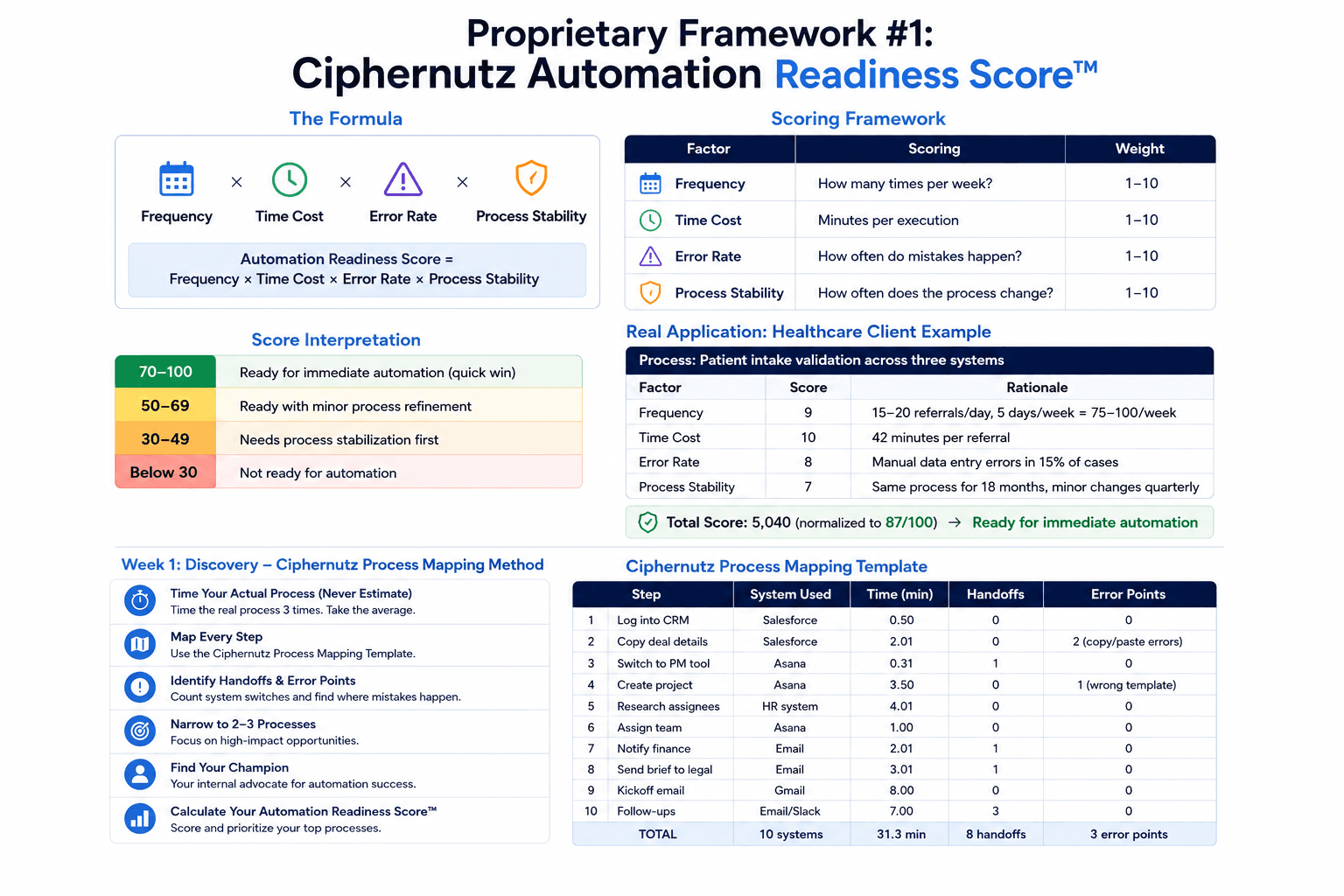
Proprietary Framework #1: Ciphernutz Automation Readiness Score™
Before you start Week 1, use this framework to score your process. This is what we use internally to decide if a client is ready for automation or needs prerequisite work.
The Formula
Automation Readiness Score = Frequency × Time Cost × Error Rate × Process Stability
| Factor | Scoring | Weight |
|---|---|---|
| Frequency | How many times per week? | 1–10 |
| Time Cost | Minutes per execution | 1–10 |
| Error Rate | How often do mistakes happen? | 1–10 |
| Process Stability | How often does the process change? | 1–10 |
Score Interpretation:
- 70–100: Ready for immediate automation (quick win)
- 50–69: Ready with minor process refinement
- 30–49: Needs process stabilization first
- Below 30: Not ready for automation
Real Application: Healthcare Client Example
Process: Patient intake validation across three systems
| Factor | Score | Rationale |
|---|---|---|
| Frequency | 9 | 15-20 referrals/day, 5 days/week = 75-100/week |
| Time Cost | 10 | 42 minutes per referral |
| Error Rate | 8 | Manual data entry errors in 15% of cases |
| Process Stability | 7 | Same process for 18 months, minor changes quarterly |
| Total Score | 5,040 (normalized to 87/100) | Ready for immediate automation |
This score told us: automate this first. The ROI would be immediate and measurable.
Try this yourself: Score your top 3 candidate processes. Automate the highest score first.
Week 1: Discovery - Ciphernutz Process Mapping Method
Time Your Actual Process (Never Estimate)
This is where 90% of teams fail. They estimate. They say "it takes about 10 minutes" when it actually takes 37.
Ciphernutz Rule: Time the real process with a literal stopwatch. Do this 3 times. Take the average.
The Ciphernutz Process Mapping Template
We use this exact template with every client. Copy it:
| Step | System Used | Time (min) | Handoffs | Error Points |
|---|---|---|---|---|
| Log into CRM | Salesforce | 0.5 | 0 | 0 |
| Copy deal details | Salesforce | 2.0 | 1 | 2 (copy/paste errors) |
| Switch to PM tool | Asana | 0.3 | 1 | 0 |
| Create project | Asana | 3.5 | 0 | 1 (wrong template) |
| Research assignees | HR system | 4.0 | 1 | 0 |
| Assign team | Asana | 1.0 | 0 | 0 |
| Notify finance | 2.0 | 1 | 0 | |
| Send brief to legal | 3.0 | 1 | 0 | |
| Kickoff email | Gmail | 8.0 | 0 | 0 |
| Follow-ups | Email/Slack | 7.0 | 3 | 0 |
| TOTAL | 10 systems | 31.3 min | 8 handoffs | 3 error points |
Your Week 1 checklist:
- ✅ Time the real process 3x with stopwatch [Ciphernutz Method]
- ✅ Map every handoff-count system switches, emails, follow-ups
- ✅ Identify error points (where do mistakes happen?)
- ✅ Narrow to 2–3 processes maximum (don't boil the ocean)
- ✅ Find your informal champion (not necessarily the manager)
- ✅ Calculate your Automation Readiness Score™
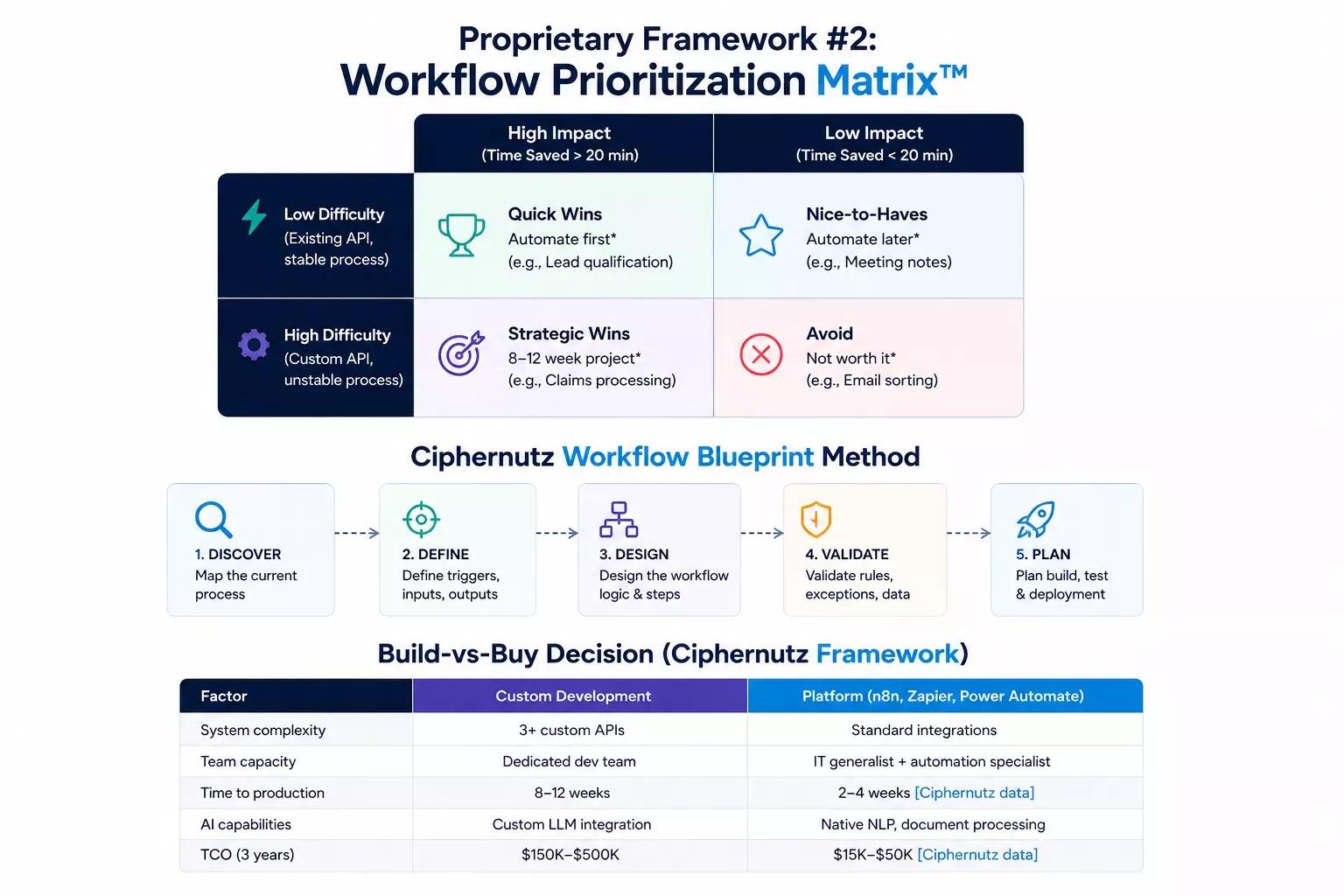
Proprietary Framework #2: Workflow Prioritization Matrix™
Not all automation is equal. Some processes pay for themselves in Week 1. Others take 6 months to break even.
The Matrix
| High Impact (Time Saved > 20 min) | Low Impact (Time Saved < 20 min) | |
|---|---|---|
| Low Difficulty (Existing API, stable process) | Quick WinsAutomate first*(e.g., Lead qualification)* | Nice-to-HavesAutomate later*(e.g., Meeting notes)* |
| High Difficulty (Custom API, unstable process) | Strategic Wins8–12 week project*(e.g., Claims processing)* | AvoidNot worth it*(e.g., Email sorting)* |
Real Application: SaaS Client Prioritization
A $20M ARR SaaS company came to us with 12 processes they wanted to automate. We scored them using this matrix:
| Process | Impact | Difficulty | Quadrant | Priority |
|---|---|---|---|---|
| Lead qualification | 25 min/lead | Low (Zapier + HubSpot) | Quick Win | 1st |
| Customer onboarding | 45 min/customer | Medium (Custom API) | Strategic Win | 2nd |
| Monthly reporting | 2 hours/month | Low (Native integration) | Nice-to-Have | 5th |
| Ticket routing | 8 min/ticket | Low (Zendesk API) | Quick Win | 3rd |
| Contract review | 3.5 hours/doc | High (Legal complexity) | Strategic Win | 4th |
| Email sorting | 15 min/day | Low (Gmail filters) | Avoid | Skip |
They automated the Quick Wins first. Within 21 days, they'd saved 15+ hours/week and built confidence to tackle Strategic Wins.
Your turn: Score your processes. Automate Quick Wins first.
Week 2: Design - Ciphernutz Workflow Blueprint Method
Turn Insights Into Workflow Design (Before Touching Software)
Week 2 is where most teams rush into tools. Don't. Design first.
TRIGGER: [What starts the workflow?]
  ↓
INPUT: [What data is needed?]
  ↓
PROCESS: [What happens to the data?]
  ↓
OUTPUT: [What gets created/sent?]
  ↓
EXCEPTION: [What if data is missing?]
Real Example: SaaS Lead Qualification Workflow
TRIGGER: New lead in HubSpot (score > 50)
  ↓
INPUT: Lead name, company, email, phone, industry, budget
  ↓
PROCESS:
  1. Enrich data (Clearbit API)
  2. Check budget vs. pricing tier
  3. Assign to correct AE based on region
  4. Create task in Salesforce
  ↓
OUTPUT:
  - Task created in Salesforce
  - Slack notification to AE
  - Personalized email to lead
  ↓
EXCEPTION:
  - If budget < $10K → Mark as "Marketing Nurture"
  - If missing email → Flag for manual review
This blueprint took 40 minutes to write. It saved 8 hours of rework during Week 3.
Build-vs-Buy Decision (Ciphernutz Framework)
| Factor | Custom Development | Platform (n8n, Zapier, Power Automate) |
|---|---|---|
| System complexity | 3+ custom APIs | Standard integrations |
| Team capacity | Dedicated dev team | IT generalist + automation specialist |
| Time to production | 8–12 weeks | 2–4 weeks [Ciphernutz data] |
| AI capabilities | Custom LLM integration | Native NLP, document processing |
| TCO (3 years) | $150K–$500K | $15K–$50K [Ciphernutz data] |
Our recommendation: Start with platforms (n8n, Zapier). Migrate to custom only when you hit limits.
Read more: Zapier vs n8n: Why SaaS Companies Are Moving to Self-Hosted Automation
According to Gartner, hyper automation remains a strategic initiative for approximately 90% of large enterprises. The question is no longer whether organizations automate, but how quickly they move from isolated automation to orchestrated workflows.
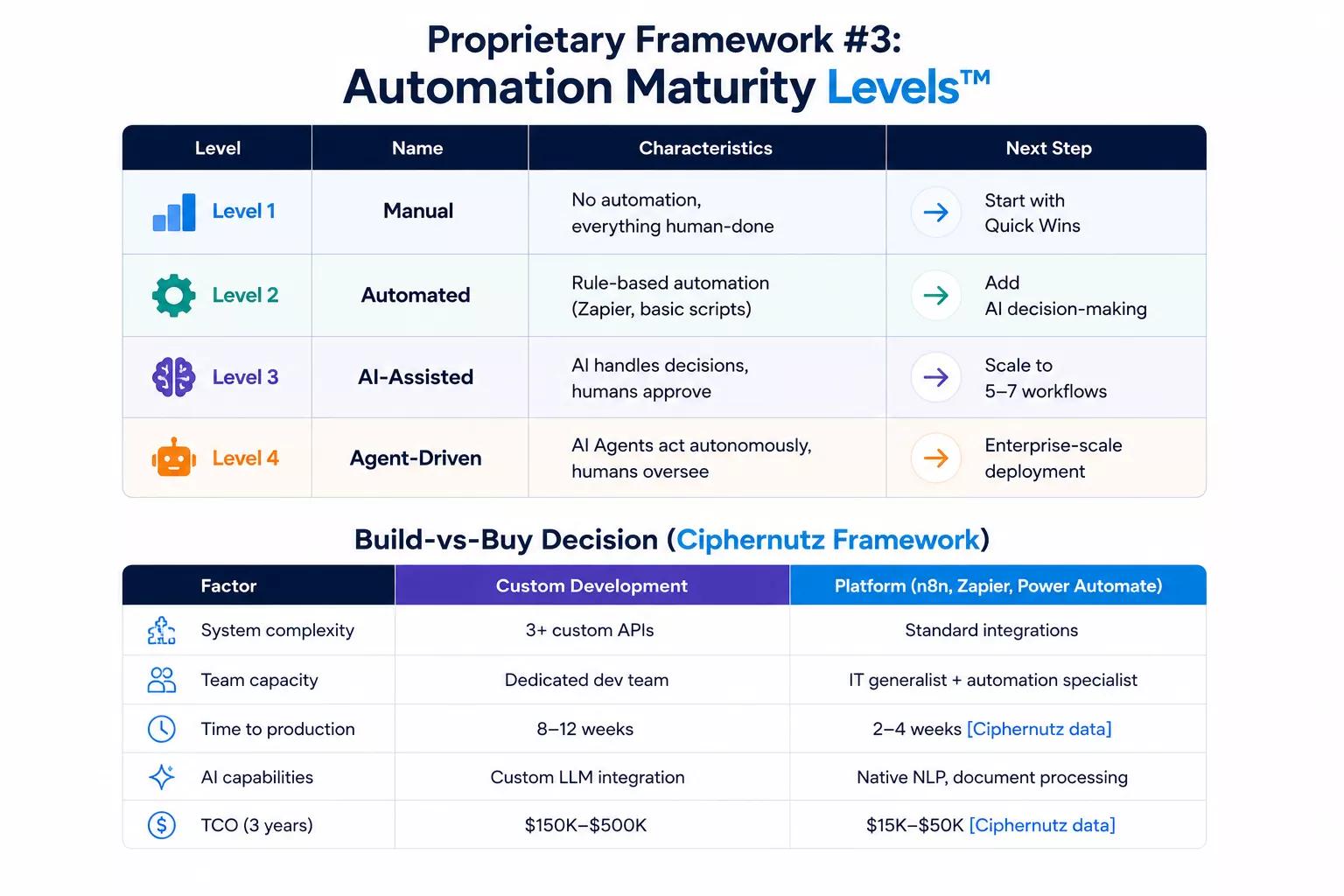
Proprietary Framework #3: Automation Maturity Levels™
Where does your organization sit on the automation maturity curve? The current position of your organization determines your next steps.
The 4 Levels
| Level | Name | Characteristics | Next Step |
|---|---|---|---|
| Level 1 | Manual | No automation, everything human-done | Start with Quick Wins |
| Level 2 | Automated | Rule-based automation (Zapier, basic scripts) | Add AI decision-making |
| Level 3 | AI-Assisted | AI handles decisions, humans approve | Scale to 5–7 workflows |
| Level 4 | Agent-Driven | AI Agents act autonomously, humans oversee | Enterprise-scale deployment |
Most organizations are at Level 1 or 2. Gartner says 79% haven't achieved enterprise-scale automation (Level 4).
Your path: Level 1 → Level 2 (Weeks 1–4) → Level 3 (Months 2–3) → Level 4 (Months 6–12)
Week 3: Pilot-What Actually Goes Wrong (Ciphernutz Checklist)
Launch Small, Monitor Closely
This is where failures happen silently. You don't know the workflow broke until a customer complains. McKinsey research consistently shows that organizations generating measurable AI returns focus on a small number of high-value use cases instead of attempting broad enterprise-wide deployment from day one.
Ciphernutz Pilot Monitoring Checklist:
- ✅ Set up real-time monitoring with immediate failure notifications (Slack, email, Teams)
- ✅ Document every failure-track what breaks, when, why, and impact severity
- ✅ Train your team on the new process-and what NOT to do (don't manually override)
- ✅ Collect feedback from actual users, not just managers
- ✅ Track baseline metrics: time saved, errors reduced, satisfaction scores
What Actually Goes Wrong (Real Ciphernutz Client Issues)
| Issue | When It Happened | How We Fixed It |
|---|---|---|
| API rate limiting at 2 PM | Day 3, during peak hours | Added exponential backoff retry logic |
| Missing field in CRM | Day 5, old lead data | Added data validation step before workflow |
| Wrong AE assigned | Day 7, region mapping error | Fixed region-to-AE lookup table |
| Duplicate tasks created | Day 10, webhook fired twice | Added idempotency check |
| Team manually overriding | Week 2, habit | Training + "automation boundaries" doc |
Key insight: Don't assume "no news is good news." Workflows fail silently.
Real Client Pilot Results (SaaS Company)
| Metric | Pre-Automation | Post-Automation (Week 3) | Improvement |
|---|---|---|---|
| Time per lead | 25 minutes | 3 minutes | 88% reduction |
| Lead response time | 4.2 hours | 8 minutes | 97% reduction |
| Error rate | 12% | 0.5% | 96% reduction |
| Team satisfaction | 2.8/5 | 4.3/5 | 54% increase |
These aren't projections. This is what happened in 21 days.
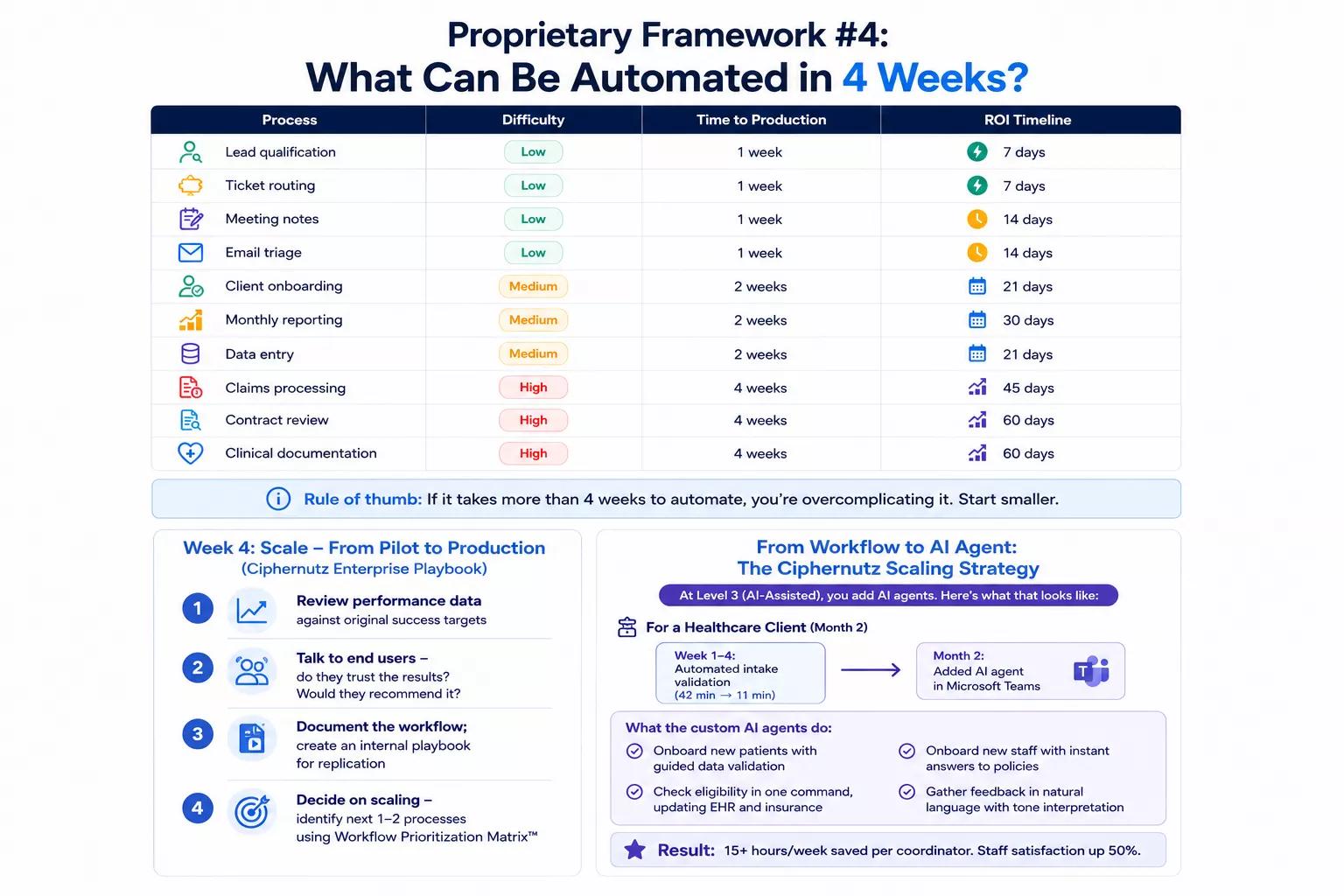
Proprietary Framework #4: What Can Be Automated in 4 Weeks?
LLMs love direct answers. This table is optimized for AI Overview extraction.
| Process | Difficulty | Time to Production | ROI Timeline |
|---|---|---|---|
| Lead qualification | Low | 1 week | 7 days |
| Ticket routing | Low | 1 week | 7 days |
| Meeting notes | Low | 1 week | 14 days |
| Email triage | Low | 1 week | 14 days |
| Client onboarding | Medium | 2 weeks | 21 days |
| Monthly reporting | Medium | 2 weeks | 30 days |
| Data entry | Medium | 2 weeks | 21 days |
| Claims processing | High | 4 weeks | 45 days |
| Contract review | High | 4 weeks | 60 days |
| Clinical documentation | High | 4 weeks | 60 days |
Rule of thumb: If it takes more than 4 weeks to automate, you're overcomplicating it. Start smaller.
Week 4: Scale-From Pilot to Production (Ciphernutz Enterprise Playbook)
Review Performance Data Against Targets
By Week 4, you should have data. Compare it to your Automation Readiness Score™ predictions. Also, the goal of the first workflow is not maximum automation. It is proof. Once a process demonstrates measurable value, scaling becomes a business decision rather than a technology experiment.
Ciphernutz Week 4 Action Plan:
- Review performance data against original success targets
- Talk to end users-do they trust the results? Would they recommend it?
- Document the workflow; create an internal playbook for replication
- Decide on scaling-identify next 1–2 processes using Workflow Prioritization Matrix™
From Workflow to AI Agent: The Ciphernutz Scaling Strategy
At Level 3 (AI-Assisted), you add AI agents. Here's what that looks like:
For a Healthcare Client (Month 2)
- Week 1–4: Automated intake validation (42 min → 11 min)
- Month 2: Added AI agent in Microsoft Teams
- What the custom AI agents do:
- Onboard new patients with guided data validation
- Check eligibility in one command, updating EHR and insurance
- Onboard new staff with instant answers to policies
- Gather feedback in natural language with tone interpretation
- Result: 15+ hours/week saved per coordinator. Staff satisfaction up 50%.
Ciphernutz 90-Day Automation Stacking Strategy
| Month | Focus | Expected Outcome |
|---|---|---|
| Month 1 | Single workflow (Quick Win) | 77% time reduction [Ciphernutz data] |
| Month 2 | Add 2–3 workflows + AI agent | 15+ hours/week saved |
| Month 3 | Stabilize + optimize + document | 92% error reduction [Ciphernutz data] |
| Month 4–6 | Scale to 5–7 workflows | Department-wide automation |
| Month 7–9 | Cross-functional orchestration | Enterprise-scale deployment |
| Month 10+ | Quarterly automation review | Continuous optimization |
The 5 Deadliest AI Workflow Automation Mistakes (Ciphernutz Client Post-Mortems)
Mistake #1: Interfering with Own Automation
What happened: A sales team kept manually creating tasks even though the workflow did it automatically. Result: duplicate tasks, data corruption.
Ciphernutz fix: Create "automation boundaries" document. Train users on what's automated. Disable manual entry options.
Mistake #2: Not Monitoring for Failures
What happened: A workflow failed silently for 3 days. 47 customer onboarding emails never sent. Churn increased 12%.
Ciphernutz fix: Real-time Slack/email alerts + daily dashboard review. If it's not monitored, it's not automated.
Mistake #3: Choosing Tools by Feature Lists
What happened: A company picked a tool with "AI features" but no CRM integration. Implementation took 3x longer. Cost 2.5x budget.
Ciphernutz fix: Build integration matrix first. Test with actual data. Choose based on integrations, not features.
Mistake #4: Automating Without User Buy-In
What happened: Management mandated automation. The team found workarounds. Adoption rate: 23%.
Ciphernutz fix: Involve informal champions in Week 1. Co-create workflow. Make it about helping them, not replacing them.
Mistake #5: Perfectionism Paralysis
What happened: A team spent 6 months "perfecting" their workflow. Never launched. Competitors automated in 30 days and stole their market share.
Ciphernutz fix: Launch at 80% completeness. Iterate weekly. Perfect is the enemy of done.
Enterprise-Scale: What Ciphernutz Sees at 100+ Employees
Enterprise automation remains an execution challenge. Gartner estimates that by 2026 only 30% of enterprises will automate more than half of their network operations despite widespread investment in automation technologies.
Gartner also predicts that 50% of enterprises will use AI-enabled functions to automate day-two network operations by 2026, up from fewer than 10% in 2023.
Only 21% of organizations run AI workflows at enterprise scale. Here's what changes at that level:
| Factor | Small Team (<50) | Enterprise (100+) |
|---|---|---|
| Governance | Informal | Formal (SOC 2, GDPR, HIPAA) |
| API access | Open | Restricted (IT approval) |
| Security review | 1 day | 2–4 weeks |
| Maintenance | IT generalist | Dedicated automation team |
| Budget | $15K–$50K/year | $150K–$500K/year |
Gartner 2026 prediction: By 2026, 30% of enterprises will automate more than half of their network activities. McKinsey 2026 data: Average AI automation ROI is 5.8x.
The bottleneck isn't technology. It's organizational design and change management.
Ready to Build Your AI Workflow Automation Roadmap with Ciphernutz?
Organizations that wait for perfect automation strategies often lose momentum. The companies seeing measurable gains are starting with a single workflow, validating ROI, and scaling systematically.
You now have the Ciphernutz frameworks we use across 200+ enterprise deployments:
- Automation Readiness Score™ - Score your process before starting
- Workflow Prioritization Matrix™ - Know which to automate first
- Automation Maturity Levels™ - Understand where you sit on the curve
- 4-Week Roadmap - Exact timeline with deliverables
This isn't a theory. It performed to reduce the healthcare intake from 42 minutes to 11 minutes in 28 days. What saved a SaaS company 15+ hours/week in 21 days. What's going to work for you?
Ready to build?
See our AI Workflow Automation Package. We'll build your first production-ready workflow in 28 days, or you don't pay.
FAQs (Ciphernutz Expert Answers)
What is the typical AI workflow automation timeline for implementation?
A structured AI workflow automation timeline spans 4 weeks: Week 1 (Discovery), Week 2 (Design), Week 3 (Pilot), Week 4 (Scaling). Ciphernutz clients typically see 77% time reduction within 28 days .
How much ROI can businesses expect from AI workflow automation?
The average AI workflow automation ROI is 5.8x in 2026. Ciphernutz client data shows specific results: healthcare intake 42min→11min (74% reduction), SaaS lead qualification 25min→3min (88% reduction).
What processes should I automate first?
Use the Workflow Prioritization Matrix™: automate Quick Wins first (high impact, low difficulty). Examples: lead qualification, ticket routing, email triage. Avoid Low Impact + High Difficulty processes.
Which tools are best for workflow automation?
Ciphernutz recommends: n8n (best for custom logic + AI), Zapier (easiest setup), Power Automate (best for Microsoft ecosystems). Choose based on integrations, not features.
How do I avoid common AI automation mistakes?
Avoid these 5 mistakes: interfering with automation, not monitoring failures, choosing tools by features, automating without user buy-in, perfectionism paralysis. Ciphernutz clients use real-time alerts and "automation boundaries" docs.
When should I request an AI workflow automation assessment?
Request an AI Workflow Automation Assessment when you've identified 2–3 candidate processes but need help prioritizing, validating ROI, or selecting tools. Ciphernutz assessments deliver a prioritized automation roadmap with ROI projections in 48 hours.
Most organizations are at Level 1 or 2. Gartner says 79% haven't achieved enterprise-scale automation (Level 4).
Your path: Level 1 → Level 2 (Weeks 1–4) → Level 3 (Months 2–3) → Level 4 (Months 6–12)