How to Integrate N8N with EHR System: Step-by-Step Guide
Vijay Vamja
6-7 mins
In healthcare, diagnostic delays aren't new. The inefficiencies in lab workflows related to EHR systems aren't new either, and let's not blame the over-burdened lab staff for bottlenecks that impact outcomes. See, healthcare has always been like a race against time. But, for this predicament, n8n (nodemation) is an emerging solution, functioning as the orchestration layer of modern digital health infrastructure.
While modern EHR systems are better connected, they still lack the native interoperability between data sources, devices, and real-time alerts. It is here that low-code workflow automation brings the most value by establishing modular, secure, and event-driven automation between apps, databases, and APIs.
The integration of n8n in the EHR or lab ecosystem is a digital transformation in healthcare, turning static lab data into real-time intelligence. It also auto-initiates workflows, reducing diagnostic turnaround time, among other benefits.
in typical scenarios, an n8n healthcare automation accomplishes the following:
- Data interoperability between Laboratory Information System (LIS), Picture Archiving and Communication System (PACS), CRM, and EHR systems
- Role-based access and custom logic per patient, lab, or device
- AI-agent triggers to route, escalate, or analyze data in real time
- Full auditability, a non-negotiable in regulated environments
By successfully setting up an integrated n8n EHR system, healthcare leaders can eliminate manual silos and improve operational throughput while improving quality-of-care indicators.
Step-by-Step Guide to Integrate n8n with EHR System
The architecture strategy should aim to be modular, secure, and scalable whenever you integrate n8n in EHR systems for medical lab automation. The aforementioned guide follows this approach step by step to implement real-world compliance expectations in healthcare IT infrastructures.
Step 1: Define the Lab Use Case and Trigger Events
Start by identifying which lab processes need automation: test order routing, sample tracking, result synchronization, or appointment notifications.
Trigger Types:
- Webhook Triggers: Capture new patient orders from the EHR or LIMS system.
- Scheduled Triggers: Automate recurring processes like daily report batches or follow-ups.
- Polling Triggers: Monitor data changes in databases or external APIs.
Example: Trigger a workflow when a new lab test is ordered in the EHR.
Step 2: Design Workflow Using n8n Nodes
Use n8n's visual editor to drag, drop, and connect logic blocks across integrations.
Common Nodes:
- HTTP Request Node: To pull or push data from EHR via FHIR or REST APIs.
- MySQL/PostgreSQL Nodes: For syncing lab data with internal databases.
- IF/Else Logic Nodes: Apply patient-specific or test-specific logic.
- Set Node: To map and format output data to match EHR schema.
This modular design is central to n8n AI integration in healthcare, offering transparency and easy debugging.
Step 3: Integrate with EHR System (FHIR-Compatible)
Use HL7 FHIR standards for interoperability. If your EHR supports FHIR endpoints, n8n connects via:
- OAuth2 Auth for Secure Access
- Custom HTTP Nodes for GET/POST to FHIR resources
- Environment Variables for tokens and endpoints
Use middleware if your EHR uses legacy HL7v2 messages. Tools like Mirth Connect can serve as translation layers between n8n and the EHR.
Step 4: Secure the Workflow Environment
For any production-level n8n healthcare automation, enforce:
- On-premise or VPC deployment of n8n
- Role-based access control (RBAC) and credential vaulting
- Audit logging via custom event nodes
- Encryption for data in transit and at rest
All configurations should comply with HIPAA, GDPR, and relevant security benchmarks.
Step 5: Add AI Agent Services (Optional)
To make workflows intelligent, integrate an AI agent development company API or your internal agent service.
Use Cases:
- AI model scores lab results
- Anomaly detection in test patterns
- NLP agent drafts patient communication
- Use Webhook Trigger + OpenAI/Custom AI Node within n8n to operationalize intelligence.
Hire AI Agent Developers if you need dedicated implementation for agents within lab/EHR processes.
Step 6: Deploy, Monitor, and Iterate
Deploy n8n using Docker, Kubernetes, or direct server setup. Enable logging and connect with observability tools like Prometheus or Loki.
Testing Strategy:
- Simulate test orders via EHR sandbox
- Validate webhook responses and downstream accuracy
- Ensure role-based view segregation
Over time, refactor your workflow to support new use cases like n8n appointment automation EHR or n8n patient reminders EHR integration.
Modular Workflow Architecture with n8n
n8n's node-based architecture makes it easy to compose modular workflows by utilizing visual logic. For example, lab sample routing workflows often involve the following applications.
- Trigger Node: Lab test order created in LIS
- Webhook Node: Validate patient data in EHR
- Function Node: Apply logic for urgency, comorbidities
- AI Node: Classify sample urgency via embedded model
- Notification Node: Alert lab technician with next-step tasks
Other sample workflows are discussed below to showcase how modular workflow architecture with n8n solves manual overload through automation.
1. Sample Workflow 1
Objective: Diagnostic Result Dispatch to Patient and Physician
Automating distribution of finalized lab results to both patients and referring physicians, ensures timely access and eliminates manual report uploads.
Workflow Steps
- Trigger: Lab result marked as “Finalized” in LIS
- Lookup: Retrieve patient communication preferences and physician details from EHR
- Generate: Format result summary with optional AI-generated explanation
- Send: Dispatch via SMS/email to patient and EHR message to physician
- Log: Record delivery confirmation and archive to audit trail
Implementation Notes
- Use EHR API calls to access patient profiles, preferences, and primary physician linkage
- Leverage AI summarization agents for abnormal result explanation using n8n AI integration
- Use notification nodes for SMS/email delivery and secure EHR messaging APIs (e.g., HL7 or FHIR Communication resources)
- Include logging node to write to secure audit database for compliance traceability
Takeaway: This workflow connects result generation and clinical action, and reduces patient anxiety by helping providers stay a step ahead.
2. Sample Workflow 2
Objective: Pre-Analytical Lab Checklist Automation
Automatically verifying sample readiness and documentation completeness before diagnostic instruments run batch processing is essential to manage, possible easily with n8n.
Workflow Steps
- Trigger: Sample barcode scanned at collection site or lab intake
- Fetch: Retrieve order details and test type from LIS
- Verify: Cross-check for missing patient consent, insurance status, and contraindications from EHR
- Notify: If incomplete, send alert to intake supervisor or lab ops
- Proceed: If verified, route sample metadata to instrument queue
Implementation Notes
- Use HTTP Request nodes to query LIS and EHR
- Integrate with barcode scanners via custom webhook nodes
- Add branching conditions to bypass routine tests with waived compliance flags
- Use audit logging for every verification outcome
Takeaway: Following regulatory adherence becomes standard operating procedures, while reducing sample rejection or re-processing.
3. Sample Workflow 3
Objective: AI-Flagged Test Escalation to Physicians
Automatically escalating abnormal results or AI-flagged data to the patient's physician with minimal human intervention is vital in reducing manual overload.
Workflow Steps
- Trigger: AI agent flags result as "requires clinical review"
- Lookup: Match patient ID to primary physician from EHR
- Compose: Auto-generate alert summary using templated message with test values
- Send: Deliver via secure email or EHR inbox message
- Confirm: Log physician acknowledgement or follow-up action
Implementation Notes
- Integrate AI engine inference calls via REST in n8n
- Use Markdown or HTML nodes for templated summary messages
- Use EHR message center APIs for secure routing (e.g., Epic's In Basket APIs)
- Use retry logic for failed delivery or timeouts
- This pattern enables n8n AI integration to act as a clinical triage coordinator inside your automation stack.
4. Sample Workflow 4
Objective: Inventory Auto-Replenishment for Lab Supplies
Tracking inventory levels of key reagents and consumables improves logistics management, with auto-generation of purchase orders when thresholds are reached.
Workflow Steps
- Trigger: Scheduled daily job or inventory system webhook
- Query: Pull real-time levels from inventory database or ERP
- Evaluate: If item level below threshold, prepare order
- Send: Generate PO and email to approved vendor or eProcurement portal
- Log: Save action with timestamp for compliance
Implementation Notes
- Use SQL nodes or ERP API integrations (e.g., SAP, NetSuite)
- Build conditional logic per item category (urgent, standard, backordered)
- Attach CSV or PDF PO formats via file generation nodes
- Integrate with approval workflows if multi-level sign-off is required
Takeaway: Automation of such a workflow allows labs to continue testing even during stockouts, also reducing human error possibilities in coordination of procurements.
In this post, we break down 3 real use cases showing what happened before automation, how n8n workflows were built, and what measurable results followed.
Use Case 1: Appointment Automation via WhatsApp
The Problem: Before Automation
A multi-specialty outpatient clinic with 12 doctors was managing 200+ daily appointments. Their front-desk staff spent 3 hours every morning calling patients to confirm same-day appointments. No-show rates hovered at 27%, costing the clinic $900 + per month in lost slot revenue.
Patients complained of late confirmations, missed reminders, and no way to reschedule without calling in.
Before Snapshot:
Staff time on confirmations: 3 hrs/day | No-show rate: 27% | Patient reschedule friction: High
The Solution: n8n-Based Automation System
We built a fully automated appointment communication workflow using n8n connected to their EHR API (Practo) and WhatsApp Business API.
Want to understand how n8n connects with EHR systems? Read our n8n EHR integration guide here.
| Trigger | Action | Channel |
|---|---|---|
| Appointment booked in EHR | Send booking confirmation + doctor name + time | |
| 24 hrs before appointment | Send reminder with 1-tap confirm/reschedule link | |
| 2 hrs before appointment | Send final reminder + clinic location map | WhatsApp + SMS |
| Patient reschedules via link | EHR slot updated automatically, staff notified | Internal alert |
| No response after 3 attempts | Flag appointment for manual follow-up | Staff dashboard |
Tools used: n8n, WhatsApp Business API, Practo EHR API, Google Calendar, Twilio SMS, internal webhook.
The Results: After Automation
• No-show rate dropped from 27% to 9% within 6 weeks
• Front-desk time on manual calls reduced by 80% (from 3 hrs to 35 mins/day)
• Monthly revenue recovery: $700 + from recaptured appointments
• Patient satisfaction scores (post-visit survey) improved by 22%
• Rescheduling now handled 24/7 with zero staff involvement
This was built using our AI Automation Services
Business Impact:
ROI positive in Week 3. The workflow paid for itself from recovered appointment slots alone.
Use Case 2: Automated Patient Follow-Up & Chronic Care Reminders
The Problem: Before Automation
A diabetic care center with 3,000 registered chronic patients was struggling with consistent follow-up. Their care coordinators were manually tracking which patients needed quarterly HbA1c tests, medication refills, and diet counseling sessions.
Result: 40% of patients were missing scheduled checkups. Coordinators spent 5+ hours per week just identifying overdue patients.
Before Snapshot:
Overdue checkups: 40% of patient base | Coordinator time lost: 5 hrs/week | Medication adherence tracking: Non-existent
The Solution: n8n-Based Automation System
We designed a patient lifecycle automation system using n8n that connected their EHR (Kareo) with WhatsApp, email, and their internal patient CRM.
| Patient Condition | Trigger | Automated Action |
|---|---|---|
| Quarterly checkup overdue | EHR date-check runs nightly | WhatsApp + Email reminder sent |
| Lab test ordered but not booked | 48 hrs after order creation | Booking link sent via WhatsApp |
| Prescription not refilled | 7 days before refill due date | Refill reminder + pharmacy contact |
| No clinic visit in 90 days | Automated patient flagging | Coordinator receives priority list |
| Post-visit follow-up | 24 hrs after appointment | Care feedback + next step instructions |
Tools used: n8n, Kareo EHR API, WhatsApp Business API, SendGrid (email), Google Sheets (tracking dashboard), Slack (care team alerts).
The Results: After Automation
• Overdue checkup rate reduced from 40% to 14% in 3 months
• Care coordinator follow-up time cut from 5 hrs/week to under 45 minutes
• Medication adherence reminders showed 31% improvement in refill compliance
• Patient retention rate improved by 18% year-over-year
• Zero additional headcount required to manage the improvement
Business Impact:
The clinic effectively scaled care coordination for 3,000 patients without hiring a single additional coordinator.
Use Case 3: Lab Report Notification & Multi-Channel Communication Automation
The Problem: Before Automation
A diagnostic lab chain with 4 branches was emailing PDF lab reports manually, a process that involved technicians completing tests, a supervisor approving reports, admin staff downloading PDFs, and then sending them via email or WhatsApp individually.
Average report delivery time: 18 hours after test completion. Patients called repeatedly to check status, clogging phone lines. Critical results had no priority escalation path.
Before Snapshot:
Avg. report delivery: 18 hrs | Inbound status calls: 60+ per day | Critical result escalation: Manual, unreliable
The Solution: n8n-Based Automation System
We built a real-time lab report automation pipeline that connected their LIS (Lab Information System) with WhatsApp, email, and an internal critical-result escalation system.
| Event | n8n Trigger | Automated Action |
|---|---|---|
| Report approved in LIS | Webhook from LIS | PDF generated + sent via WhatsApp & Email in under 5 mins |
| Critical value detected | Flag in LIS | Instant alert to referring doctor via SMS + WhatsApp |
| Report not opened after 2 hrs | Status check node | Follow-up resend + SMS notification |
| Patient requests re-send | WhatsApp keyword trigger | Automated secure re-delivery |
| Doctor needs stat report | Priority flag in system | Escalated workflow with 15-min SLA |
Tools used: n8n, LIS API (custom integration), WhatsApp Business API, Twilio SMS, AWS S3 (secure report storage), Slack (critical alert channel), SendGrid.
The Results: After Automation
• Report delivery time: from 18 hours to under 8 minutes on average
• Inbound status inquiry calls dropped by 74%
• Critical result escalation time reduced from 2+ hours to under 3 minutes
• Admin time on report dispatch reduced by 90%
• Patient NPS score for the lab improved from 52 to 78 in 4 months
Read more: n8n for Medical Lab Automation
Business Impact:
The lab eliminated a 4-person manual dispatch process and redirected staff to higher-value tasks. Phone queue wait times dropped to near zero.
Stuck on the EHR integration?
Get help from our n8n engineers - by the task or as a dedicated expert.
ROI & Business Impact: What Healthcare Automation Actually Delivers
Here is a realistic look at what clinics and hospitals typically see after implementing n8n + EHR automation:
| Metric | Before Automation | After Automation (Typical) | Improvement |
|---|---|---|---|
| No-show rate | 22–28% | 8–12% | ~60% reduction |
| Staff time on admin tasks | 3–5 hrs/day | 30–60 mins/day | 75–85% reduction |
| Lab report delivery time | 12–24 hours | Under 15 minutes | 95%+ faster |
| Patient follow-up compliance | 55–65% | 82–91% | 25–35% improvement |
| Staff satisfaction (survey) | Below average | Significantly improved | Less burnout |
The ROI numbers above are achievable but only with the right implementation sequence. We've documented exactly how healthcare organizations should approach AI integration, phase by phase, in: AI Integration in Healthcare Systems: Our Roadmap to Deployment.
Benefits of n8n-Powered Medical Lab Automation
After embedding n8n in the EHR system and into the healthcare infrastructure, the impact multiplies across operational, clinical, and regulatory fronts. The core benefits are stated below based on outcome layer structurization.
1. Operational Efficiency and Throughput
Labs, after adopting n8n in EHR systems management, can transition from batch-based data processing to real-time decision making. Once an order is placed in the EHR, downstream triage, test routing and device syncing happens automatically without needing human intervention. Automating these inter-system exchanges helps labs reduce their processing time per sample and scale without increasing admin headcount.
2. Error Reduction and Result Integrity
Friction exists often in manual coordination between LIS, devices, and EHRs in the form of misfiled tests, skipped steps, or missed follow-ups. These inefficiencies can compromise patient outcomes but n8n eliminates these failure points by turning every step into a tracked node. Within a deterministic workflow, you gain full traceability, from order receipt to final report.
3. Better Interoperability Across Systems
n8n possesses the ability to connect REST, SOAP, HL7, and database nodes, to help labs unify data from legacy LIS platforms, IoT devices, and modern cloud-based EHRs. Automation of n8n healthcare automation at this level makes interoperability a configuration problem, not an integration to setup again.
4. Built-In Compliance and Auditability
Each execution within the workflow in n8n is logged, timestamped, and traceable anytime. This helps the solution and infrastructure align with regulatory requirements without additional hassles, whether they're about data handling and access control. Upon configuring this process properly, the automation layer becomes its own compliance shield that generates on-demand HL7 logs, access records, and exception flows.
5. AI Enablement and Future-Proofing
Healthcare labs are testing AI-driven diagnostics but not many are using n8n with AI integration. Doing so can form a connective layer between raw data, ML inference, and final clinical decision-making systems, without needing to have an infrastructure overhaul. Labs are assisted through this integration to quickly add or modify workflows that incorporate AI agents for prioritization, anomaly detection, or report generation.
Key Integration Scenarios: EHR + Billing + Scheduling
Below, we outline three major integration scenarios and how n8n can serve as the orchestration layer.
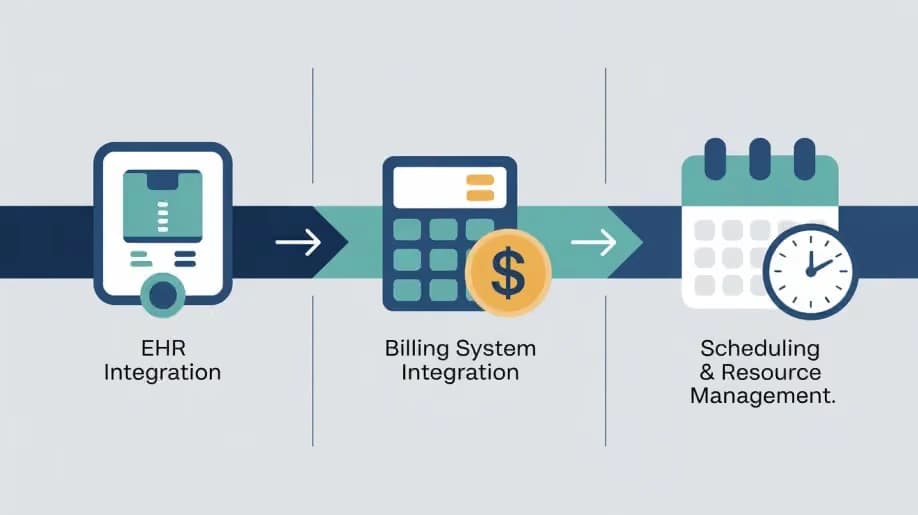
1. EHR Integration
Pain point: Many EHR systems (Epic, Cerner, Athenahealth) are isolated; extracting patient data, pushing it into other systems, or coordinating with external workflows is cumbersome.
Solution with n8n:
- Use n8n to trigger workflows when a new patient record is created or updated in the EHR.
- Extract key data (e.g., admissions, diagnoses, lab results) and route to downstream systems or notifications.
- Use AI agent integration to assess data (e.g., flag high-risk cases) and trigger scheduling or billing workflows.
Benefit: Real-time updates, fewer manual entries, and improved care coordination.
Explore detailed insights in our post on Integrating n8n with EHR Systems.
2. Billing System Integration
Pain point: Billing systems are frequently disconnected from clinical operations, causing delays, errors and compliance risk.
Solution with n8n:
- Trigger when a patient visit is closed in the EHR → automatically generates an invoice in the billing system.
- Automate payment reminders or insurance claim follow-ups via email/SMS.
- Use AI agents to audit billing codes or identify mismatches, reducing denials.
Benefit: Faster billing cycles, fewer claims rejected, improved revenue flow.
3. Scheduling & Resource Management
Pain point: Scheduling systems often operate independently of clinical workflows, creating mismatches in resource allocation and patient wait times.
Solution with n8n:
- Connect scheduling system API and EHR to update appointments automatically when clinical status changes.
- Automate reminders, follow-up sequences for no-shows or cancellations.
- Use n8n AI agent flows to predict no-show risk and proactively reschedule or alert staff.
Benefit: Better resource utilisation, fewer missed appointments, higher patient satisfaction.
Key Challenges to Navigate in n8n and EHR System Integration
When adopting n8n in EHR systems, the setup must follow careful orchestration to maintain flexibility of use and applications. Below are critical implementation challenges that must be addressed early to prevent complications.
1. Infrastructure Compliance for PHI Handling
n8n is not HIPAA-compliant by default, but it can solve the compliance requirements. Organizations must self-host the platform in a secure cloud or on-premise environment with full encryption (TLS, at-rest), audit logs, role-based access controls, and no credential leaks. Failure to enforce these can create liability, whereas correct implementation ensures you have an automated HIPAA-compliant n8n and EHR system.
2. LIS and Legacy System Integration
Most lab systems weren't built for open API integrations or external infrastructure linking. When you're dealing with flat files, HL7, MLLp, or FTP-based data drops, you'll require custom nodes, queue systems, or dedicated middleware connectors. This is where partnering with a custom healthcare software development company becomes critical.
3. Workflow Governance and Technical Debt
As the labs scale automation, workflows can easily sprawl wider, by duplicated logic or undocumented nodes, or brittle dependencies. CTOs must enforce dedicated engineering oversight through naming conventions, CI/CD for workflows, version control (via n8n CLI), and environment separation (dev, staging, prod).
4. Cross-Functional Alignment
Automations that ignore clinical workflows will inevitably cause disruption. Hence, engineers must work alongside lab operations managers, data stewards, and regulatory teams to ensure every workflow aligns with on-ground protocols. When building from scratch, it's, therefore, wise to hire a dedicated software development team with healthcare and workflow automation experience.
Who Should Own the n8n Lab Stack?
CTOs, after direct input from lab heads, IT compliance officers, and platform engineers should lead the architecture design process. However, since n8n is not plug-and-play like the SaaS, it's more of an infrastructure, which means:
- Treat it like middleware, not an app
- Assign DevOps and MLOps support
- Budget for workflow optimization sprints
If you're launching a new product or test line, consider working with an experienced MVP development service company in USA to scope, prototype, and deploy faster.
Final Thoughts
EHR systems-driven lab diagnostics and workflows are not just tied to back-office operations but they're a clinical frontline. Delays, errors, and inefficiencies directly affect outcomes but you can save yourself these hassles by embedding n8n. Turn your fragmented data into real-time action, orchestrated AI insights, and engage patients proactively with integration as low-code isn't anymore tied to low-impact.
Ready to gain your strategic edge?
Bring automation to your lab or healthcare platform with us.
Hire n8n experts to architect your workflows
Hire AI agent developers to embed AI logic into lab tasks
Hire healthcare app development teams to launch your MVP
Consult top healthcare IT consultants for long-term automation governance
Frequently Asked Questions
Q. Can I integrate n8n into an existing Epic or Cerner EHR?
Yes. Use REST endpoints, FHIR API, or HL7 adapters. For Epic, use App Orchard APIs. For Cerner, connect via Ignite APIs.
Q. Does n8n support AI agent orchestration?
Yes. You can call LLMs, Python models, or RAG services via HTTP nodes. Workflows can include AI decisions with logging and fallback paths.
Q. How do I control workflow access across teams?
Use n8n’s built-in roles + external OAuth. Store credentials in encrypted vaults. Limit node editing based on role. Audit frequently.
Q. Can n8n be used for home diagnostics or remote test coordination?
Yes. Combine scheduling, logistics APIs, and telehealth triggers. Partner with healthcare app developers to extend to mobile or patient portals.
Q. How does n8n integrate with existing EHR systems?
n8n uses REST APIs, GraphQL, and webhooks to connect with major EHR systems. Custom nodes can be created to bridge with HL7 or FHIR standards, making n8n in EHR system extensible and secure.
Q. Can n8n handle token-based access control in sensitive patient data?
Yes. When self-hosted, n8n supports token-passing, encrypted credential storage, and scoped access to comply with HIPAA and GDPR.
Q. Is n8n modular enough for AI-first lab architectures?
Yes. With n8n AI integration, AI agents can be embedded directly into workflows. This modularity enables plug-and-play upgrades in diagnostic logic or patient routing.