n8n vs LangGraph: Which to Use for Production AI Agents in 2026
Yuti Agarwal
3-4 mins
Choosing between n8n vs LangGraph isn't about which platform is better - it's about choosing the right architecture for your AI agent.
While both can build AI-powered workflows, they solve different problems. n8n excels at visual workflow automation and integrations, whereas LangGraph is built for stateful AI agents that can reason, remember context, and handle complex decision-making.
In this guide, we'll compare n8n vs LangGraph, explore their strengths, limitations, use cases, and help you decide which one is the right fit for production AI agents in 2026.
n8n vs LangGraph: Quick Comparison at a Glance
Before going deeper, here is how n8n vs LangGraph compare on the factors engineering and operations teams weigh first.
| Factor | n8n | LangGraph |
|---|---|---|
| Core purpose | Workflow automation and system integration | Stateful AI agent orchestration |
| Build style | Visual canvas, low-code with optional scripting | Code-first in Python or TypeScript |
| State handling | Session memory, external stores for anything durable | Typed state with checkpointing and resume |
| Multi-agent | Chained agent nodes and sub-workflows | Supervisor, network, and hierarchical patterns |
| Integrations | Hundreds of maintained prebuilt nodes | Any API or tool you wrap in code |
| Debugging | Visual run logs, step replay, error workflows | Terminal traces plus LangSmith observability |
| Team fit | Ops, RevOps, product, and developers | AI engineers and software engineers |
| Deployment | Self-hosted or managed cloud | Your own application infrastructure |
Still unsure which layer your agent belongs in?
Book your AI Readiness today and let our experts guide you with a clear architecture recommendation.
8 Key Differences Between n8n vs LangGraph That Decide Production Fit
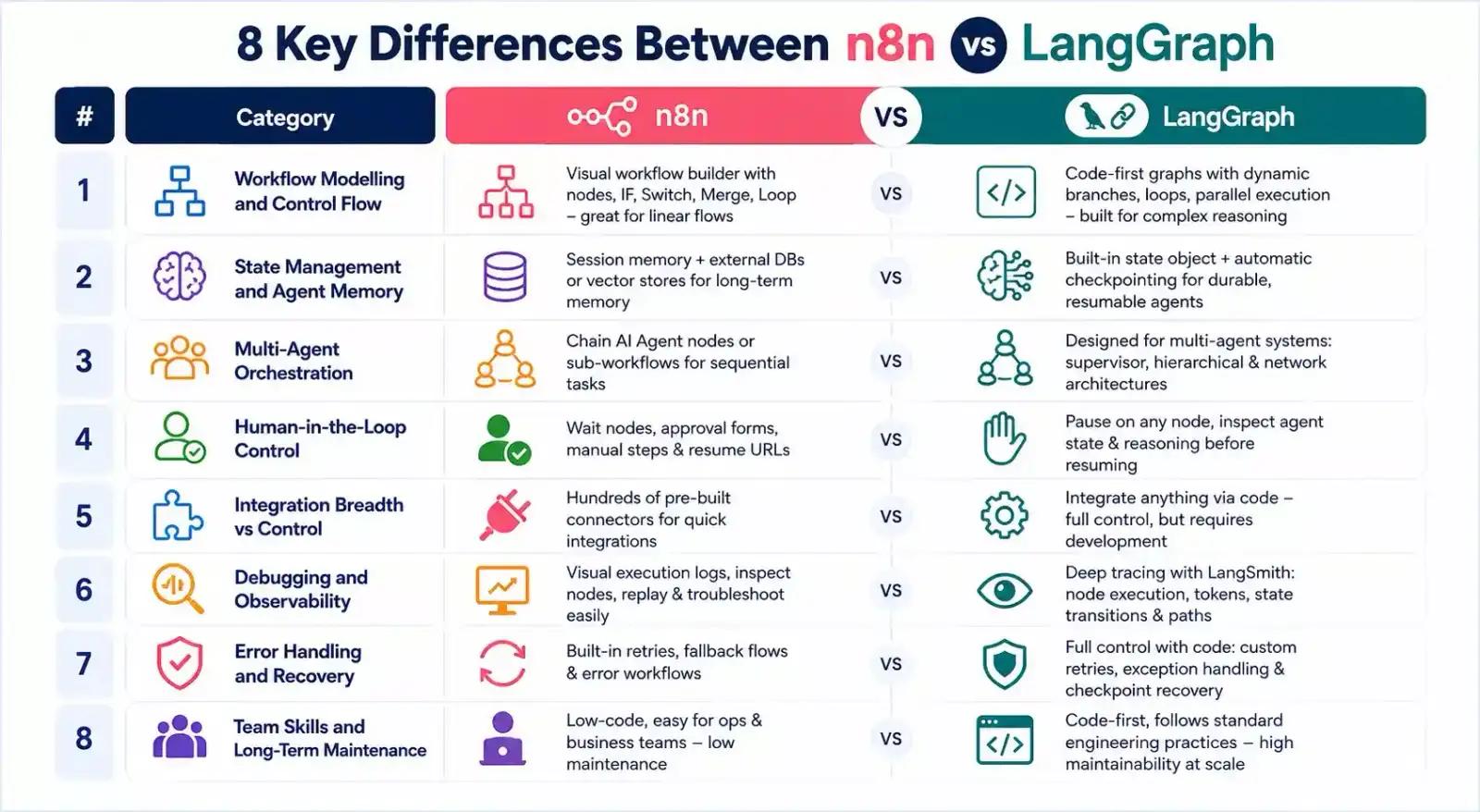
Here are eight key differences between n8n vs LangGraph that you need to kno
1. Workflow Modelling and Control Flow
In n8n, the visual workflow designer works by connecting nodes through IF, Switch, Merge, Loop, and Code nodes, making the creation of linear workflows and simple branching easy without much coding. The business processes and system automation tasks continue to be very clear since all the steps can be seen on the canvas.
LangGraph models workflows as programmable graphs instead of visual flows. Developers define nodes and edges in code, allowing agents to loop, branch dynamically, execute parallel tasks, and revisit earlier decisions. This level of control makes LangGraph better suited for complex reasoning rather than traditional workflow automation.
2. State Management and Agent Memory
n8n provides session memory for AI conversations and can connect to external databases or vector stores for long-term knowledge. While this works well for many business agents, managing durable memory requires additional infrastructure outside the workflow itself.
State management is one of LangGraph's biggest strengths. A typed state object moves through every node, and automatic checkpointing allows agents to pause, recover after failures, and resume exactly where they stopped. This makes it ideal for long-running and stateful AI agents.
3. Multi-Agent Orchestration
n8n supports multi-agent workflows by chaining AI Agent nodes together or triggering sub-workflows. This approach works well when different agents perform sequential business tasks such as research, summarization, and notifications.
The design of LangGraph is specifically suited for the orchestration of several AI agents. It allows support for supervisor-based, hierarchical, as well as network-based architectures of agents that cooperate and delegate tasks to each other during the process. This feature becomes relevant as orchestrating logic becomes more complex.
Related: How to Run n8n Multi-Agent Orchestration
4. Human-in-the-Loop Control
Human interventions in n8n are easy because of Wait nodes, approval forms, manual review steps, and resume URLs. Business users have the ability to halt workflows before key activities such as sending emails, invoice approvals, or customer record updates.
Human interventions in LangGraph are even more advanced because it gives you the power to halt workflows on certain nodes, but it also allows you to see the reasoning of the agent's current state.
5. Integration Breadth vs Integration Control
One of the main strengths of n8n is that it has an extensive integration library. There are hundreds of connectors that enable one to quickly link up CRMs, databases, messaging systems, cloud storage, and APIs without much configuration at all.
LangGraph can be integrated with almost any third-party application, but each of the integrations needs to be developed manually using programming code. Even though it takes a lot of programming effort, it allows for full flexibility with everything mentioned above.
6. Debugging and Observability
n8n workflow automation offers visual execution logs where every node can be inspected individually. Teams can replay failed executions, review inputs and outputs, and isolate workflow issues without digging through application logs.
LangGraph debugging starts with application logs but becomes significantly more powerful when paired with LangSmith. Developers can trace every node execution, model call, token usage, state transition, and decision path throughout an agent's lifecycle.
7. Error Handling and Recovery
Retry logic, fallback flows, and error flows are provided out-of-the-box by n8n, which enables recovery from transient errors without coding. It makes the creation of more robust production workflows easier with very little configuration.
With LangGraph, developers have full flexibility to recover from failures. Exception handling, conditional flows, retry, and checkpoint-based recovery can all be programmed by developers in the code.
8. Team Skills and Long-Term Maintenance
n8n is very understandable by operational teams, product managers, and developers because it is all visual. Sometimes changes can be made without writing any code. This results in low maintenance costs in the case of business-centric AI flows.
LangGraph considers AI agents to be software applications. Changes in the system are made following standard engineering principles, including code review, testing, version control, CI/CD pipeline, and deployment. Even though this process involves engineering efforts, it ensures good maintainability of AI products at scale.
Now that you have seen where n8n vs LangGraph split, let's take a look at the situations where n8n is clearly the right call.
When to Use n8n for Production AI Agents
Choose n8n when your AI agent's main job is automating business processes and connecting different applications.
- You require integration of different business applications. Seamlessly integrate CRMs, databases, Google Workspace, Slack, email, and thousands of other applications using built-in connectors.
- You wish to develop and deploy your workflow fast. The drag-and-drop workflow builder allows you to build, test, and deploy AI workflows much more quickly than coding.
- You require workflow management by business teams. Your operations or product team will be able to edit prompts, workflows, and automations without having to rely on developers.
- You have simple or moderately complex workflows. n8n is perfect for workflows that contain clear steps, conditions, approvals, and API integrations without any complex AI reasoning.
- You require total control over your data. Self-host n8n within your own infrastructure to ensure your sensitive business data and credentials do not leave your network.
When to Use LangGraph for Production AI Agents
Choose LangGraph when your AI agent needs to reason, remember information, and make complex decisions.
- Your agent should plan out many steps. It can plan out, analyze, tool, and iterate on its own responses before producing a final answer.
- Feedback loops are essential for your processes. Your agents will be able to try again if a step fails, pivot, and keep going until they find the best solution.
- There are multiple agents involved. Multiple agents will work with each other, exchange information, and handle different aspects of the task.
- Memory is an important factor. Your agents will be able to recall past interactions, preferences of users, and previous decisions made in many sessions.
- Your product is meant for production. LangGraph is better for you if your AI agent is a part of the application you're working with.
Also Read: n8n Native Agents vs LangChain and LangGraph: Enterprise Architecture Fit.
Why Businesses Choose Ciphernutz for Production AI Agent Development
Choosing between n8n vs LangGraph gets easy once someone has shipped both. Living with that choice for two years is the hard part.
That is where Ciphernutz makes the difference. We architect the layering, build the agents, and hand over a system your own team can maintain through our AI integration services. If you need additional implementation expertise, you can hire AI automation developers to build and maintain production-ready AI workflows and agents.
What sets us apart:
- Self-hosted by default: n8n and agent runtimes running inside your infrastructure, never a vendor's
- Fixed-scope engagements: production-ready systems in 3 to 6 weeks, not open-ended retainers
- Hybrid architecture expertise: visual orchestration where it helps, code-level control where it counts
- Measurable outcomes: over 10K hours saved annually across live client automation workflows
- Zero risk to begin: one-week risk-free trial, strict NDA, and a dedicated project manager
Conclusion
Choosing between n8n vs LangGraph, the selection will depend on the demands of your AI agent.
In case you would like to automate processes and integrate business applications rapidly, you should use n8n. If your agent requires sophisticated reasoning and memory capabilities, go for LangGraph.
Many businesses use both together, with n8n handling workflows and LangGraph powering the AI logic.
If you're not sure which approach is right for your project, connect with our experts, and they’ll help you design and build production-ready AI agents that scale with your business.
FAQs
1. What is the main difference between n8n vs LangGraph?
n8n is a visual workflow automation platform for connecting systems and running AI steps inside business processes. LangGraph is a code-first framework for building stateful agents whose reasoning loops, memory, and recovery need precise control.
2. Can n8n replace LangGraph for building AI agents?
For most standard business automation, yes. n8n agent nodes handle tool selection, session memory, and branching well. It falls short when you need deep state persistence, self-correcting loops, or several specialised agents coordinating on one task.
3. Is n8n good enough for production or only for prototypes?
n8n runs production workloads at a serious scale today. Teams pair it with self-hosting, error workflows, and approval steps for compliance. Prototype-only thinking underestimates what the platform handles when the agent logic stays reasonably contained.
4. Does LangGraph work without LangChain?
It does run standalone as an orchestration library, so you can bring your own model clients and tools. Most teams still use LangChain components because the ecosystem saves considerable integration effort on retrievers and memory.
5. Which is cheaper to run at scale, n8n vs LangGraph?
Self-hosted n8n is usually cheaper because execution-based billing does not punish workflow complexity. LangGraph costs concentrate on model tokens, engineering hours, and always-on infrastructure, which tends to grow faster than any subscription line does.