n8n vs Google Opal: Which Automation Tool Should You Choose in 2026?
Yuti Agarwal
8-10 mins
Picking an automation tool feels easy until you actually start comparing them. You see two names everywhere, you hear both called "the future of automation," and somehow that makes the decision harder, not simpler.
That is exactly the trap most teams fall into with n8n vs Google Opal.
One promises you can build AI apps by typing a sentence. The other promises full control over serious, production-grade workflows. Both sound great, so which one actually fits your business?
Here is the real problem. These two tools are not competing for the same job, yet they get pitched as direct rivals. So people pick based on hype instead of fit, then waste weeks building on the wrong foundation. And switching later is painful.
This guide clears that confusion completely. We break down what each tool does, where each one wins, and which one matches your team, your budget, and your goals.
In this guide, you will learn:
- What Google Opal is and how it works
- What n8n is and why teams rely on it
- 10 key differences that actually matter
- Pricing for both tools
- Pros, cons, and ideal users for each
- Whether you can use both together
- How to choose the right tool for your business
By the end of this guide, you will know exactly which automation tool deserves your time and money, and you will be able to make that call with confidence instead of second-guessing it later.
n8n vs Google Opal: Quick Comparison
Before we go deep, here is a side-by-side snapshot of how n8n vs Google Opal stack up across the factors that matter most to a buying decision. This n8n vs Google Opal table gives you the headline view at a glance.
| Factor | Google Opal | n8n |
|---|---|---|
| Type | AI no-code app builder | Open-source automation platform |
| Build method | Natural language prompts | Visual node canvas + code |
| Best for | Beginners, prototyping | Developers, production teams |
| Integrations | Mostly the Google ecosystem | 400+ apps and any API |
| Hosting | Google-managed only | Self-hosted or cloud |
| Data control | Limited (Google Cloud) | Full control when self-hosted |
| AI role | AI builds the workflow | AI runs inside the workflow |
| Maturity | Experimental beta | Mature and proven |
What Is Google Opal?
Google Opal is a no-code, AI-first builder that turns plain English descriptions into working mini-apps. You describe what you want, and Opal assembles the workflow for you, complete with inputs, an AI model, and an output, then hands you a shareable link.
It lives inside Google Labs and connects tightly to the Gemini ecosystem. So you get native access to models like Gemini and Imagen, plus smooth links to Google Docs, Sheets, and Slides without any setup headaches.
The core idea is speed for non-technical users. A marketer or product manager can prototype an AI tool in minutes, share it, and test the concept before anyone writes a line of code.
What is n8n?
n8n is an open-source workflow automation platform built for teams that need real control. You build automations by connecting nodes on a visual canvas, where each node is a trigger, an action, or a piece of logic that moves data between your apps.
Unlike a simple prototyping tool, n8n is made to run mission-critical processes. It connects to 400+ apps and any service with an API, supports custom JavaScript, and handles branching, loops, retries, and error handling.
Its biggest advantage is self-hosting. You can run n8n on your own server, which gives you full ownership of your data and makes compliance far easier for regulated industries.
That single feature is why so many businesses trust it for scalable workflow automation, and it shapes much of the n8n vs Google Opal decision.
n8n vs Google Opal: 10 Key Differences Explained
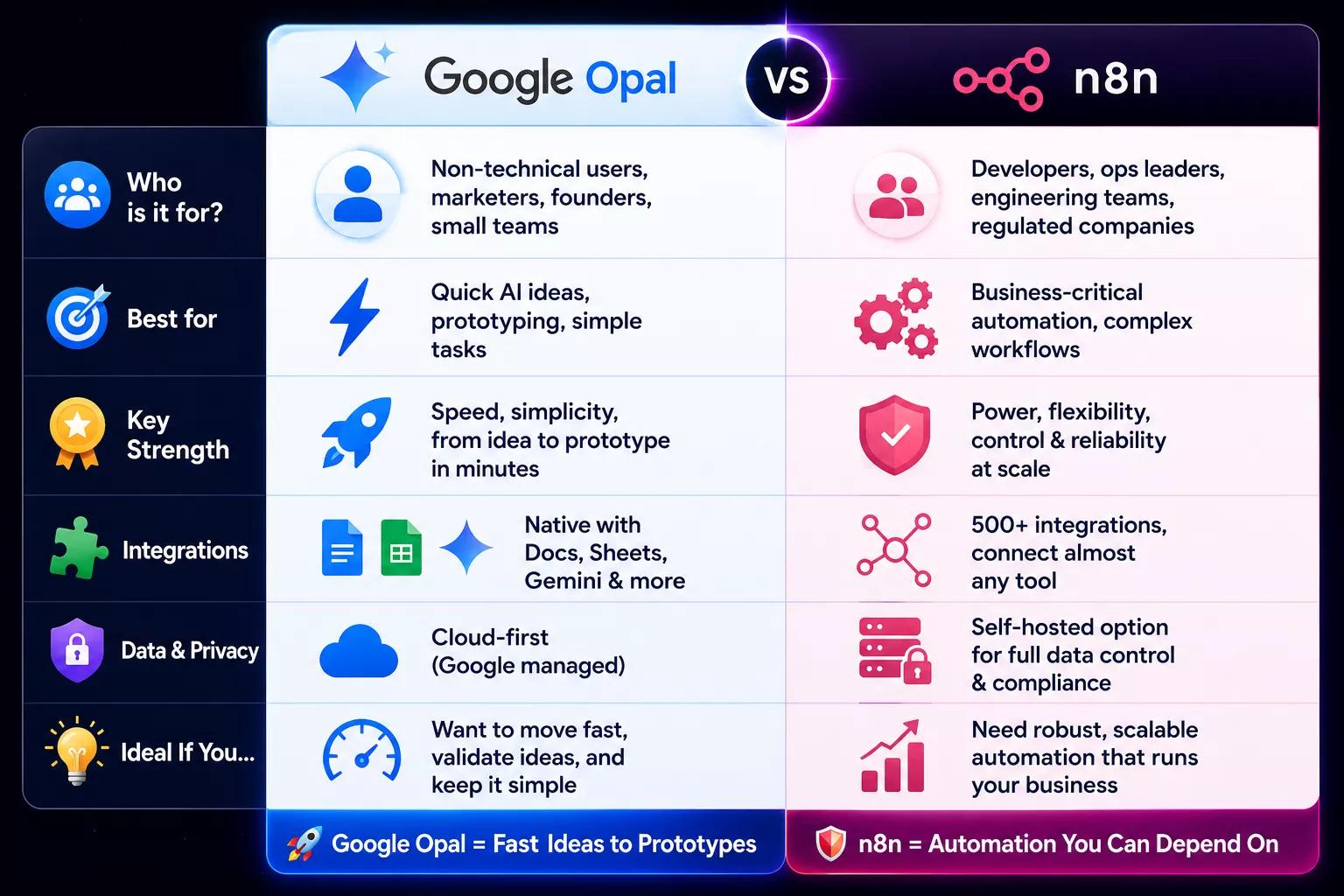
A table tells you the headlines, but the real decision lives in the details. Here are the ten differences that separate n8n vs Google Opal in ways that directly affect what you can build and how long it lasts.
1. Core Purpose and Design Philosophy
Google Opal exists to turn an idea into a usable AI app as fast as possible, so its whole design pushes you toward describing intent and letting the system handle the wiring. It rewards speed and simplicity above everything else.
n8n takes the opposite stance. It assumes you want to orchestrate real business processes across many systems, so it gives you a flexible canvas where every connection, condition, and fallback is yours to shape exactly how your operations demand.
2. Ease of Use and Learning Curve
With Opal, the barrier to entry is almost nothing. If you can write a clear sentence, you can build something, which makes it perfect for people who have never touched automation before and want a result the same afternoon.
n8n asks more of you upfront. You need to understand triggers, data, and logic before things click, and that learning curve is real. Once you cross it, though, the canvas feels powerful rather than intimidating, and you stop hitting walls.
3. Workflow Power and Complexity Handling
Opal handles simple, linear flows beautifully, but it runs out of room quickly. The moment you need branching, loops, or multi-step logic across several tools, you start bumping into limits the tool was never designed to cross.
This is where n8n genuinely shines. You can build deeply branched workflows, chain dozens of steps, add conditional paths, and manage complex processes that span your entire stack, all without the system buckling under the weight.
4. AI Capabilities
Both tools use AI, but in completely different ways, and this distinction trips up a lot of buyers.
In Opal, AI is the thing that builds your workflow from your description, while the workflow itself only uses AI if you wire in a Google model.
Here, AI becomes an active ingredient inside the automation, so you can call Claude, GPT, or local models mid-flow, process their output, and feed it into the next step, which is ideal for AI agent workflows.
5. Integrations and Ecosystem Reach
Opal stays close to home. It connects smoothly to Google Workspace and Gemini tools, which is great if your work already lives there, but it offers little beyond that walled garden for now.
n8n reaches almost anywhere. With 400+ native integrations plus generic HTTP and webhook nodes, you can connect CRMs, databases, messaging apps, and obscure internal tools, so your automation is never blocked by a missing connector.
6. Hosting, Data Control, and Self-Hosting
Opal runs entirely on Google's infrastructure, which removes all setup work but also means your data and your workflows live inside Google's environment with no option to move them elsewhere.
N8n hands the keys back to you. You can self-host it behind your own firewall for complete data ownership, or use the managed cloud if you prefer convenience, giving you the flexibility that matters enormously for privacy-sensitive teams.
7. Customization and Custom Code
Opal keeps the engine hidden on purpose. You tweak prompts and basic settings, but you never touch raw code, which is freeing for beginners yet frustrating the moment you need precise, custom behavior.
n8n welcomes the tinkerers. You can drop in custom JavaScript, set environment variables, and build logic that the pre-made nodes do not cover, so technical teams can shape automations down to the smallest detail.
8. Reliability, Error Handling, and Production Readiness
Opal works well for interactive, user-triggered tasks, but as a beta product, it can behave unpredictably, and there is limited visibility when something goes wrong mid-flow.
n8n was built to run at 3 AM without anyone watching. It includes retries, error branches, logging, and monitoring, so your workflows recover gracefully and keep your business processes moving even when an API fails.
9. Security, Compliance, and Data Sovereignty
Opal currently offers little insight into how it processes data, and it is not positioned as compliance-ready, which makes it risky for industries bound by strict regulations.
n8n, especially when self-hosted, gives you the control that regulated teams need. Your data never leaves your servers, which supports frameworks like HIPAA and GDPR and is a big reason healthcare and finance teams lean on it for compliant automation.
10. Maturity, Longevity, and Vendor Lock-In Risk
Opal is young and experimental, and Google has a long history of retiring Labs projects, so building core operations on it means accepting real uncertainty about its future.
n8n is mature, widely adopted, and open-source, which means even if priorities shift, you keep the code and your workflows. That stability protects your investment in a way a closed beta simply cannot match today.
n8n vs Google Opal: Pricing Compared in 2026
Pricing is where the n8n vs Google Opal decision gets practical, because the cheapest option on paper is not always the cheapest at scale. Here is how the n8n vs Google Opal numbers look in 2026.
Google Opal is free during its beta, with a paid Gemini plan at around $20/month that unlocks stronger models and higher usage limits. For light prototyping, the free tier covers most needs without any cost at all.
n8n gives you two clear paths. The self-hosted community edition is genuinely free with no workflow limits, while the managed cloud starts at roughly $20 to $24/month, scaling with execution volume as your usage grows.
| Plan | Google Opal | n8n |
|---|---|---|
| Free option | Free beta (Gemini Flash) | Free self-hosted, unlimited workflows |
| Paid entry | ~$20/month (Gemini plan) | ~$20 to $24/month (cloud) |
| Pricing model | Tied to the Google plan | Flat cloud or free self-host |
| Best value for | Quick AI prototypes | Predictable cost at scale |
For teams that expect heavy, ongoing automation, self-hosted n8n usually wins on long-term cost since there are no per-execution surprises waiting at the end of the month.
Also Read: n8n AI Workflow Automation: Latest Features and Updates
Google Opal Pros and Cons
Every tool trades something away to do what it does well, and Opal is no exception. Here is an honest look at where it helps you and where it holds you back.
Pros
- Extremely fast to start: You can describe a workflow and have something working within minutes, which makes Opal the lowest-friction entry point into AI automation for anyone.
- No technical skills needed: Marketers, founders, and project managers can build useful tools without code, so you do not need to wait on a developer to test an idea.
- Generous free AI access: The free tier gives you real Gemini power at no cost, which is perfect for experimenting and validating concepts before committing a budget.
- Tight Google integration: If your work already lives in Docs, Sheets, and Drive, Opal feels like a natural extension that just works out of the box.
Cons
- Limited to simple workflows: Once you need branching or multi-tool logic, Opal hits a ceiling fast and cannot handle the complexity real operations demand.
- No direct external publishing: Output goes to Google apps only, so end-to-end automation that posts elsewhere still requires manual copy-and-paste steps.
- Uncertain long-term future: As an experimental beta, Opal could be discontinued, which makes it risky to build anything mission-critical on top of it.
n8n Pros and Cons
n8n carries its own balance of strengths and trade-offs. Knowing both helps you decide whether the upfront effort pays off for your situation.
Pros
- Handles serious complexity: You can build deeply branched, multi-step workflows across your whole stack, so n8n scales with your operations instead of capping them early.
- Full data ownership: Self-hosting keeps every byte on your own servers, which makes compliance far simpler and removes the worry of a vendor accessing your data.
- Massive integration reach: With 400+ apps plus any API, you rarely hit a dead end, and custom code fills whatever small gaps remain in coverage.
- Production-grade reliability: Built-in retries, logging, and error handling keep your automations running smoothly even when an external service has a bad day.
Cons
- Steeper learning curve: You need to grasp triggers, logic, and data mapping first, so the early days take patience before the tool starts feeling effortless.
- Self-hosting overhead: Running your own instance means handling updates and infrastructure, which adds a small operational burden for non-technical teams.
Who Should Use Google Opal?
Google Opal is the right pick when speed and simplicity matter more than depth. If you are a non-technical user who wants to test an AI idea quickly, it gets you from thought to working prototype faster than anything else.
It also suits teams living inside Google Workspace, since the native connections to Docs, Sheets, and Gemini make those tasks feel seamless.
So in the n8n vs Google Opal choice, marketers, founders, and small teams validating concepts on a tight budget will find Opal an excellent starting point.
Who Should Use n8n?
n8n fits teams that need automation to actually run the business, not just demo an idea.
If you require complex logic, deep integrations, or workflows that connect dozens of tools reliably, it gives you the control and stability to pull that off.
It is also the clear choice when data privacy and compliance are non-negotiable, thanks to self-hosting.
So developers, ops leaders, and any company in a regulated space will find n8n delivers the production-grade backbone their operations genuinely depend on.
Also Read: How Enterprises Are Using n8n for AI Workflow Automation
Can n8n and Google Opal Work Together?
Yes, and pairing them is often smarter than choosing only one. In the n8n vs Google Opal conversation, the two tools cover opposite ends of the same pipeline, so they complement each other neatly when you set them up right.
A common pattern looks like this. You use Opal as a friendly front-end where a non-technical teammate builds an AI helper, then that app sends its output through a webhook to n8n. From there, n8n takes over the heavy lifting and runs the real automation behind the scenes.
In that setup, Opal handles the quick AI generation and user experience, while n8n manages the integrations, data sync, and reliable execution.
So you get Opal's accessibility on the surface and n8n's production power underneath, which is the best of both worlds for many teams building end-to-end AI workflows.
Risks and Limitations to Know Before You Commit
Before you build anything serious, it helps to know where each tool can let you down, so you are not surprised six months in. Both sides of the n8n vs Google Opal comparison carry trade-offs worth weighing early.
For Google Opal:
- Uncertain longevity: It is an experimental Google Labs product, and Google has discontinued many such projects, so building core operations on it is genuinely risky.
- No self-hosting or export: Everything lives on Google's infrastructure, so you cannot host it yourself or migrate your workflows out later.
- Limited debugging: The AI logic stays opaque, so when a workflow breaks, you get little visibility into why it failed.
- Weak compliance: It offers no real compliance guarantees, which makes it a poor fit for sensitive or regulated data.
- No external publishing: Output goes to Google apps only, so true end-to-end automation still needs manual steps.
For n8n:
- Steeper learning curve: You need to grasp triggers, data, and logic first, so non-technical teams feel slowed in the early weeks.
- Self-hosting upkeep: Running your own instance means handling updates, security, and infrastructure, which adds operational work.
- Setup time: Building a workflow takes hours, not minutes, so it rewards patience over instant results.
The honest takeaway is simple. Match the tool to how critical the work is, because using a prototyping toy for production, or over-engineering a throwaway test, both cost you in the end.
How to Choose the Right Automation Tool for Your Business
Choosing well comes down to matching the tool to your reality, not to the hype. When you weigh in vs Google Opal this way, follow these steps in order, and the right answer usually becomes obvious.
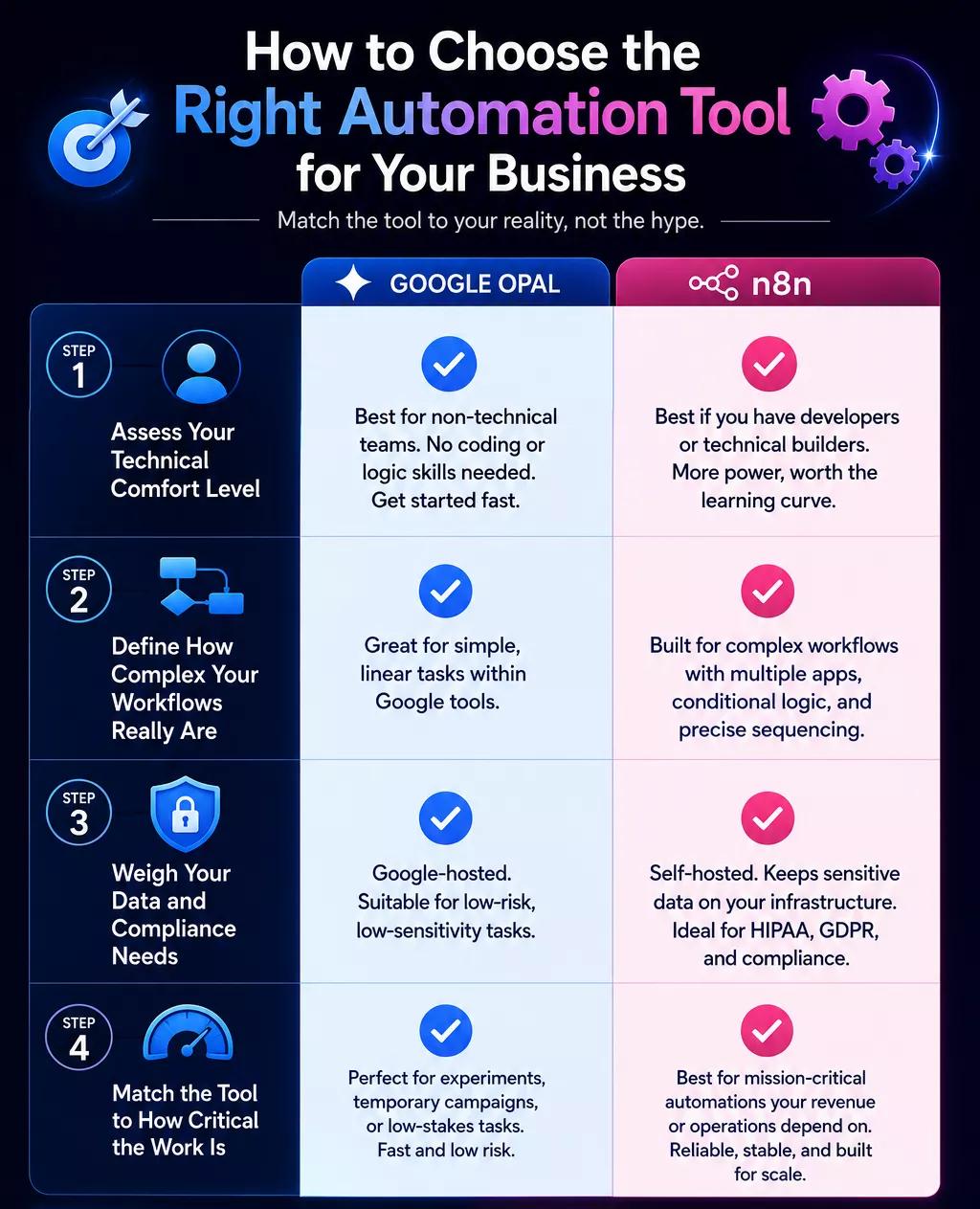
Step 1: Assess Your Technical Comfort Level
Start by being honest about your team's skills. If nobody is comfortable with logic, data mapping, or a bit of code, Google Opal will get you moving without frustration. But if you have developers or technically confident builders on hand, n8n unlocks far more, and that learning curve becomes a worthwhile investment rather than a barrier.
Step 2: Define How Complex Your Workflows Really Are
Next, map out what you actually need the automation to do. If it is a simple, linear task within Google tools, Opal is more than enough. If your process involves multiple apps, conditional branching, or steps that must run in a precise order, you will outgrow Opal fast, so n8n is the safer long-term home.
Step 3: Weigh Your Data and Compliance Needs
Now think about the data flowing through your workflows. If you handle sensitive customer or patient information, or you operate under HIPAA or GDPR, self-hosted n8n keeps everything on your infrastructure and makes audits manageable. Opal's Google-hosted model is fine for low-stakes tasks but not for regulated, high-trust data.
Step 4: Match the Tool to How Critical the Work Is
Finally, ask how much automation matters. For a quick experiment or a temporary campaign, Opal's speed is perfect, and the risk is low. For anything your revenue or operations depend on daily, you want n8n's reliability, error handling, and stability, because downtime there costs real money and trust.
Why Choose Ciphernutz to Build Your n8n Automation
Comparing tools is the easy part. Building automation that actually delivers measurable outcomes is where most projects stall, and that is exactly where the right partner changes everything.
At Ciphernutz, we design and deploy production-ready n8n workflows built around your real operations, never templated. We help you skip the trial-and-error phase and go straight to automation that works, scales, and saves your team real hours every week.
Why businesses choose us:
- 60+ clients across 20+ countries with a 98% client retention rate
- 55+ live workflows and 10K+ hours saved for clients annually
- Fixed-scope delivery in 3 to 6 weeks, with zero templates and full custom builds
- Compliance-ready engineering for HIPAA, GDPR, and data-sensitive industries
Whether you need a single workflow or a full AI integration strategy, our team takes you from idea to deployment without the guesswork.
Start Your Automation Journey
Book a free consultation with our experts and discover the right automation strategy for your business.
Conclusion
The n8n vs Google Opal debate is not really about which tool is better. It is about which one fits the job in front of you. Opal wins on speed and simplicity for quick AI prototypes, while n8n wins on power, control, and reliability for serious, production-grade automation.
So the smartest move is to match the tool to your needs. Pick Opal to validate ideas fast, choose n8n to run your business, and consider pairing them when you want both speed and depth working together.
We hope this guide helped you understand how n8n vs Google Opal truly compare and which one deserves a place in your stack. Now it's your turn to take what you have learned and make a confident, informed choice.
FAQs
1. What is the main difference between n8n and Google Opal?
n8n is an open-source workflow automation platform built for complex, production-grade processes, while Google Opal is an AI-first no-code builder for quickly creating simple AI mini-apps. One is for serious execution, the other for fast prototyping.
2. Is Google Opal free to use?
Yes, Google Opal is free during its beta period using Gemini Flash. A paid Gemini plan at around $20/month unlocks more powerful models and higher usage limits, but most light prototyping fits comfortably within the free tier.
3. Is n8n really free?
The self-hosted community edition of n8n is genuinely free with no limits on workflows. You only pay for the infrastructure to run it, or you can choose the managed cloud plan starting around $20 to $24/month for convenience.
4. Which tool is better for non-technical users?
Google Opal is far easier for non-technical users because it is built by describing what you want in plain English. n8n is more powerful but requires understanding triggers, logic, and data, so it suits technical teams better.
5. Can n8n and Google Opal work together?
Yes. A common setup uses Opal as an AI front-end that sends output via webhook to n8n, which then handles the heavy backend automation. This pairing combines Opal's simplicity with n8n's production-grade reliability.
6. Which tool is better for data privacy and compliance?
n8n is the stronger choice, especially when self-hosted, because your data stays on your own servers. This supports compliance with HIPAA and GDPR, while Opal runs on Google's cloud with limited data control today.
7. Is Google Opal good for production workflows?
Not in its current form. Opal is an experimental beta that can behave unpredictably and lacks robust error handling and external publishing. For mission-critical, production workflows, n8n offers the reliability, monitoring, and stability businesses need.
8. Which automation tool should a growing business choose?
It depends on your needs. Choose Opal for fast, low-stakes AI prototypes, and choose n8n for complex, scalable, compliance-ready automation. Many growing businesses use both, or partner with experts like Ciphernutz to build durable n8n systems.